
Onventis 2026.1
The new Onventis 2026.1 release contains various enhancements, improvements, and bug fixes. Check out the complete list below!
Beta release date: Friday,
Release date: Tuesday,
Procure-to-pay
Prevent ordering of blocked catalog items
Why this change?
Blocked catalog items are usually deactivated for a reason for example, because they are outdated, temporarily unavailable, or should no longer be ordered. To avoid accidental purchasing of such items, the system now ensures that blocked catalog articles cannot be used in follow-up processes.
What’s new?
Onventis now automatically prevents blocked catalog items from being:
sent from the shopping cart
converted into a requisition or purchase order
included in a purchase order being sent
used for follow-up actions on PO positions
If a blocked article is detected, the action is stopped and the user receives a clear message indicating which item is blocked. Users may still reject orders that contain blocked items, or approve orders where the blocked line is rejected in the same step.
Additional details
This enhancement applies only to blocked catalog items. Free-text items are not affected.
All Weight Types for OCI catalog items
Why this change?
Items from External OCI catalogs can use different weight units. Previously, only KG was handled correctly, while other units were incorrectly defaulted, causing inconsistent weight data.
What’s new?
Full support for all weight types from OCI catalogs: G, KG, TO, KT, LB, MG, OZ, TON
Original weight unit is preserved in the shopping cart, requisitions, and purchase orders
Correct display of weight value and unit in the shopping cart
Validation of weight types against master data
Additional details
Applies only to External OCI catalogs
Internal catalogs are not affected
Small Enhancements
Hide search in select fields when option count is ≤ 5: Search inputs in shopping cart select dropdowns are now shown only when more than five options are available. For dropdowns with five or fewer options, the search field is hidden to keep the UI clean and simple, while preserving existing selection behavior, keyboard navigation, and styling.
Folder search added to Mail Importer configuration: The folder dropdowns in the Mail Importer configuration now include a search field, allowing users to quickly filter and select the desired mailbox folder especially useful when many folders exist.
Prevent transfer of requisition items already in a sourcing event: Requisition line items with the status “In Sourcing Event” can no longer be transferred to follow-up documents, even when the Org setting → Requisition line item → “Transfer line items more than once” setting is enabled. The action is blocked and a message informs the user that the item can only be transferred once the sourcing process is completed or cancelled.
Support for assigning “Inventory-managed” Order Processing Workflows via BC job: The ERPInventory flag for inventory-managed Order Processing Workflows is now fully supported in supplier import/export via Excel. The flag is included in the supplier export in the OrderProcessNrByCostAllocType column. This ensures that inventory-relevant workflows can be maintained and exported without losing the inventory management information. The new functionality is relevant for customers who are using different order processing workflows depending on the account allocation type.
Interfaces Related Key-Update
Configurable Control of Supplier Remark Import from SAP (CREMAS05): A new parameter
IgnoreSupplierRemarkhas been introduced in the SAP interface mapping to control whether supplier remark texts from SAP should be imported back into Onventis. In scenarios where users enter long remark texts in Onventis, SAP restricts the remark field to 40 characters; during re-import via CREMAS, these truncated values previously overwrote the full remark text in Onventis. When the new parameter is activated, the<REMARK>node in the incoming SAP file is ignored so that the remark field in Onventis remains unchanged and is no longer cut to 40 characters. By default,IgnoreSupplierRemark = false, which keeps the current behavior unchanged. This enhancement ensures greater data integrity for supplier remark texts and prevents unintended truncation caused by SAP field length limitations.Preserve and Update Multi-Accounting Assignments on SAP Order Changes (ORDERS05): When purchase order changes with multi-accounting are imported from SAP via ORDERS05, Onventis now updates existing accounting assignments instead of deleting and recreating them. A new parameter
UpdateMultiAccounting(enabled by default) has been added, Using the SAP<ZEKKN>value in combination with the Onventis<SerialNo>identifier, the interface now aligns accounting lines by position and only updates values delivered by SAP, while keeping all other fields unchanged. This prevents situations where mandatory accounting fields that are not part of the IDoc (such as BusinessArea, CustomerAccounting1/2, Project, CAPEX, or Customer) were previously removed during re-import, blocking automated order-change processing. With this enhancement, missing entries are added, obsolete ones can be deleted, and existing assignments are safely updated ensuring data consistency between SAP and Onventis without losing locally-maintained accounting information.Org-Unit Based Catalogue Comparison for SAP Demand Imports: The catalogue comparison for demand positions imported from SAP (with
SAPImport_ConditionFromCatalogenabled) has been adjusted to use the organisational unit provided in the SAP requisition instead of the requester’s default organisational unit stored in Onventis. Previously, when catalogue items were assigned to framework agreements with org-unit–specific conditions, the comparison was performed against the requester’s default org unit, which could cause valid catalogue items to lose their framework agreement reference and be processed as free-text items leading to incorrect budget consumption in the framework agreement. With this enhancement, the catalogue comparison is now performed exclusively on the organisational unit contained in the imported demand position, ensuring that catalogue conditions and framework agreements are correctly applied and that contract references and budget tracking remain accurate.
Sourcing
Request for Proposal
Summary
A new RFP flow for Sourcing Events where suppliers can create line items for complex events while the buyer provides one detailed solicitation.
Customer benefit
Less buyer effort: Buyer submits a single comprehensive RFP; suppliers add detailed line items.
Aligned proposals: Unit of measurement and sourcing settings are shared with suppliers, for example whether delivery date is set per line item.
Faster ordering: Buyers review supplier offers and merge supplier-created line items with buyer line items into one purchase order.
How it works
Buyer creates a detailed RFP for a Sourcing Event with sourcing settings.
System shares unit of measurement and configured sourcing settings with invited suppliers.
Suppliers add and submit requested and self created line items with quantities, delivery, and pricing.
Buyer reviews proposals and converts selected line items into an order.
Templates now support also type RFP
Supplier Management
Edit Supplier Records During Approval of Supplier Creation
Overview
Supplier Managers with supplier approval rights can now correct invalid or incorrect supplier data during the approval process for supplier creation. This enhancement ensures data accuracy before the supplier is confirmed and transferred to connected ERP systems.
What’s New
Edit During Approval: When approving a supplier creation work item, if an error occurs and the user has both Supplier Edit and Supplier Create rights, the system now provides:
New Action Button: Edit Master Data – Allows direct access to the supplier’s master data for corrections.
Enhanced Error Message: The system error message is enriched with guidance: EN: “[System Error message] + Go to that supplier's master data to edit the data before approval.”
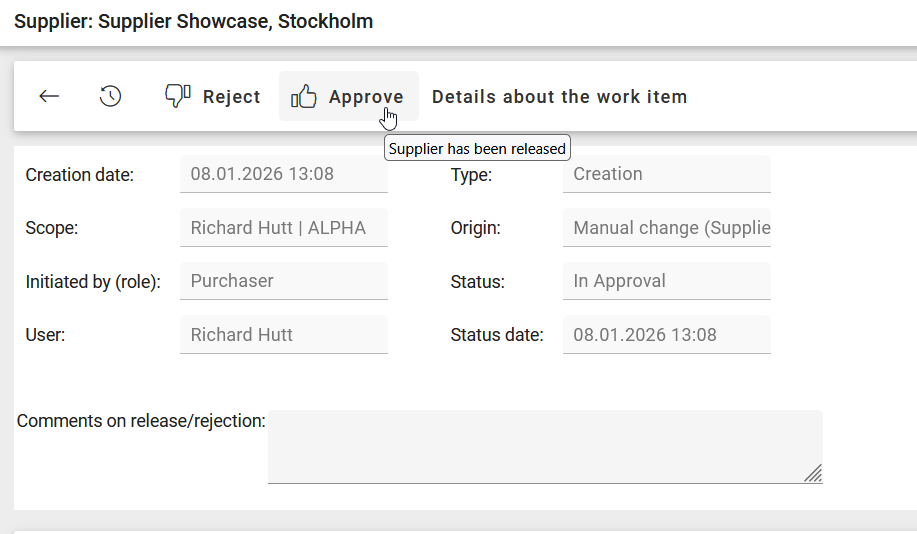
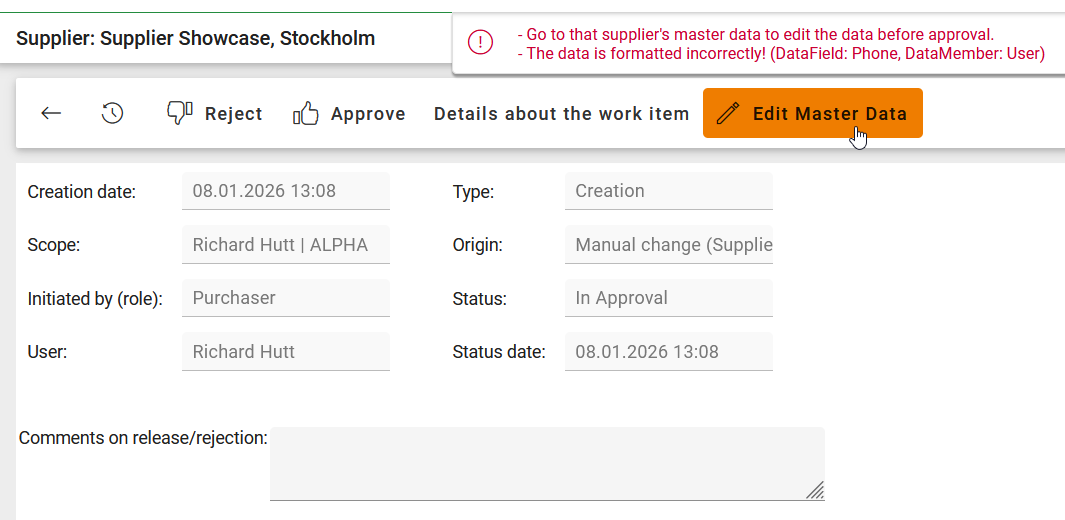
How It Works
Accessing Edit Mode: Clicking Edit Master Data opens the supplier in a special view:
Displays only supplier master data and related tabs (no OrgUnit extensions).
Info box hint: “You can edit the supplier during the approval process. Changes are updated directly in the supplier work item (type: creation).”
Toolbar reduced to Back and Save & Close.
Navigation:
Back: Returns to the previous page.
Save & Close: Validates changes and returns to the previous page for re-approval.
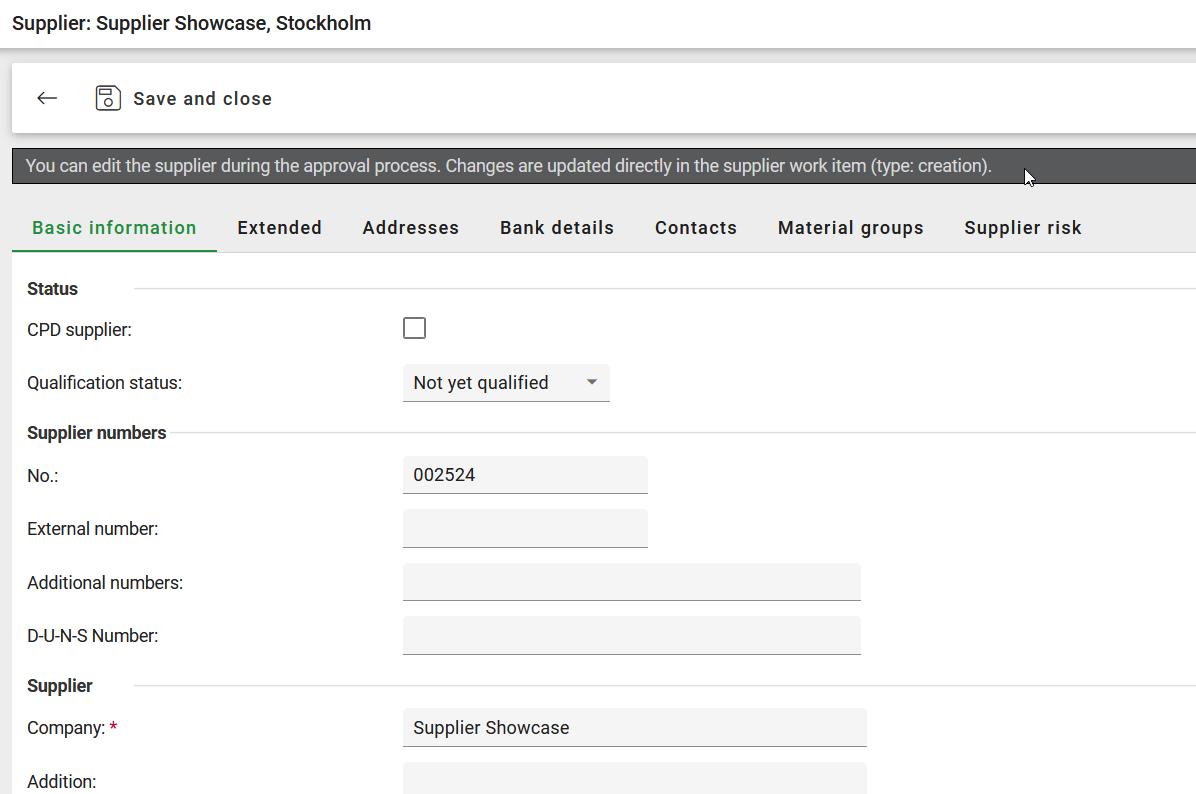
Open the special view to edit the supplier record. A textual hint is given. “You can edit the supplier during the approval process.” Organizational Unit extensions are not shown.
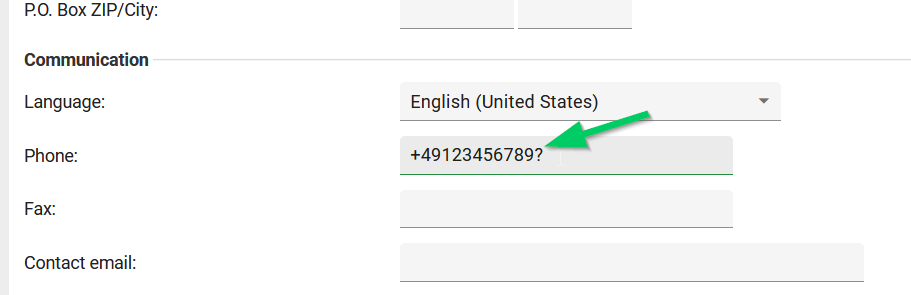
User can correct invalid data.
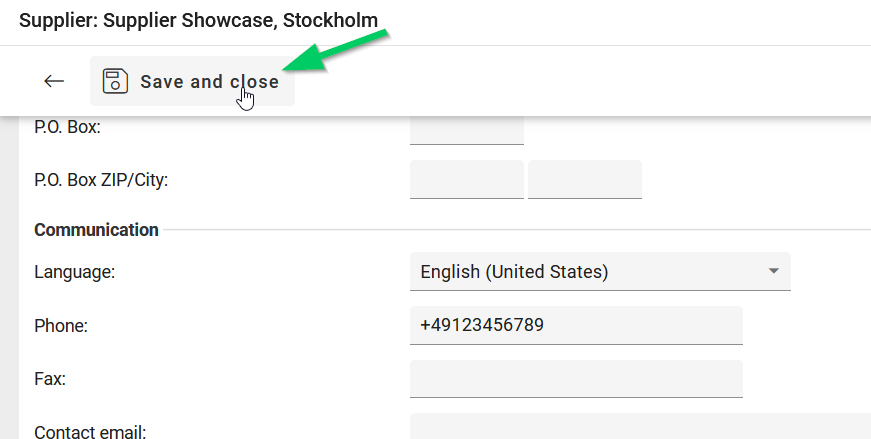
User can Save & Close supplier record with valid data.
Process Logging: On the work item details page, a log entry is added: Timestamp, User Name, Message: “Corrections have been made by this user before the work item was approved.”
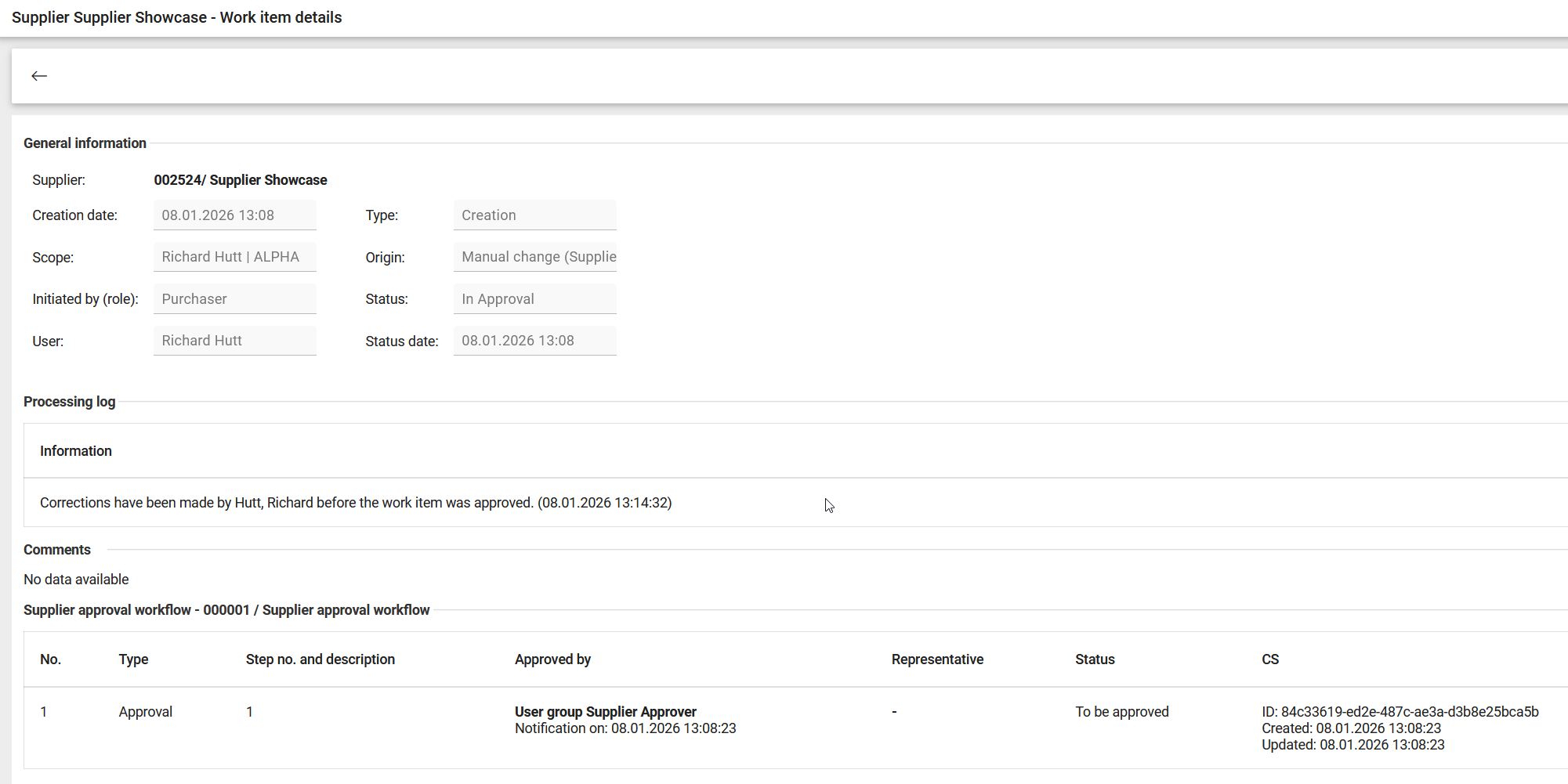
Log entry is added to track changes made during approval process.
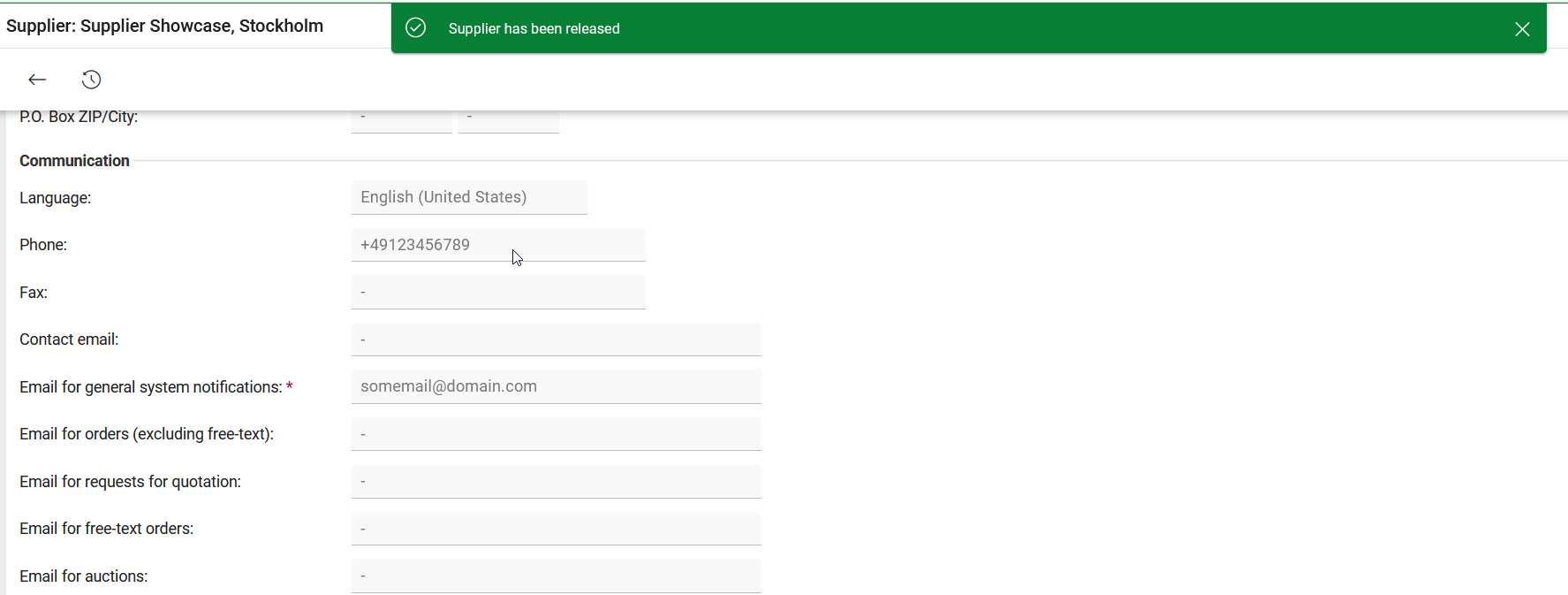
User can now approve the supplier.
List of items to be released: Also from that list a user is sent to the Supplier Work Item, offering the new Edit Mast Data button, if access rights (create/edit supplier) are provided
Benefits
Ensures supplier data accuracy before ERP integration.
Reduces approval delays caused by incorrect data.
Improves compliance and data quality in supplier onboarding.
Contract Lifecycle Management
This release delivers a governed and transparent contract lifecycle management solution that brings all contracts into a single, structured contract repository.
Onventis CLM standardizes how contracts are created, structured, reviewed, signed, and managed, while remaining flexible enough to adapt to different business needs. Every contract follows consistent rules and a unified data model, ensuring comparability, control, and full traceability across the lifecycle.
By combining template-driven standardization with configurable contract types, custom attributes, and controlled lifecycle stages, CLM replaces fragmented contract handling with a disciplined and adaptable contract portfolio.
Role-based permissions and governed workflow establishes clear ownership and compliance control, while structured and extensible contract data enables reliable search and reporting.
Contract Repository
Purpose
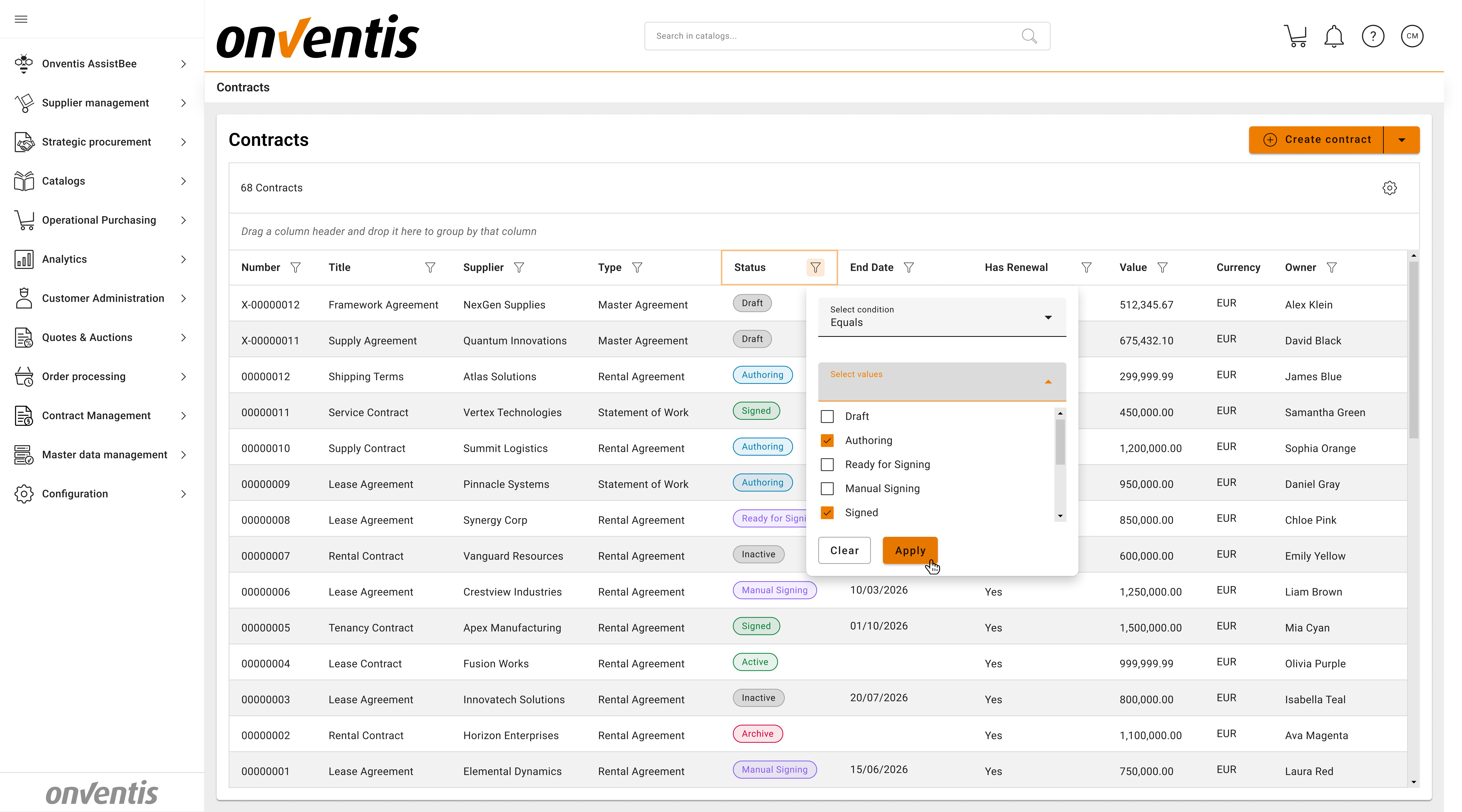
Provide a centralized and governed contract repository (Power Grid) where all contracts are stored in a consistent structure and remain fully traceable throughout their lifecycle.
What’s included
Central repository for contracts across all lifecycle stages - from Draft to Archive.
Advanced filtering, multi-column sorting, grouping, and column customization.
Access Rights and Role-based visibility of contracts and contract data.
Quick access to contracts by supplier, contract type, material group, status, etc
Learn more
Contract Repository Overview – Contract Repository
Available for
Standard business user
Standard power user
Contract Data Model
Purpose
Core Attributes are system-defined metadata fields that apply to every contract. They ensure a consistent data structure across all contracts and enable automation, analytics, and integrations.
Custom attributes are template-specific metadata fields which apply to concrete templates. They capture specific business, legal, and risk information in a controlled and reusable way and assure required flexibility.
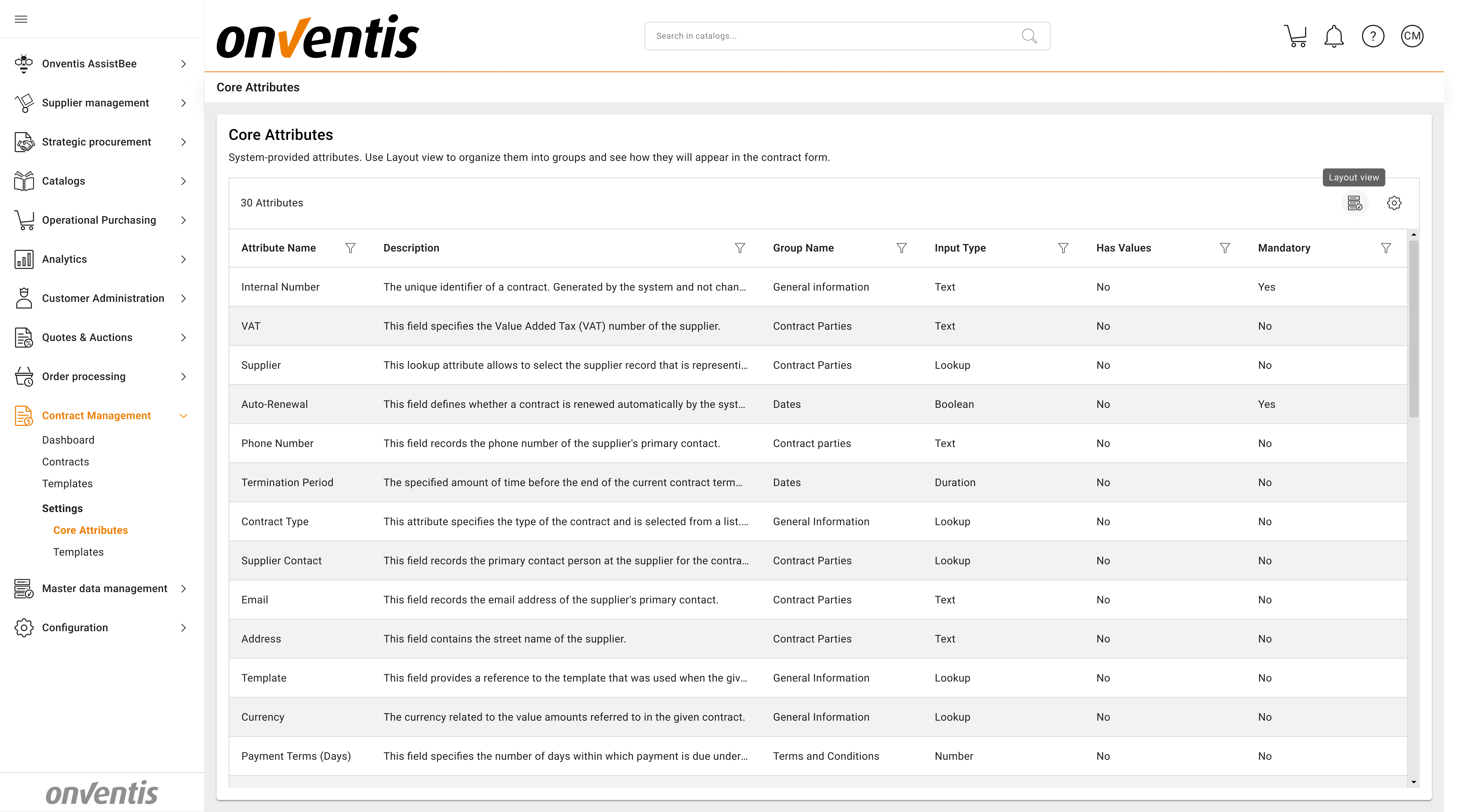
What’s included
Standard system attributes - fields, available for all contracts (e.g Internal Number, Contract Type, Contract Owner, etc)
Core and custom attributes can be added to existing or new groups and rearranged - making contract view match the designed structure.
Custom attributes support for different attribute data types (text, numbers, dates, text multiline)
Support of attributes with values (e.g. custom attribute with predefined values - “Risk Level” - “High”/”Medium”/”Low”).
Custom attributes can be deprecated without impact to existing contracts to ensure traceability and historic records.
Multilingual support for attributes.
Learn more
System and custom attributes – Contract Core Attributes and Grouping
Available for
Standard Power User
Contract Types
Purpose
Classify contracts by business context and usage and guide users toward the correct templates.
What’s included
System-defined contract types “Goods”, “Services”, “Construction”, “Software”, “Others”.
Custom contract types configurable per organization
Contract types used for categorization and reporting
Each contract type linked to one or more templates
Learn more
Contract types overview – What is a Contract Type in CLM?
Available for
Standard Power User
Templates Management & Contract Standardization
Purpose
Establish consistent contract structures and governed creation processes through reusable, centrally managed templates.
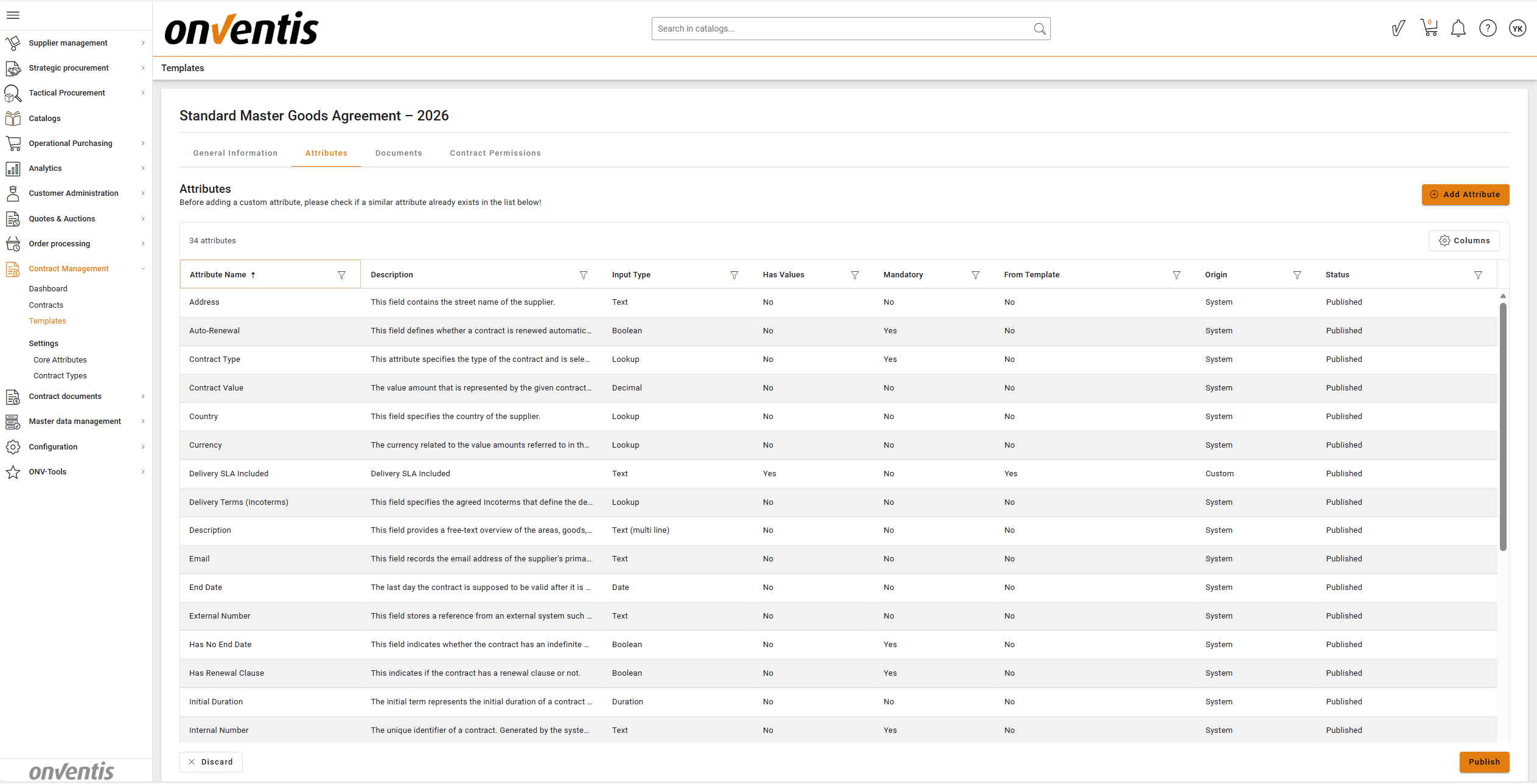
What’s included
Centralized template creation and management
Automatic inheritance of system-defined contract attributes in every template
Definition of custom, template-specific attributes
Assignment of templates to organizational units and material groups
Linking of templates to contract types to guide correct contract creation
Configuration of template-level documents and access permissions
Draft and publish lifecycle to ensure controlled and governed template changes
Learn more
How to create a Template – How to create a Template
Available for
Standard Power User
Contract Documents & Versions
Purpose
Provide a structured and controlled way to create, manage, and review all contract-related documents, ensuring consistency, version integrity, and clear identification of the legally relevant content.
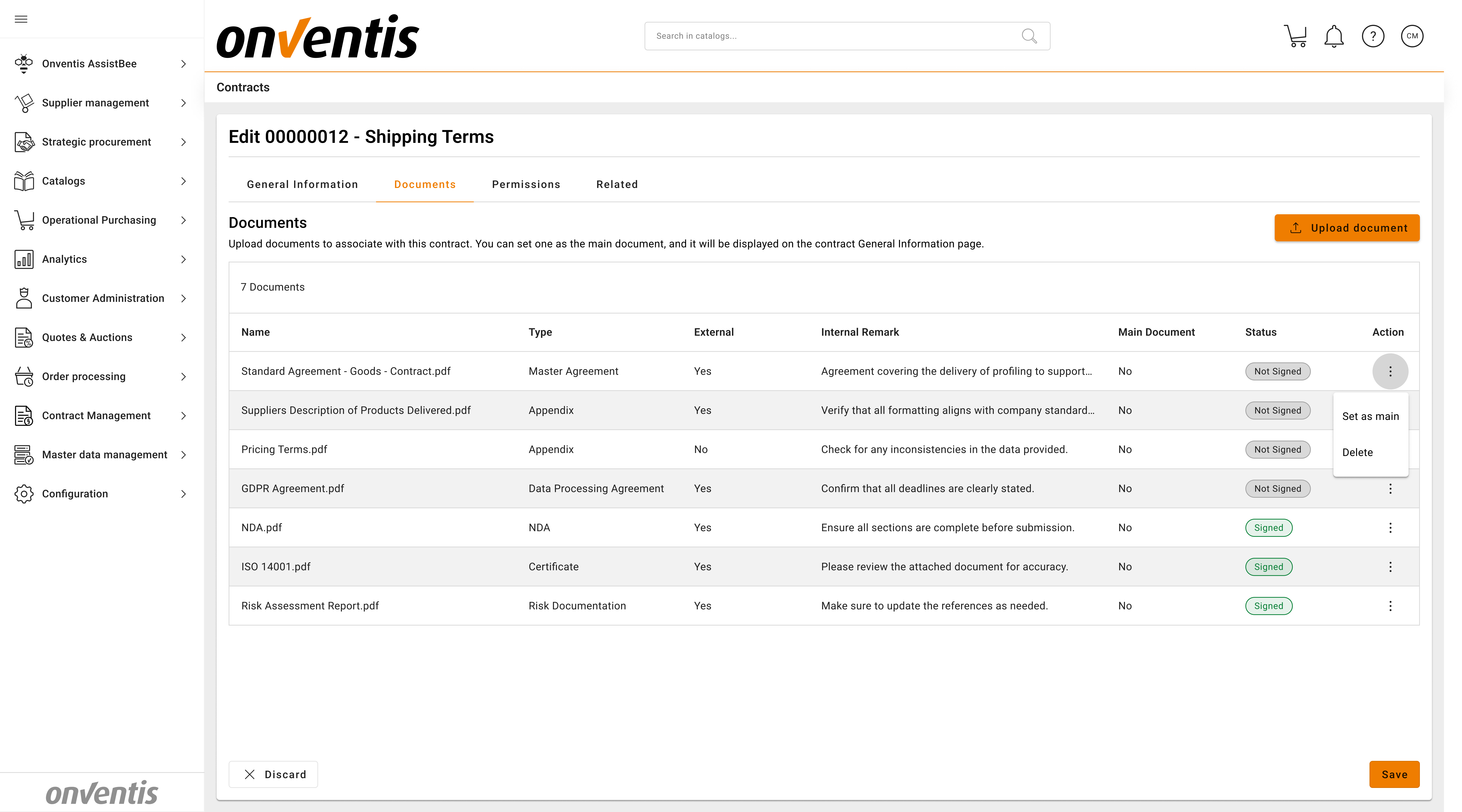
What’s included
Creation and management of multiple documents within a single contract
All documents are visible in the grid view in the Contract Documents tab
Support for different document types, including main documents and supporting attachments
Clear designation of the main contract document used for review and execution, also visible in the contract overview page
Document versioning with timestamps to track updates while preserving previous versions
Support for document metadata, includes differentiation between “internal” and “external” documents, description and the remark.
Controlled upload and updates of documents throughout lifecycle
Capability to upload “signed” addendums and additional documents
In-browser document review through the integrated PDF viewer
Learn more
Document types overview - Document Types in CLM
How to upload documents and versions - How to upload Documents and Versions
Available for
Standard Business User
Standard Power User
Permissions & Access Control
Purpose
Ensure that contract data and documents are accessed and modified only by authorized users, establishing clear ownership, responsibility, and controlled collaboration across the contract lifecycle.
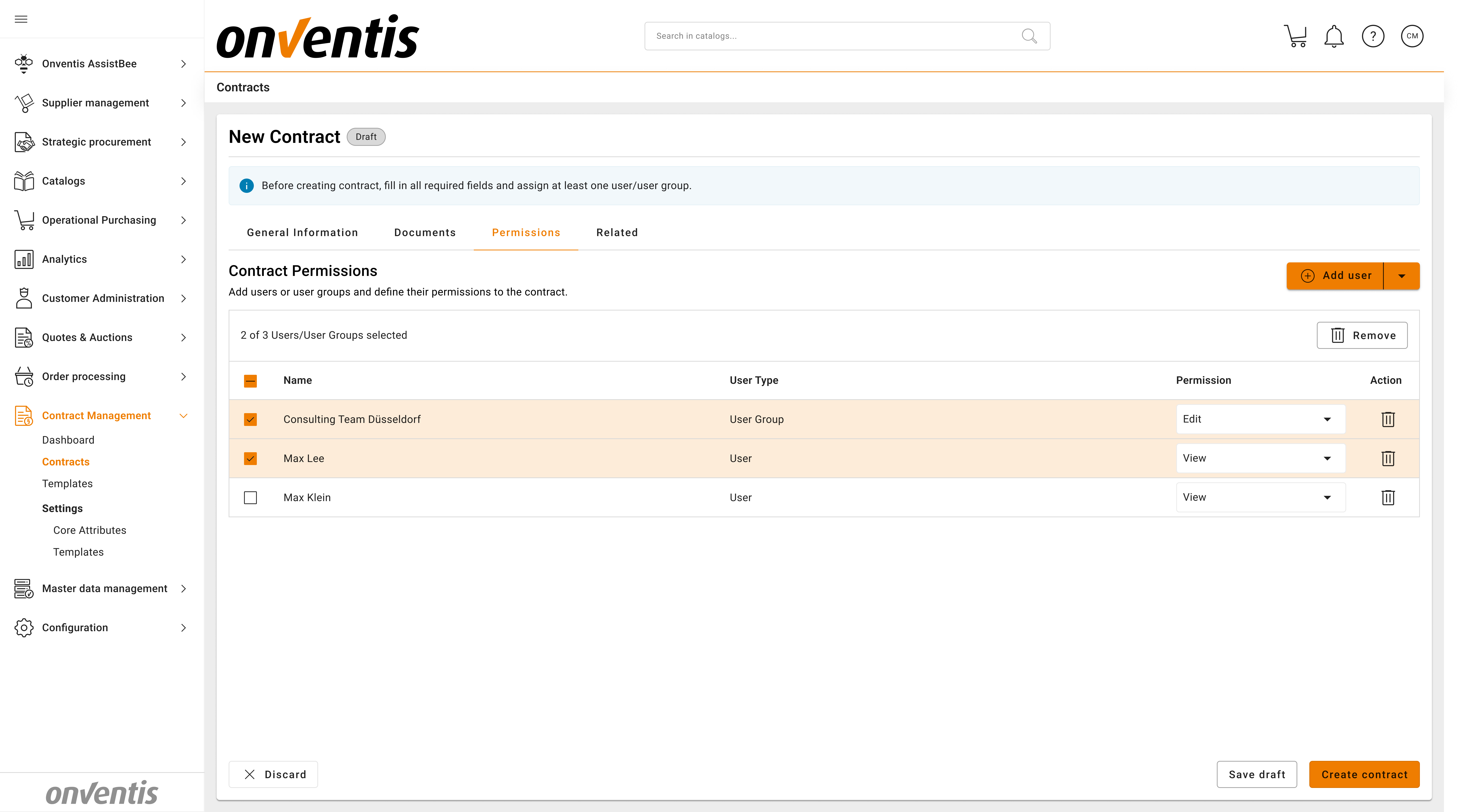
What’s included
Role-based access control aligned with business roles (e.g. owner, editor, viewer, administrator)
Permission settings at both template and contract level
Support for user- and user group-based access assignment
Clear distinction between editing and read-only access
Transparent visibility of contract ownership and responsibility
Learn more
Setting permissions on contract level - Permissions on Contract Level
Available for
Standard Power User
Contract Creation
Purpose
Support both standardized and non-standard contract scenarios while maintaining structure, governance, and transparency.
What’s included
Contract creation based on created templates to ensure consistent structure, predefined documents, and inherited metadata
Inheritance of system attributes, template-level custom attributes, documents, and permissions when creating contracts from templates
Creation of contracts from scratch for exceptional or non-standard agreements, without forcing template usage
Consistent contract structure and lifecycle governance applied to both template-based and scratch-created contracts
Ability to link related contracts to existing agreements where applicable
Learn more
Contract metadata - How to register Metadata for a Contract
Contract creation from Scratch – Create Contract from scratch
Contract creation from Template - Create Contract from Template
Indefinite Contract creation - How to register an Indefinite Contract (with no end date) C
Linking Contracts - How to Create Relations between Contracts
Available for
Standard Power User
Contract Authoring & Edit Lock
Purpose
Enable controlled contract authoring by ensuring that only one user can edit a contract at a time, preventing conflicts, overwrites, and uncontrolled changes.
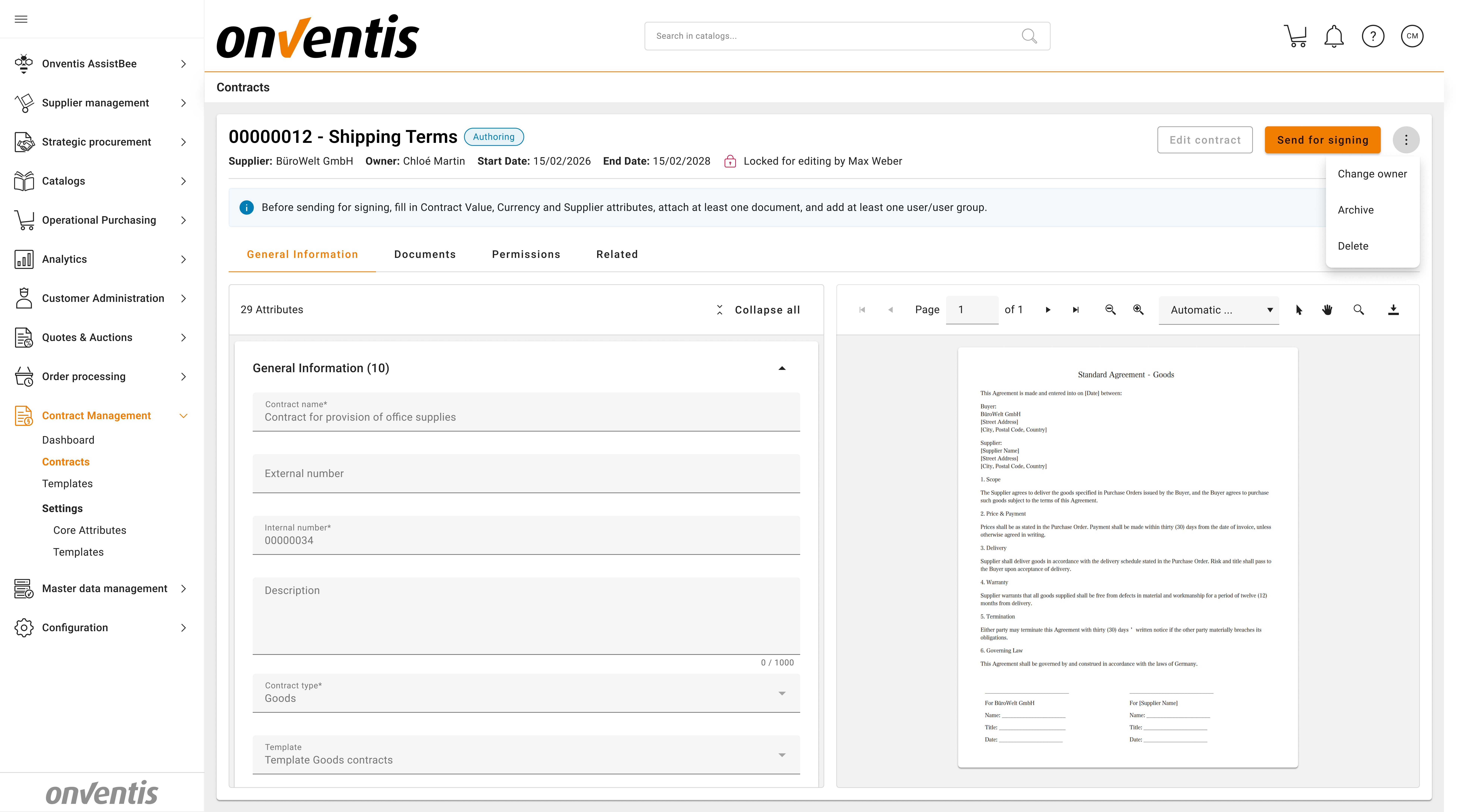
What’s included
Explicit authoring mode for contracts to clearly separate editing from review
Automatic locking of a contract when a user starts editing
Read-only access for other users while a contract is locked
Clear visibility of who is currently editing the contract
Protection against parallel edits and accidental data loss
Seamless transition back to collaborative review once editing is completed
Learn more
Contract Co-Authoring – Contract Authoring Phase
Available for
Standard Business User
Standard Power User
Governed Contract Lifecycle
Purpose
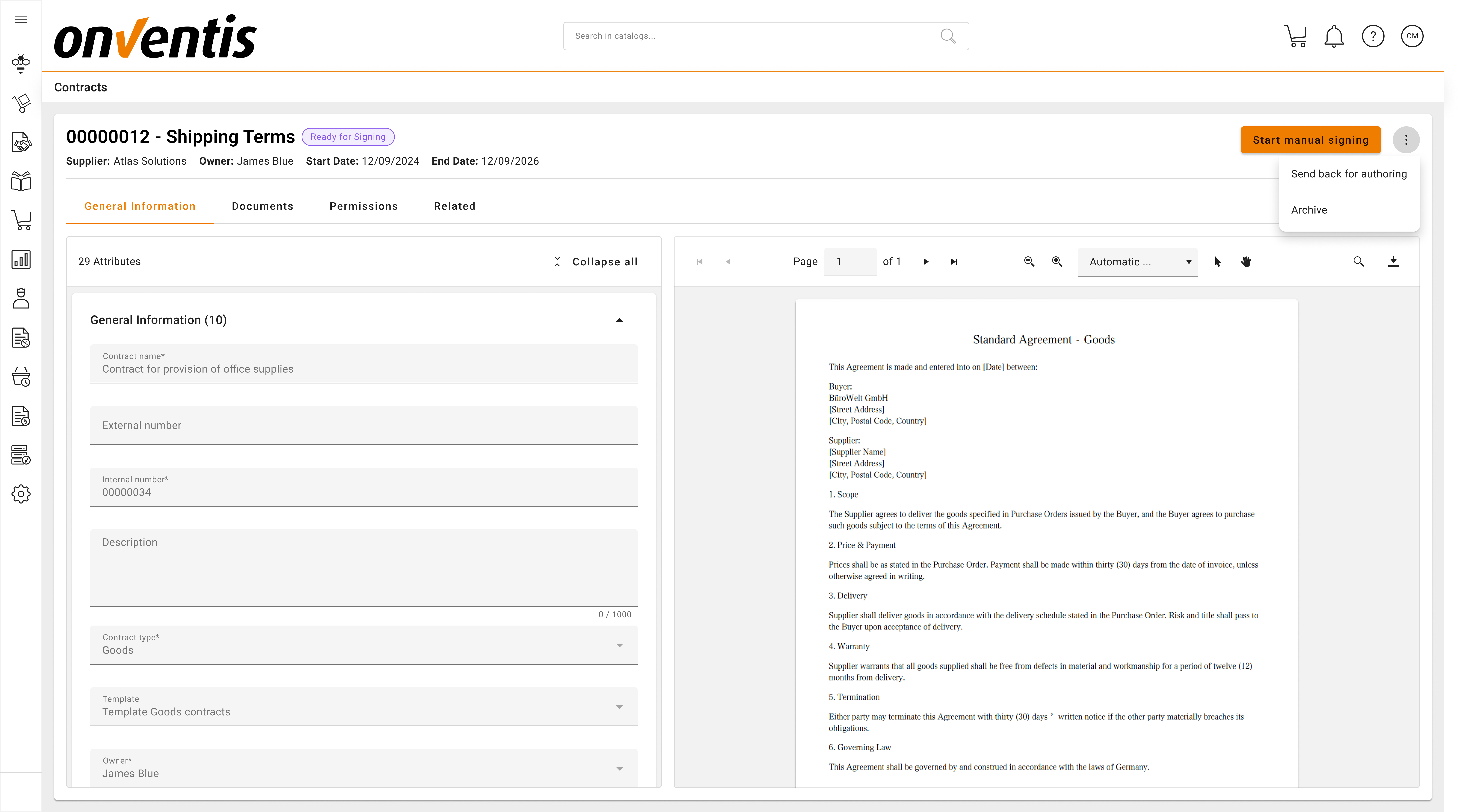
Provide a structured and transparent contract lifecycle that enforces control, accountability, and consistency from contract creation through execution and closure.
What’s included
Clearly defined and enforced lifecycle stages, from Draft and Authoring through Signing, Activation, and Archiving
Explicit visibility of contract status, ownership, and responsibilities at every stage
Support for both fixed-term and open-ended contracts, aligned with different business scenarios
Controlled and guided transitions between lifecycle stages to prevent unmanaged or unintended contract changes.
Validation that required contract data is completed before signing - Main document must be attached.
Support for manual signing outside the system, using uploaded signed documents
Upload of final signed documents and explicit marking of signed versions
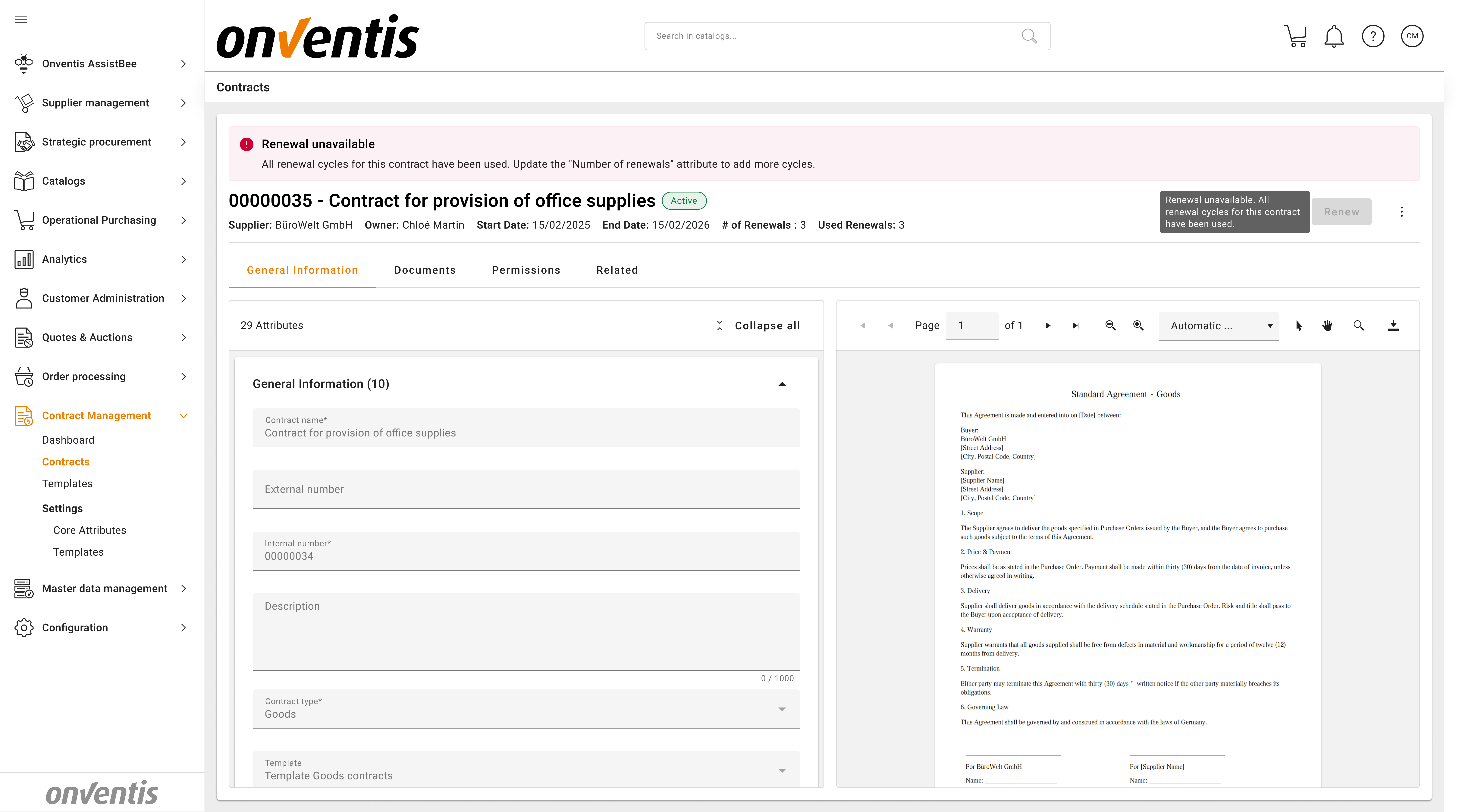
Renewal configuration embedded directly into the contract lifecycle to ensure predictable and controlled renewals, support of manual and auto renewals.
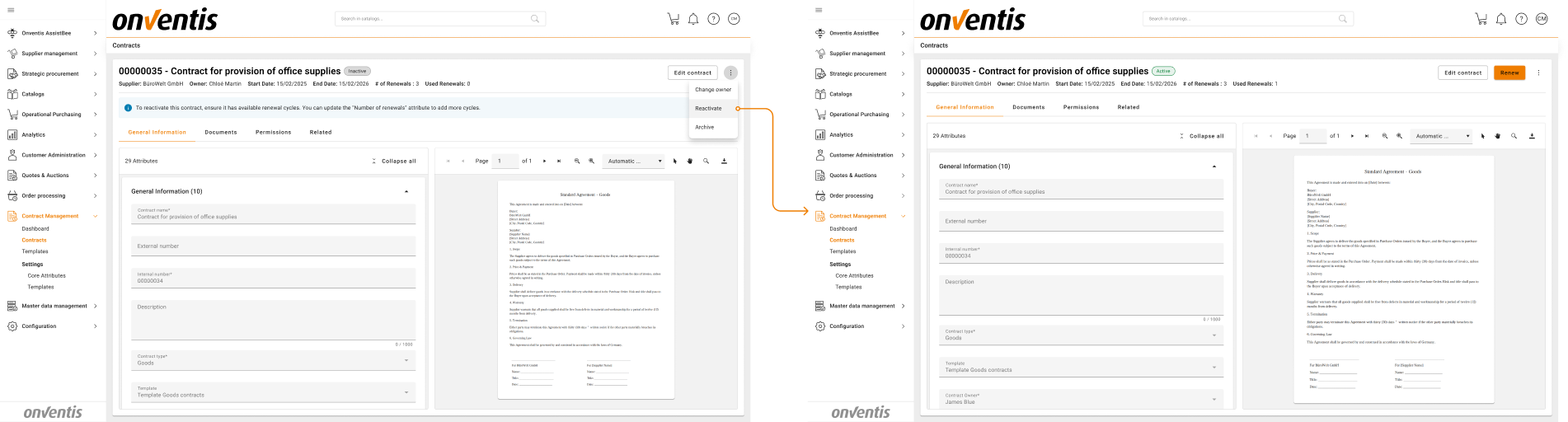
Contacts Deactivation - support for both manual and auto inactivation logics.
Learn more
Manual Signing flow - Manual Contract Signing
Contract Activation – How to transition a Contract to Active
Contract Inactivation - How to transition a Contract from Active to Inactive
Contract renewal - Contract Renewal
Contract Reactivation - How to Re-Activate a Contract
Contract Deletion - How to Delete a Contract
Change Contract Owner - How to change Contract Owner
Available for
Standard Business User
Standard Power User
Contract Archiving
Purpose
Keep the active contract portfolio clean and manageable while ensuring continued access to archived agreements for reference and compliance.
What’s included
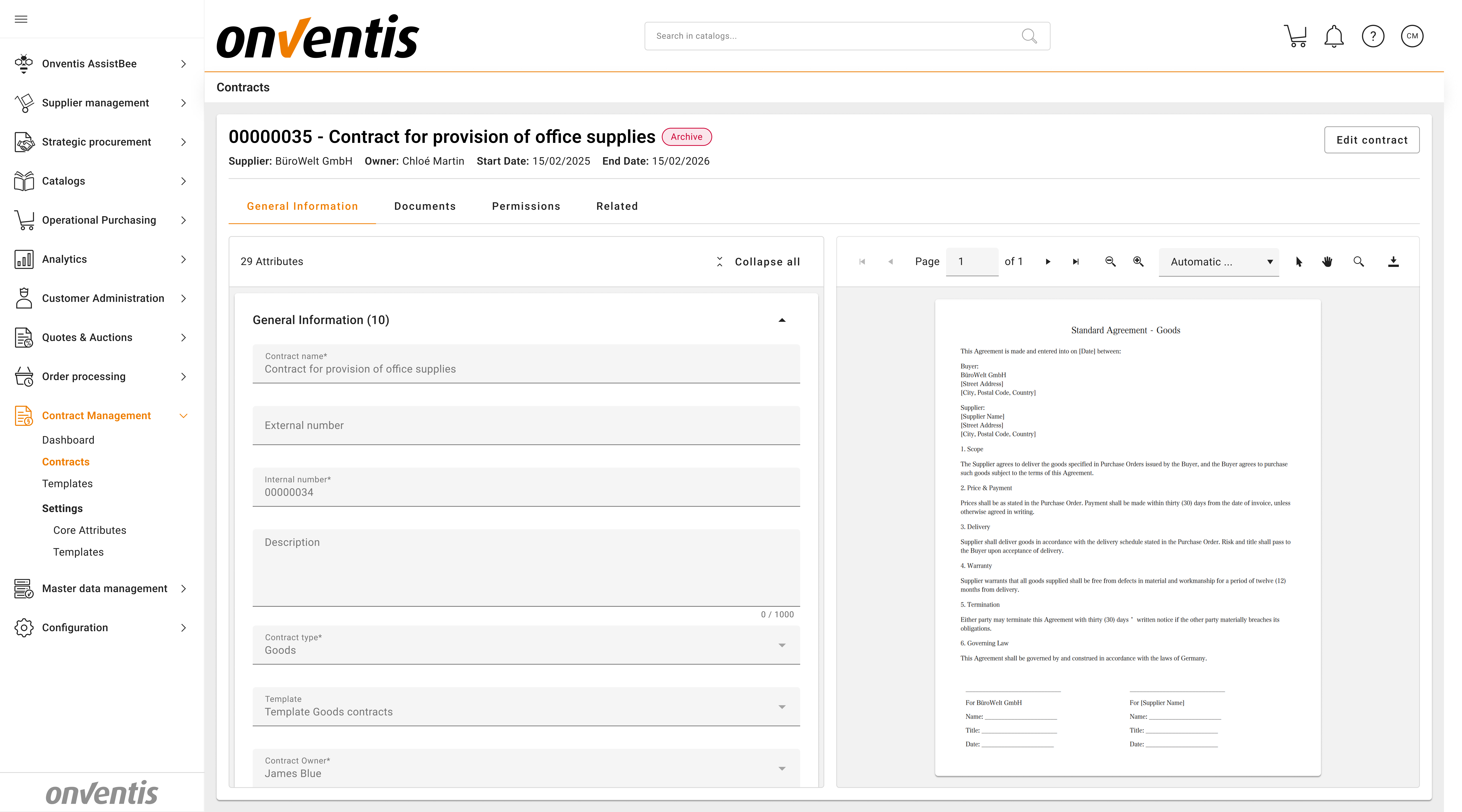
Manual archiving of expired or inactive contracts
Clear separation between active contracts and archived contracts
Archived contracts remain searchable and viewable
Preservation of contract structure, documents, and metadata after archiving
Archived contracts are view only mode, with exception to adding permissions and related contracts
Learn more
Move contract to Archive - How to Archive a Contract
Available for
Standard Business User
Standard Power User
Dashboards & Operational Visibility
Purpose
Provide transparent, role-based insight into the contract portfolio, enabling users to monitor status, value, and upcoming actions at a glance.
What’s included
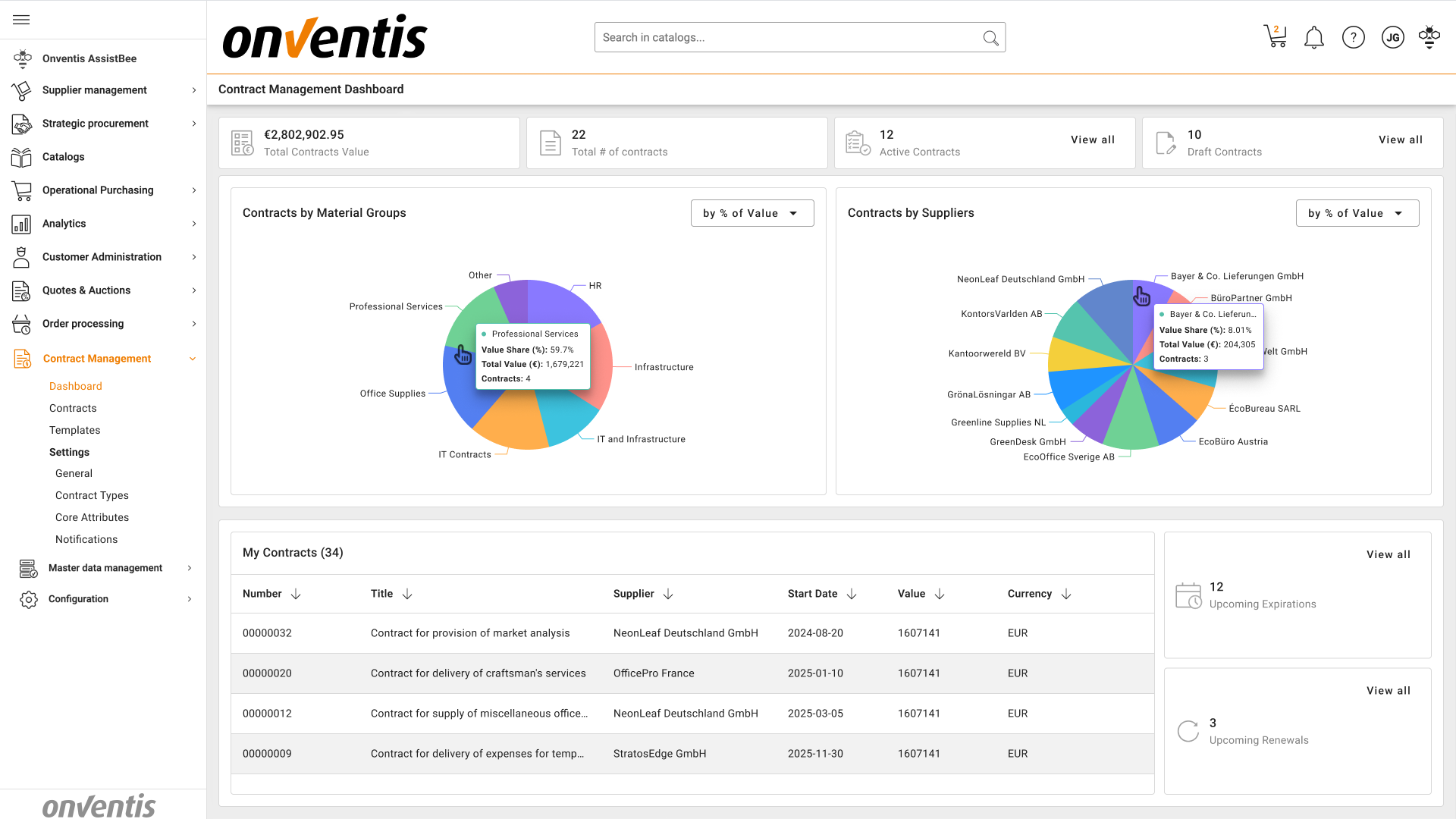
Role-based dashboards with a consistent layout across all users, while displaying data according to access rights
KPI tiles providing immediate visibility into:
Total number of contracts
Total contract value
Total Active contracts
Draft contracts
Contracts approaching expiration and renewal
Interactive charts showing contract distribution and value by:
Supplier
Material group
Drill-down navigation from tiles, charts, and tables directly to individual contracts for further review and action
“My Contracts” view to show all contracts associated with the contract owner
Learn more
Dashboard Overview – CLM Dashboard
Available for
Standard Business User
Standard Power User