
Contract Renewal

This article explains how contracts can be renewed in the CLM system, including manual and automatic renewal, who can perform renewals, and how renewal limits and dates are managed.
🗺️ Overview
Contract renewal allows an Active contract to be extended for an additional period based on predefined renewal rules. Renewal helps organizations continue contractual relationships without creating new contracts, while maintaining clear control over how many times a contract can be extended.
Renewals can be triggered manually by authorized users or automatically by the system, depending on the contract configuration.
🧑🦱 Who Can Use This
The following roles can perform manual contract renewal:
CLM Power User
Automatic renewals are performed by the System when all renewal conditions are met.
💻 General rules
The Renew action is available for a contract only when all of the following conditions are met:
The contract status is Active
Has Renewal Clause is yes
The contract has a defined End Date (definite contract)
Renewals Used is less than Number of Renewals
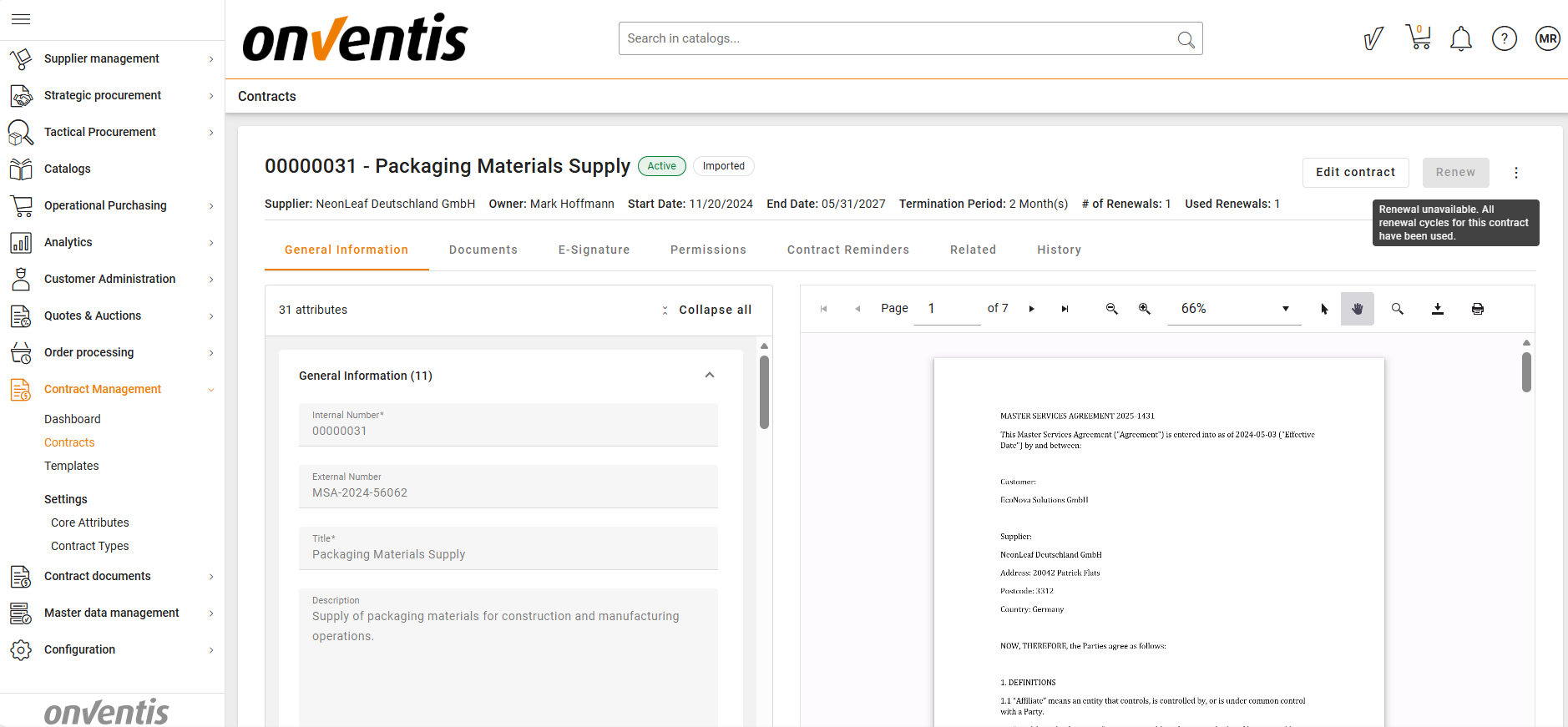
🧩 Note: If all renewal cycles for a contract have been used, users can update the “Number of Renewals” attribute to add additional renewal cycles and allow further renewal.
The renewal action cannot be undone.
The following fields are displayed in the header of the Contract Overview page for Active contracts:
# of Renewals – reflects the system attribute Number of Renewals
Used Renewals – shows how many renewals have already been applied
⚠️ Important: Be aware that currently, the system does not prevent decreasing the “Number of Renewals” value, even if renewals have already been used.
⚙️ Manual vs Automatic Renewal Configuration
Renewal behavior is defined by the Auto Renewal (yes/no) attribute at the contract level:
Auto Renewal is no
The contract supports manual renewal
The Renew button may be available (if other conditions are met)
Auto Renewal is yes
The contract supports automatic renewal only
The Renew button is not displayed in the Active status
A contract cannot use both manual and automatic renewal at the same time.
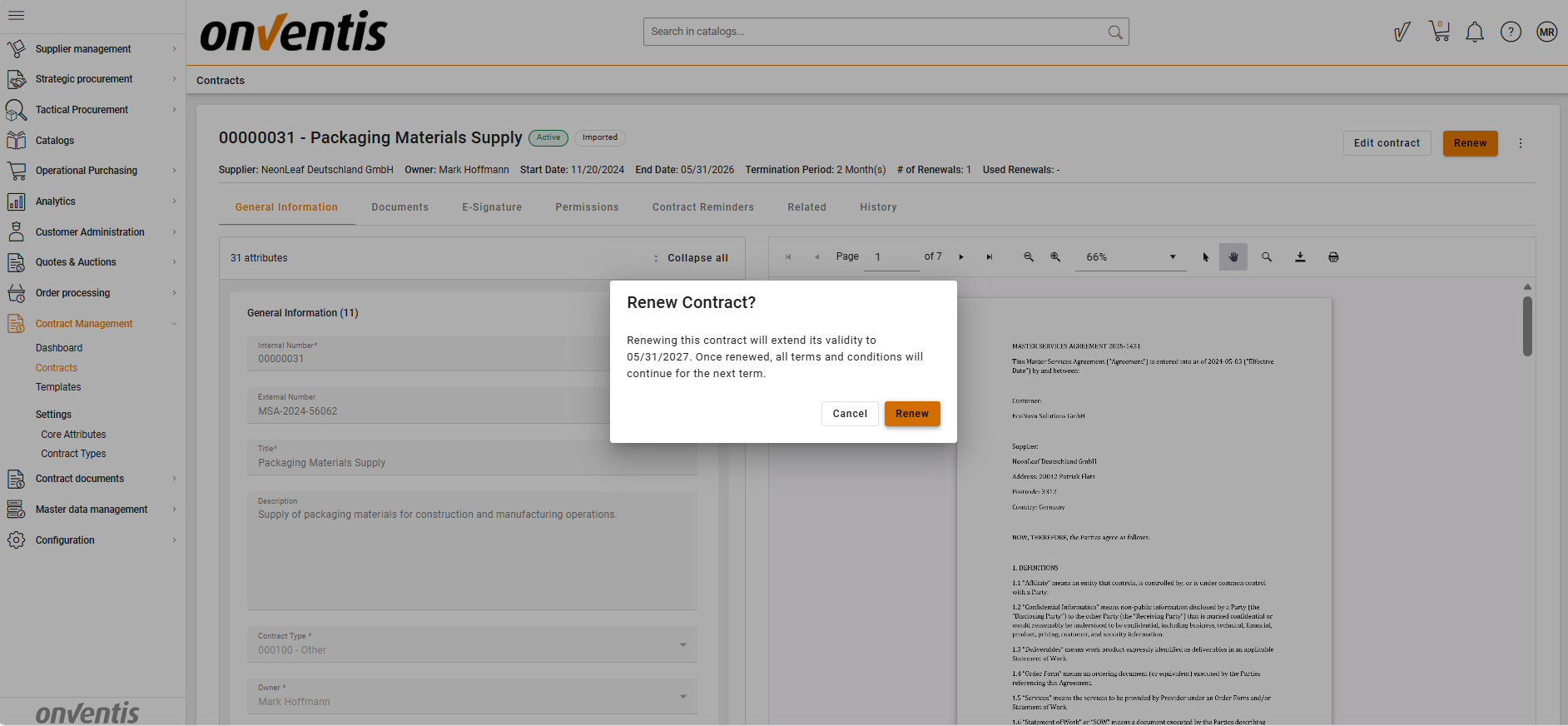
✍️ Manual Renewal
Manual renewal is available on the Contract Overview page if Has Renewal Clause is yes and Auto Renewal is no.
When a CLM Power User performs a manual renewal:
The contract remains in Active status
The End Date is extended by the defined Renewal Duration
The Start Date remains unchanged
The Used Renewals counter increases by 1
An email notification is sent to inform Viewers/Editors and CLM Power User
The Renew action freezes when:
Renewals Used is equal to or greater than Number of Renewals
🧑💻 Automatic Renewal
When End Date + 1 day is reached, the system automatically checks:
Has Renewal Clause is yes
Auto Renewal is yes
Number of Renewals > 0
Renewals Used < Number of Renewals
If all conditions are met, the contract is automatically renewed:
The contract remains Active
The End Date is updated to previous End Date + Renewal Duration
The Start Date remains unchanged
Used Renewals increases by 1
An email notification is sent to inform Viewers/Editors and Contract Owner
The System is recorded as the actor
If any condition is not met, the contract does not auto-renew and continues through the lifecycle according to existing rules.
🧩 Note: If End Date + 1 day is reached and no renewal occurs, the contract is automatically Inactivated.
Best Practices

💡 Tips for Effective Use:
Define renewal rules clearly during contract setup to avoid unexpected expirations.
Use manual renewal when contracts require a business decision before extension.
Use automatic renewal for standardized agreements that should continue without manual intervention.
Monitor Used Renewals regularly to ensure renewal limits are not exceeded.
Increase Number of Renewals to add additional renewal cycles and allow further renewal.
Remember that renewal is only possible for Active contracts with a defined End Date.