Onventis 2026.3
I’m The new Onventis 2026.3 release contains various enhancements, improvements, and bug fixes. Check out the complete list below!
Beta release date: Tuesday,
Release date: Tuesday,
Procure-to-pay
New Feature: Voice Dictation in Chatbot
Voice Dictation is now available in the Onventis chatbot. This feature allows users to interact with Intake & Order Orchestration agent and policy agent using speech‑to‑text instead of typing, making conversations faster, more natural, and more accessible.
Users can dictate their questions or commands, review the transcribed text, and send it directly to the chatbot for processing.
Feature highlights
Speak instead of typing using the new microphone button
Real‑time speech‑to‑text transcription
Supported languages:
English
German
Transcribed text can be edited before sending
Send action is disabled during active dictation to prevent conflicts
Dictation automatically stops when:
A new chat starts
The chatbot is closed
Works in supported browsers (Chrome, Edge, Safari)
Automatically uses the user’s system language for recognition but the responses are defaulted to English and German
How it helps
With Voice Dictation enabled, users can interact with the chatbot more efficiently, especially in hands‑busy or mobile scenarios.
This helps:
Speed up interaction with Guided Buying and guideline assistants
Improve accessibility for users who prefer speaking over typing
Enable more natural, conversational user experiences
Reduce effort when asking complex or long questions
New Feature: Custom Checkbox in Purchase Orders
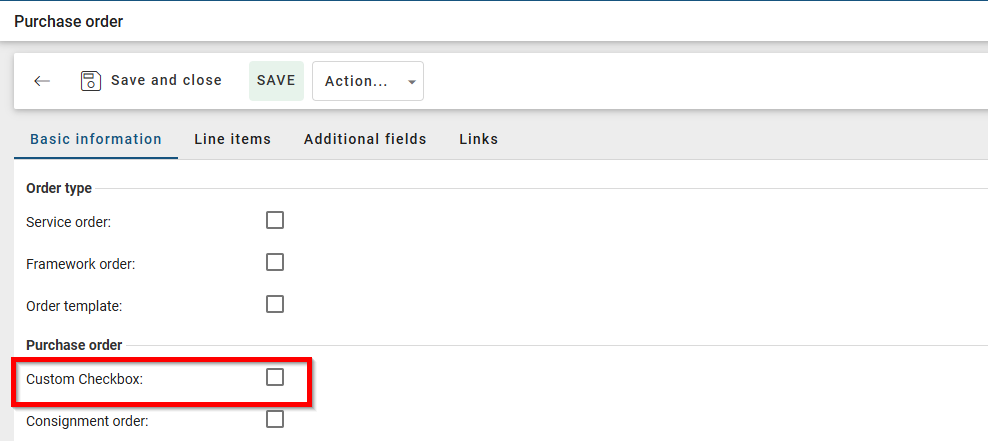
The Custom Checkbox feature is now available in Onventis Buyer. This feature allows organizations to add a configurable checkbox to the Purchase Order header, enabling customers to mark and track specific procurement cases, such as repetitive orders or internal flags.
The checkbox is fully configurable, access‑controlled, and seamlessly integrated into Purchase Order workflows and Onventis Invoice Management.
Feature highlights
Custom checkbox available directly in the Purchase Order header
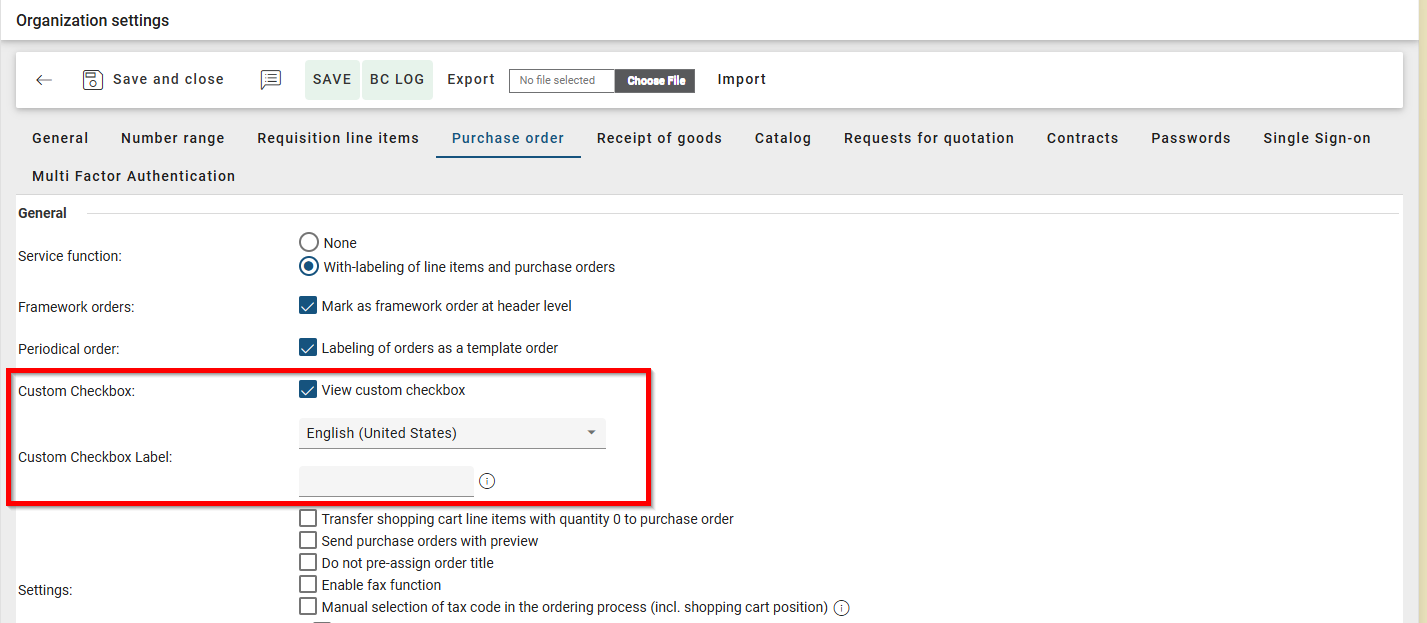
Checkbox label is configurable per organization
Visibility and editability controlled by Organization setting
Value can be edited until the Purchase Order is approved or sent
Checkbox value can be transferred to Invoice Processing
How it helps
The Custom Checkbox provides organizations with a flexible way to mark Purchase Orders for internal tracking and downstream processing.
This helps:
In flagging specific Purchase Orders with distinct values based on your business needs.
Align procurement processes with internal compliance or accounting requirements
Maintain consistent data between Purchasing and Invoice Management
Reduce the need for custom fields or workarounds
Learn more
The Custom Checkbox is controlled via Organization setting for visibility on PO Header across Organization
Custom checkbox will be enabled by default for all customers with Order Management License role.
Supporting this field value in OpenTRANS export of PO’s will be in upcoming release.
Enhancements: AI - Powered PDF Offer Upload
PDF Offer Upload has been enhanced in Onventis Buyer with improvements covering free trial usage, access control, visibility, article number handling, and overall user experience. These enhancements make it easier for organizations to evaluate Offer Upload, manage who can see uploaded content, and ensure better data quality during the ordering process.
The improvements apply to the full Offer Upload lifecycle, from upload and usage tracking to shopping cart integration.
Feature highlights
Free Trial Availability:
Free Trial mode with 25 uploads per organization visible for all users who have access to Shopping cart & creation of free text line item in shopping cart to ensure they can give this new feature a try.
Trial counter decreases only after successful uploads
Failed or incomplete uploads do not consume trial credits
Remaining uploads clearly displayed via a Trial Mode banner
Trial banner visible across:
Empty state
Offer list
Upload flow
New upgrade flow with “Request full access” action that let's the Sales activate the license for the feature
User Based Visibility Control
User‑based visibility by default:
Users can see only their own uploaded offers
Optional access right “View all Offer Upload records” enables organization‑wide visibility which could help in administrative activities
Menu entries and APIs are fully controlled by access rights
Article Number recognition
Article numbers extracted from uploaded offers are transferred to the Shopping cart
Supports multiple line items
Empty or missing article numbers are allowed and do not block processing
Article numbers are displayed and used consistently during shopping cart and ordering
How it helps
Offer Upload Enhancements allow organizations to test and adopt AI‑powered offer processing while maintaining control, transparency, and data accuracy.
This helps:
Evaluate Offer Upload without immediate licensing commitments
Prevent accidental usage loss due to failed uploads
Ensure privacy through user‑based visibility by default
Enable controlled access to all offers via dedicated permissions
Improve ordering quality by transferring article numbers automatically
Reduce manual corrections during shopping cart and order creation
Provide a smooth and guided upgrade path to full access
Improve overall usability and visual consistency
Other Improvements
Improved Account Allocation Category Display in Workflow Assignment: In the vendor master data, when configuring different order processing workflows for each account assignment type, the combination of the account assignment type abbreviation and the account assignment type title is displayed in the drop-down list.
Billing Rule Now Available for Yearly Invoice Plans: When configuring billing plans, the options “Rule for the next billing/invoice date” and “In advance” are now available for all intervals (month, quarter, half-year, and year).
More Flexible Supplier Filtering for BC Job Exports: Effective immediately, all filter options available in the supplier list are now also available when exporting recurring jobs via Excel.
Interfaces Related Key-Update
Improved Ignore Supplier Bank Logic for Extended Bank Data: When importing suppliers from SAP, the configuration options have been expanded so that, through configuration, all bank details contained in the SAP IDOC are ignored during import into Onventis. Previously, the first bank account was always imported from the IDOC, and only the additional bank accounts could be ignored during import via configuration.
More Consistent Data Transfer When Updating Purchase Requisitions: When updating requisition items from Onventis to SAP via an interface, all fields from the account assignment block are always transferred. This ensures that values deleted during the approval process (e.g., due to a change in the account assignment type) are also deleted in SAP, and that the data in both systems remains consistently synchronized.
OpenTrans Import Enhanced with Customer Sales Order Numbers: The XML structures for openTRANS-Order and openTRANS-OrderChange have been expanded, so that orders can now be passed as account assignment elements.
Sourcing
Category based scoring
· Buyer can now select which team member should score which response assessment category.
· In response comparison matrix setup every category must receive at least one evaluator (max. 10) and weighting of all evaluators must sum up to 100% per category.
· Evaluators are only able to score categories they are assigned to in response assessment.
· Every response will only be shown once all evaluators have scored the response
Contact person selection
· Buyer can now select contact persons out of suppliers contact persons directory
· If supplier is added to Sourcing Event and that supplier is maintained in your supplier administration, there is new button to open contact person directory
· Every editor can select one or more contact persons that should receive the Sourcing Event emails instead of the initially found mail address
· Contact persons must have an email address maintained in master data
· As soon as Sourcing Event is not in draft anymore, information cannot be changed
Price visibility
· Ensure fair and unbiased evaluations by controlling who can see prices within a Sourcing Event
· Activate Price Visibility easily by enabling “Hide prices during evaluation” for individual team members in the Sourcing Event team setup
· Hide prices consistently across the entire Sourcing Event, including responses, line items, price comparison, and awarding
· Maintain transparency within the team with clear indicators showing which users can or cannot see prices
· Guarantee control and continuity by ensuring at least one team member always has price visibility
· Prices automatically become visible to everyone once the Sourcing Event is completed or cancelled
· Reliable behavior across versions so users never see prices they were not intended to see
· Reuse settings effortlessly when creating Sourcing Events from templates or by copying existing Sourcing Events
Template during Requisition Line Item to Sourcing
· Buyers can now transfer requisition line items into a Sourcing Event and apply a template during creation
· This reduces manual setup and ensures a standardized event structure
· Requisition data always takes precedence over template defaults
· Template availability depends on RFQ type, organizational unit, and active status
· Supports single and multiple requisition line items in one flow
Supplier Management: 🚀 AI Questionnaire Response Insights
Overview
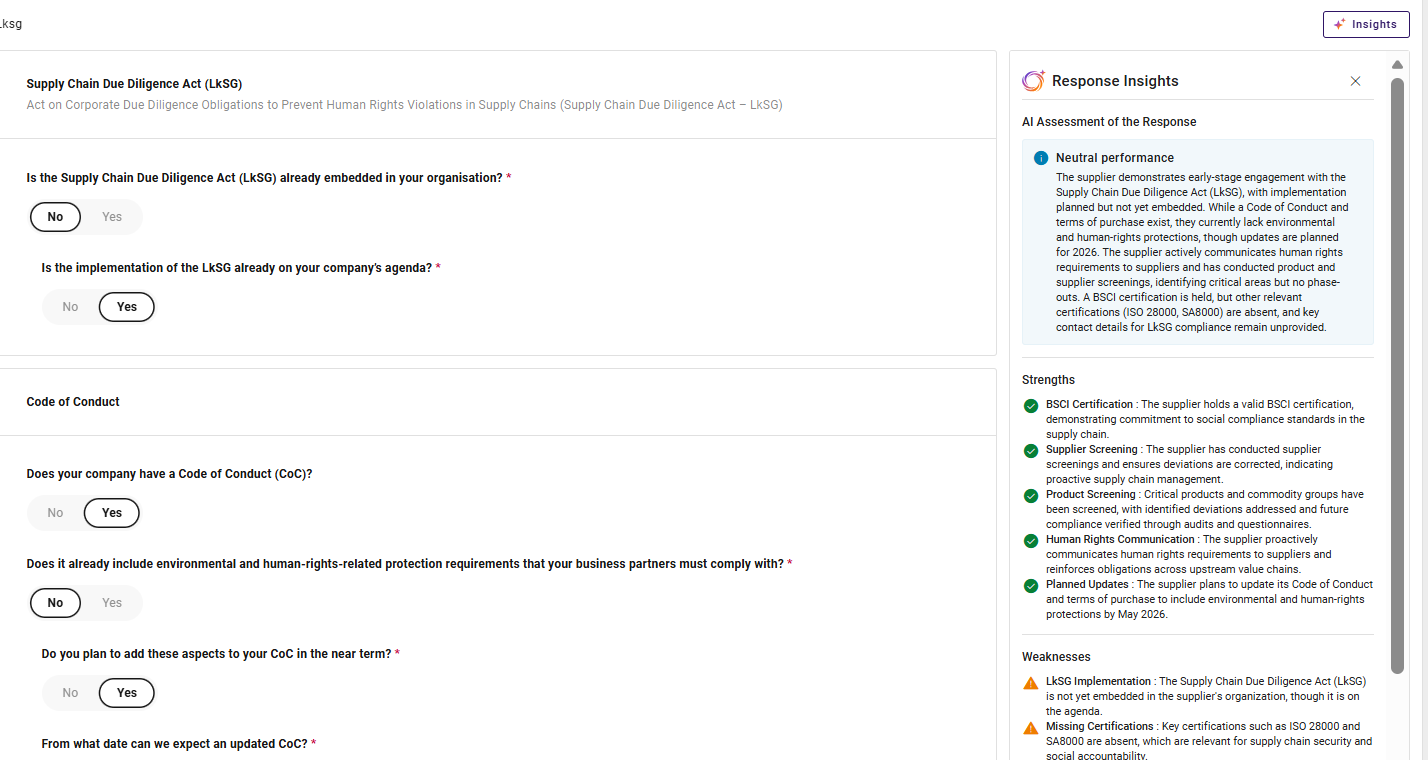
AI Response Insights introduces AI‑powered analysis directly within supplier questionnaire responses. Reviewers can now instantly understand key strengths, weaknesses, and an overall assessment recommendation—without manually reading through lengthy questionnaires or validating documents one by one.
The AI evaluates both questionnaire answers and submitted file contents together, providing a more complete and reliable view of supplier compliance and suitability.
Why this change?
Supplier qualification decisions often depend not only on written answers, but also on the quality, relevance, and correctness of submitted documents. Previously, reviewers had to:
Manually cross‑check uploaded files against requested documents
Inspect certificates and other documents to verify whether they are valid, relevant, or complete
Interpret questionnaire answers and files separately
Detect mismatches or incorrect uploads on their own
AI Response Insights removes this manual effort by contextually analyzing questionnaire responses and file content together, resulting in more accurate and explainable qualification outcomes.
Key Improvements
1. Context‑Aware Strengths and Gaps Analysis
AI now evaluates questionnaire answers together with the content of each submitted file when identifying strengths and gaps.
This enables the system to:
Confirm strengths based on document evidence, not just declarations
Identify gaps where required documents are missing, incomplete, or inconsistent
Distinguish between neutral file submissions and meaningful compliance signals
As a result, strengths and weaknesses reflect the full qualification context, not isolated inputs.
2. Intelligent File Issues Detection
AI automatically detects file‑related issues by understanding what the buyer requested and what the supplier actually submitted.
For each document request, the system:
Identifies the requested file based on the question context
Analyzes the structure and content of the uploaded file
Checks the validity of the file
Compares intent versus submission to detect mismatches
When discrepancies are found, they are clearly listed in a File Issues section.
3. Explainable and Actionable Outcomes
All detected strengths, gaps, risks, and file issues are presented in a clear, structured, and explainable format, enabling reviewers to:
Quickly understand why a recommendation was made
Take corrective action where needed
Justify decisions during audits or internal reviews
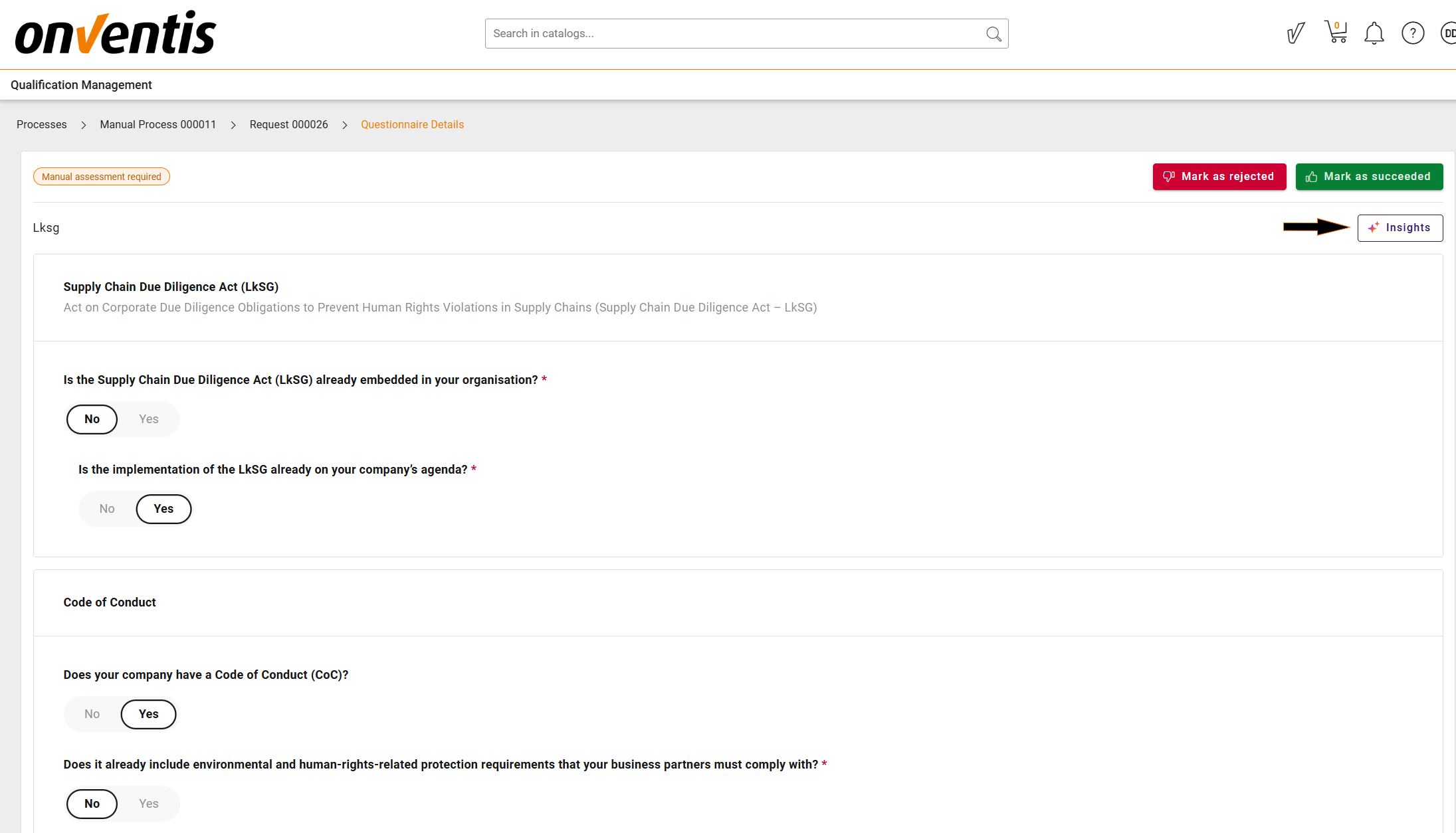
How to View AI Response Insights
AI Insights is available directly within the qualification workflow.
To generate insights:
Open a Qualification Request
Navigate to the Questionnaire detailed view
Click the Insights button
Once triggered, AI analyzes the questionnaire responses together with the submitted files and displays the insights in a side panel. The generated insights are stored and reused for all reviewers until the qualification request is restarted.
Important Notes
File and certificate analysis supports decision‑making but does not replace human responsibility
AI insights always reflect the latest submitted response version
Restarting a qualification request resets insights to ensure accuracy
❗ For activation or licensing, contact your Account Manager or insidesales@onventis.de
Contract Lifecycle Management
Release 2026.3 marks a major step forward for Onventis CLM, introducing AI‑supported contract search for faster insights, combined with fully embedded Onventis CLM E‑Signing to enable true end‑to‑end contract execution within a single platform.
The release further enhances core CLM capabilities with proactive alerts and reminders, controlled contract termination handling, a comprehensive contract history log for full auditability, and broadened bulk operations for efficient portfolio management. Additional usability improvements include customisable contract repository views, improved navigation and search experience, as well as multiple quality and stability enhancements across the contract lifecycle — strengthening transparency, compliance, and operational efficiency.
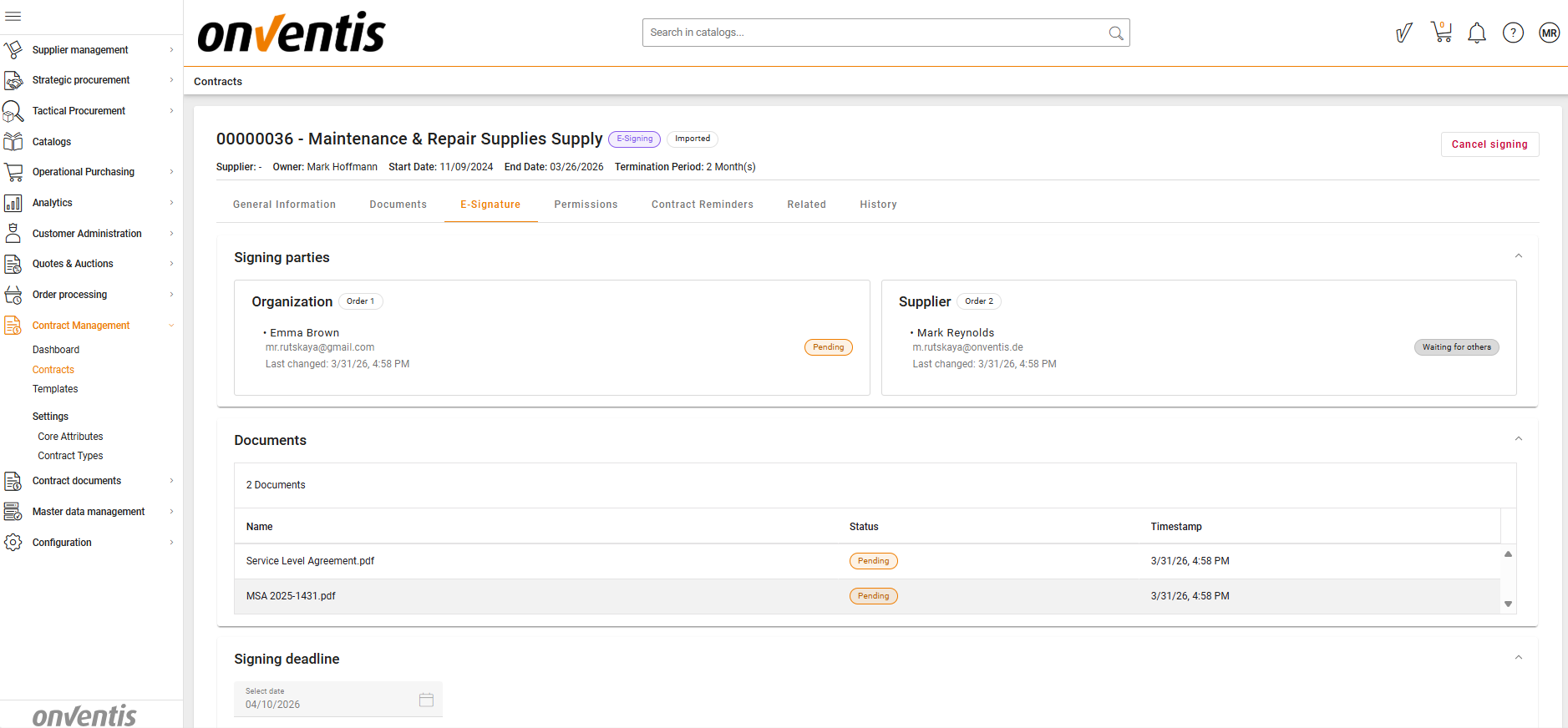
E‑Signing of Contracts
Purpose
Enable legally compliant digital signing directly within CLM, reducing manual effort and ensuring full traceability of the signing process.
What’s included
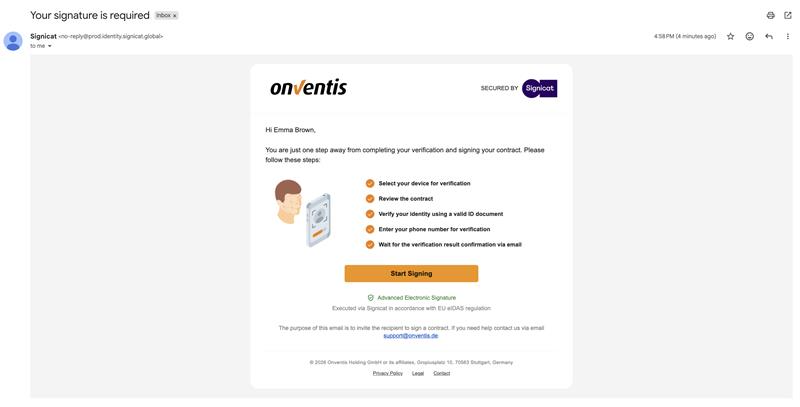
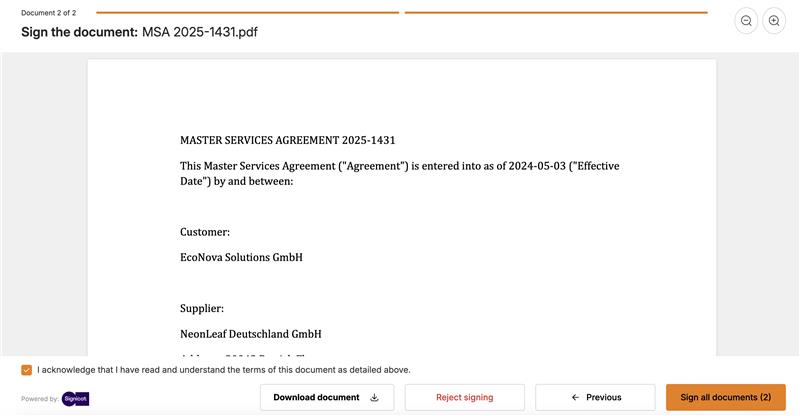
Embedded Advanced Electronic Signature (AES) support.
Secure identity verification (EIDV) for external signatories.
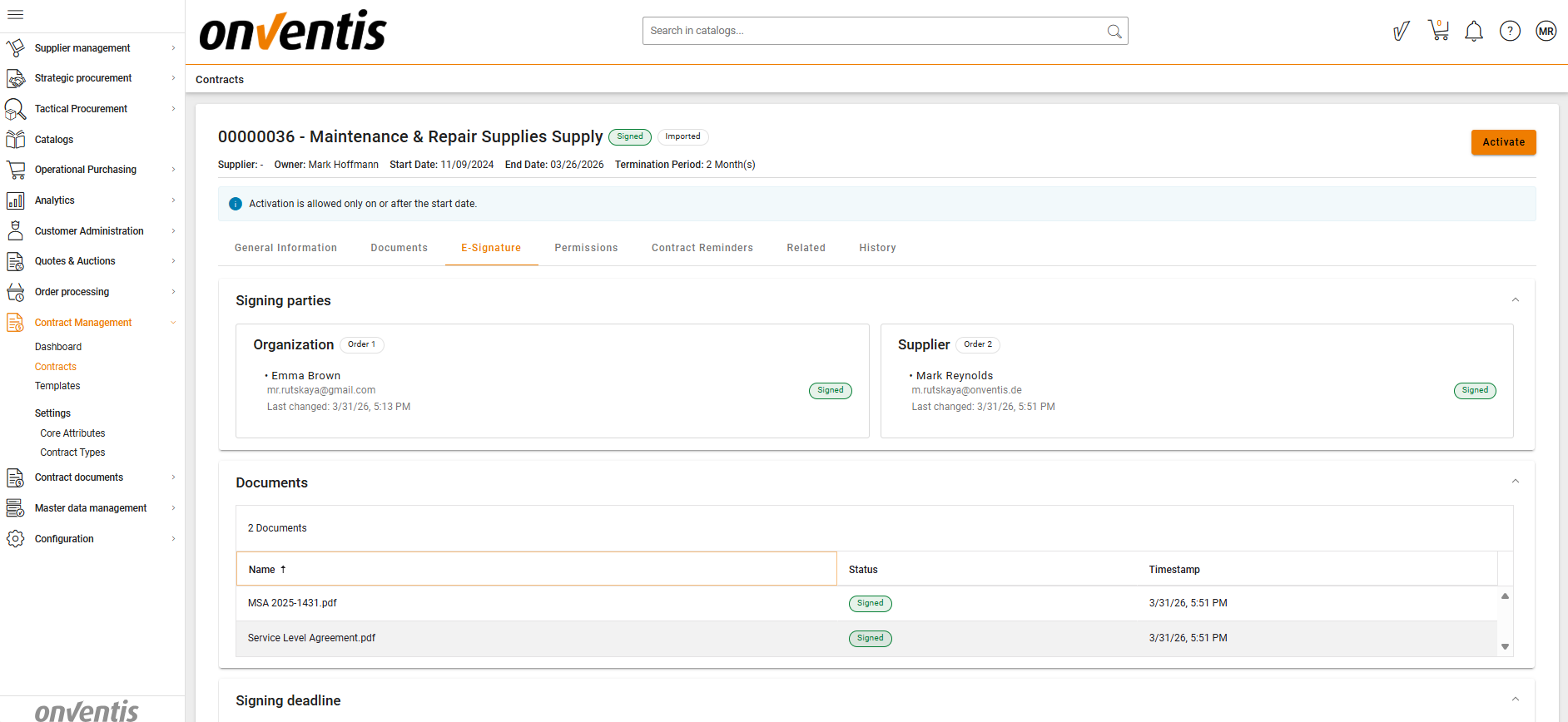
Flexible signing order configuration (parallel or sequential, by party and signatory).
Package‑based signing of multiple documents.
Automatic attachment of signed document versions with visible signature stamps.
Support for signing, rejection with mandatory reason, expiration, and cancellation scenarios.
Automatic return to Authoring if signing does not complete successfully.
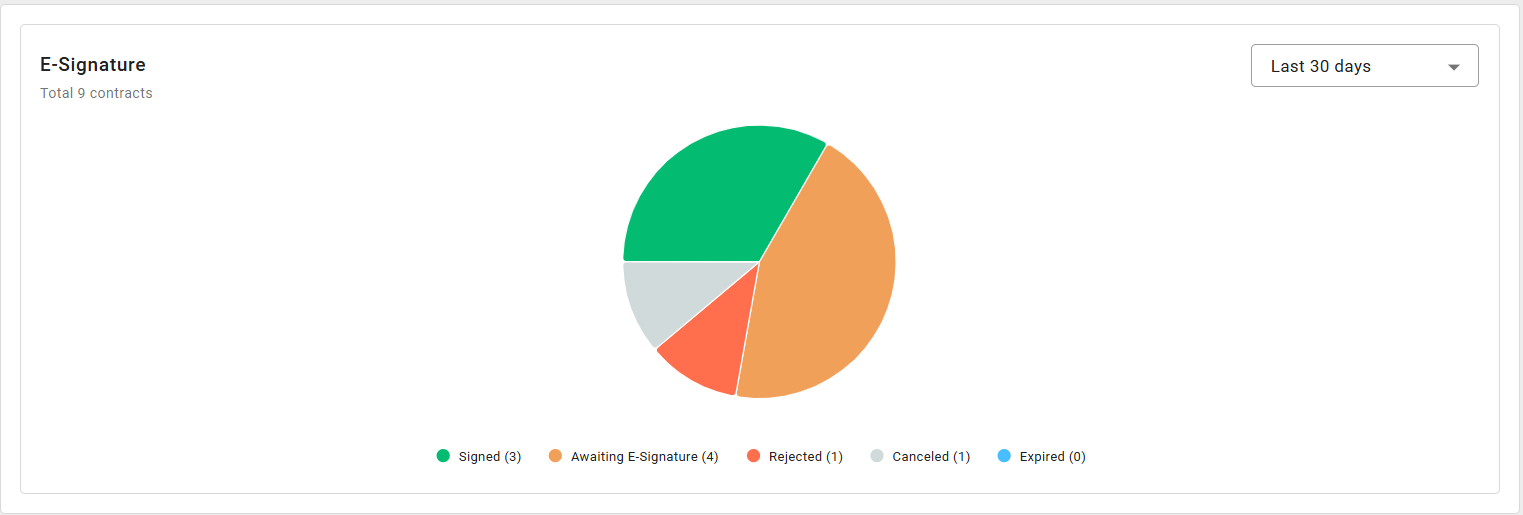
Full audit trail of all e‑signing events in the Contract History Log.
Reminder notifications for inactive signatories.
Learn more
E‑Signing of Contracts – How e-signing works in CLM
Available for
Premium Business User
Premium Power User
Semantic Contract Search
Purpose
Enable users to quickly find the most relevant contracts using AI‑powered semantic search, even when exact keywords are unknown or not used.
Semantic Search helps users discover contracts based on meaning and intent, rather than literal text matches, improving visibility across large contract portfolios.
What’s included
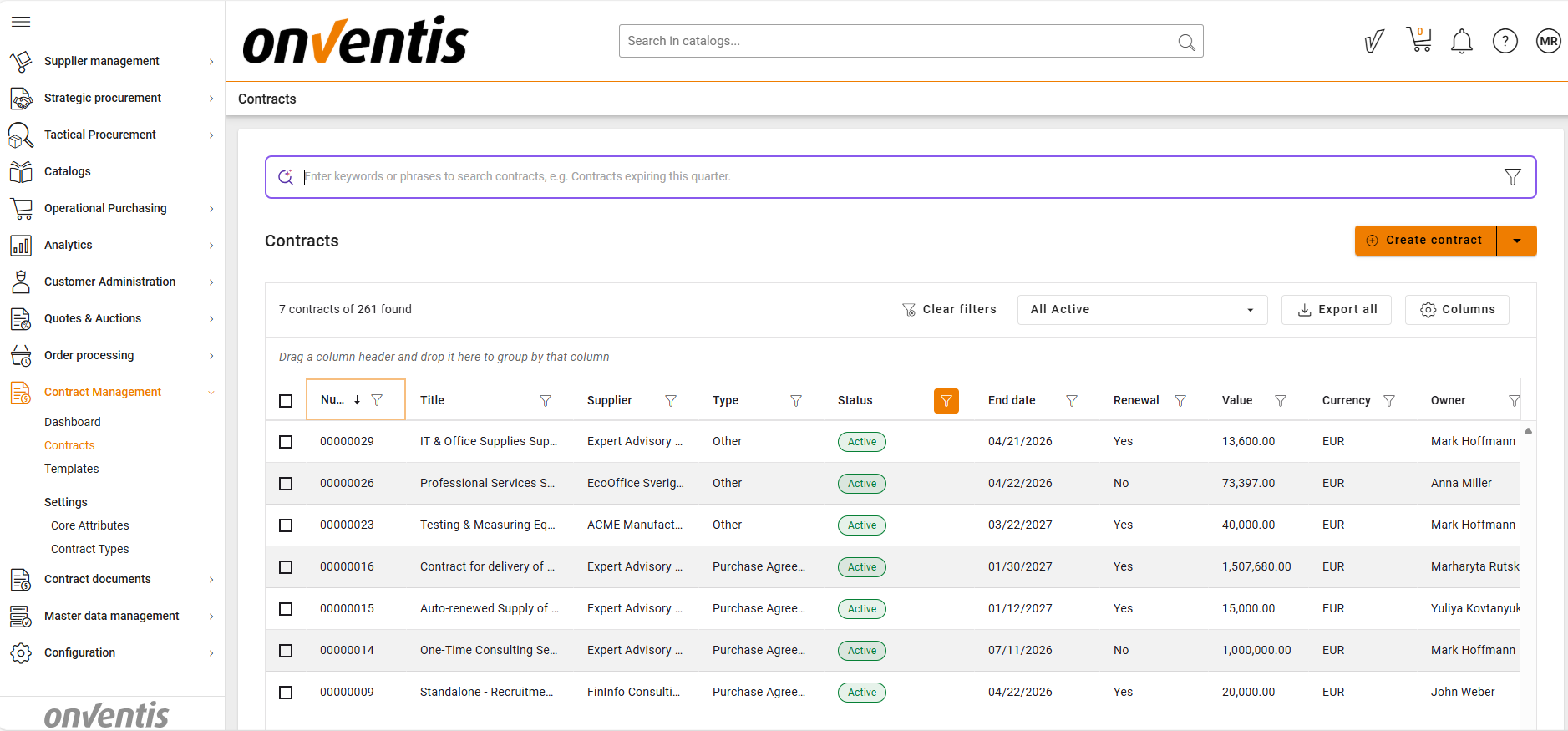
Dedicated semantic search experience available from the Contract Repository.
Free‑text search supporting natural language queries (e.g. “Termination rights”, “Data protection obligations”, “Supplier liability”).
AI‑powered semantic matching across latest versions of contract documents.
Multilingual search support — queries can be entered in any language.
Search results ranked by relevance score (highest to lowest).
Dedicated Search Results page displaying:
Original search query
Number of matching contracts
Number of matches per contract
Top 20 most relevant contracts
Result list includes:
Contract internal number
Title
Status
Highlighted text snippets showing where matches were found.
Expand/collapse view to review all matches per contract.
Permission‑aware results — only contracts the user has access to are returned.
Optional filtering by key contract attributes (status, start and end dates).
Filters can be combined with search text and reused across searches.
Full preservation of Contracts Grid state when navigating between grid and search results.
Learn more
Semantic Search – How to find contracts using Semantic Search
Available for
Standard Business User
Premium Business User
Standard Power User
Premium Power User
Contract External Negotiation
Purpose
Enable structured and secure collaboration with external parties during the pre‑signing phase, ensuring contracts are validated and aligned before signature while maintaining full internal control and auditability.
What’s included
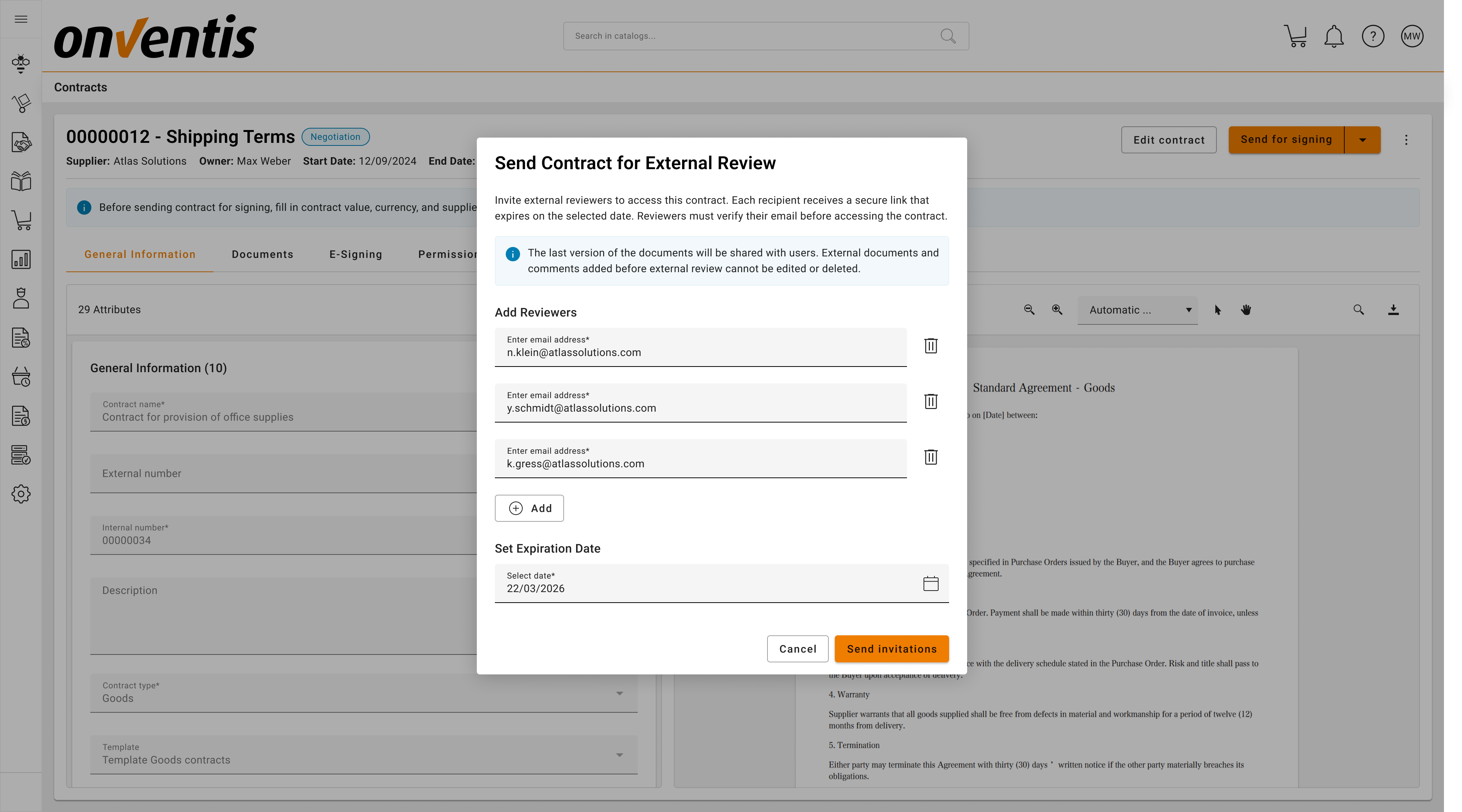
Dedicated external negotiation phase embedded in the governed contract lifecycle.
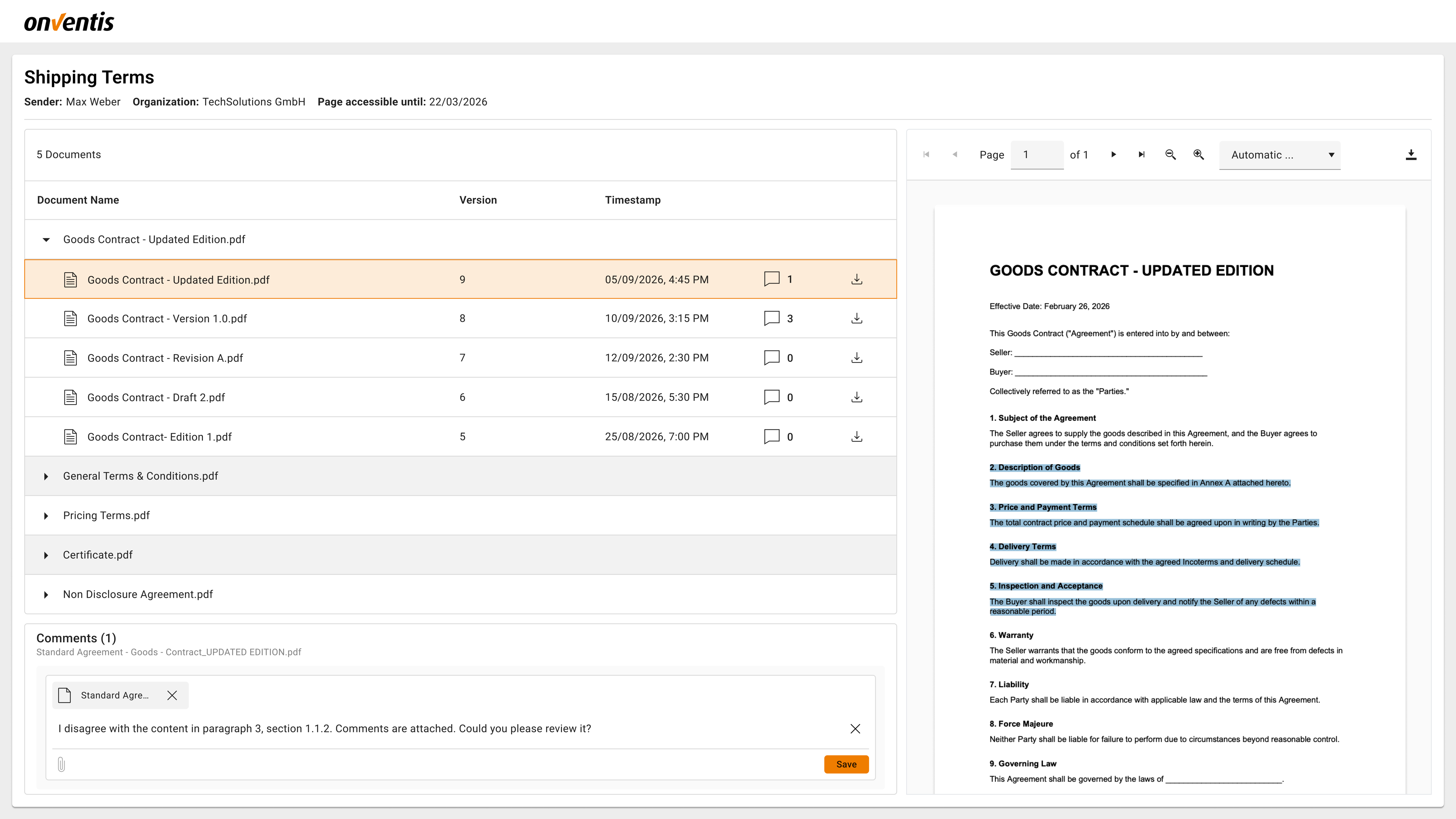
Secure, time‑limited access for external reviewers via email invitation (no CLM access required).
Controlled sharing of selected “external” contract documents only.
External feedback via document‑level comments and attachments.
Full visibility for internal users into negotiation progress.
Ability to manage external access during negotiation (add/remove reviewers, adjust deadlines, stop review).
Immediate revocation of external access when negotiation is stopped or the contract transitions.
Full traceability of all negotiation actions in the Contract History Log.
Learn more
Contract External Negotiation – Contract External Negotiation
Available for
Standard Business User
Premium Business User
Standard Power User
Premium Power User
Contract Termination
Purpose
Provide a compliant and controlled way to formally end active contracts while preserving contractual dates, preventing unintended renewals, and ensuring full lifecycle traceability.
What’s included
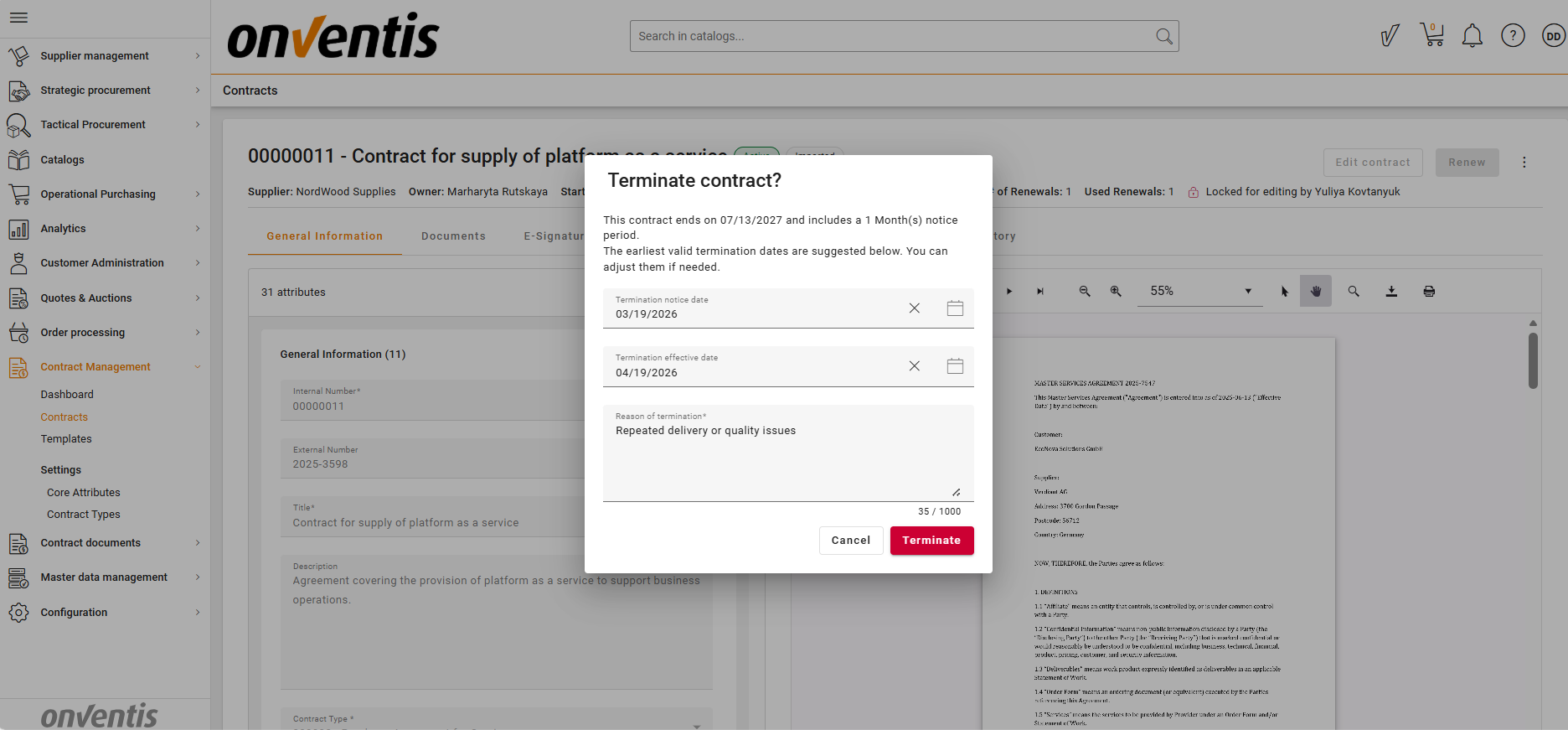
Scheduling of contract termination for Active contracts with mandatory termination reason, notice date, and effective date.
Preservation of both the original contractual End Date and the newly defined Termination Date.
Automatic exclusion of terminated contracts from upcoming renewals and expirations.
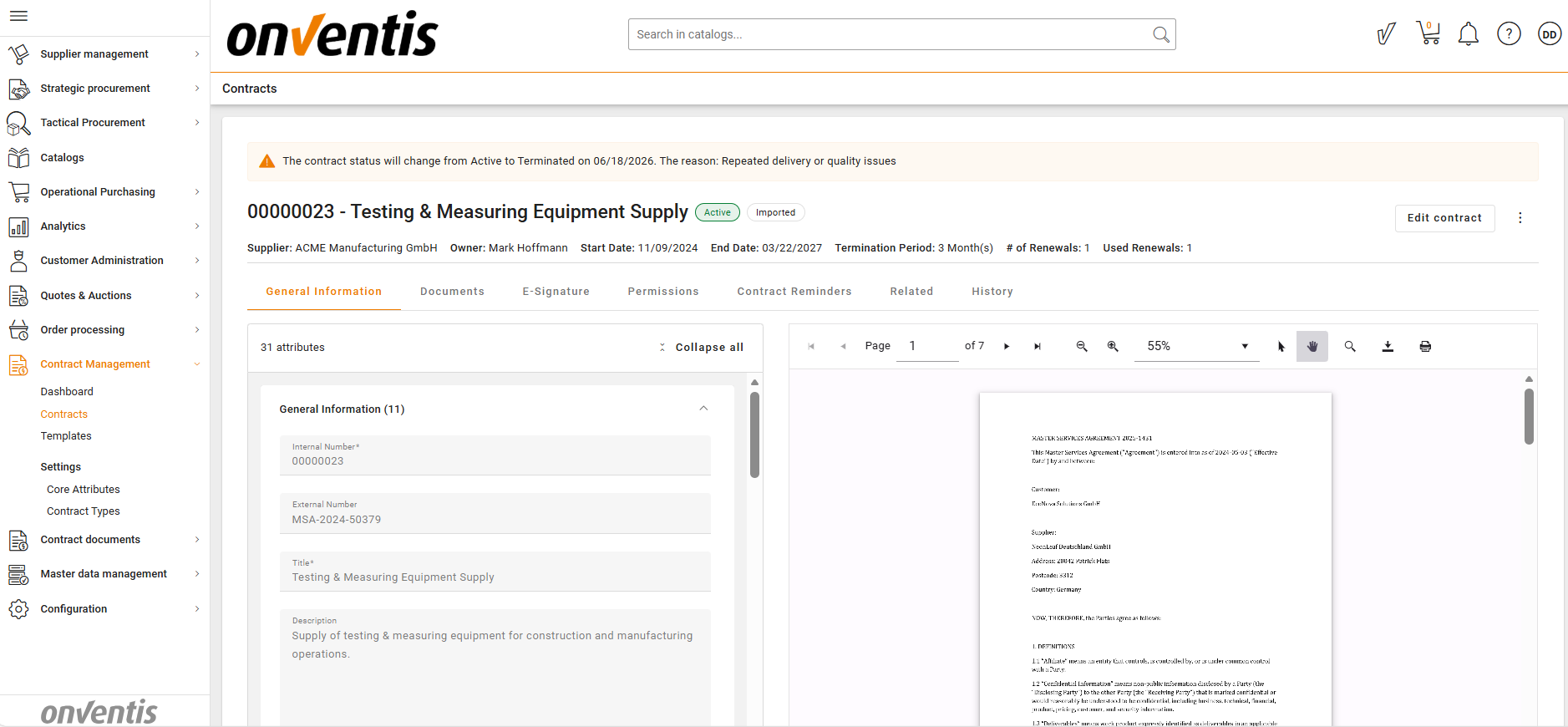
Contract remains Active until the Termination Date is reached, then automatically transitions to Terminated.
Blocking of renewal, deactivation, and archiving actions once termination is scheduled.
Immediate blocking of auto‑renewal logic after termination is set.
Default termination date calculation for definite and indefinite contracts based on notice and lock‑in periods.
Compliance warnings when notice or lock‑in periods are not respected, without blocking permitted terminations.
Learn more
Contract Termination – How to schedule and manage Contract Termination
Available for
Standard Power User
Premium Power User
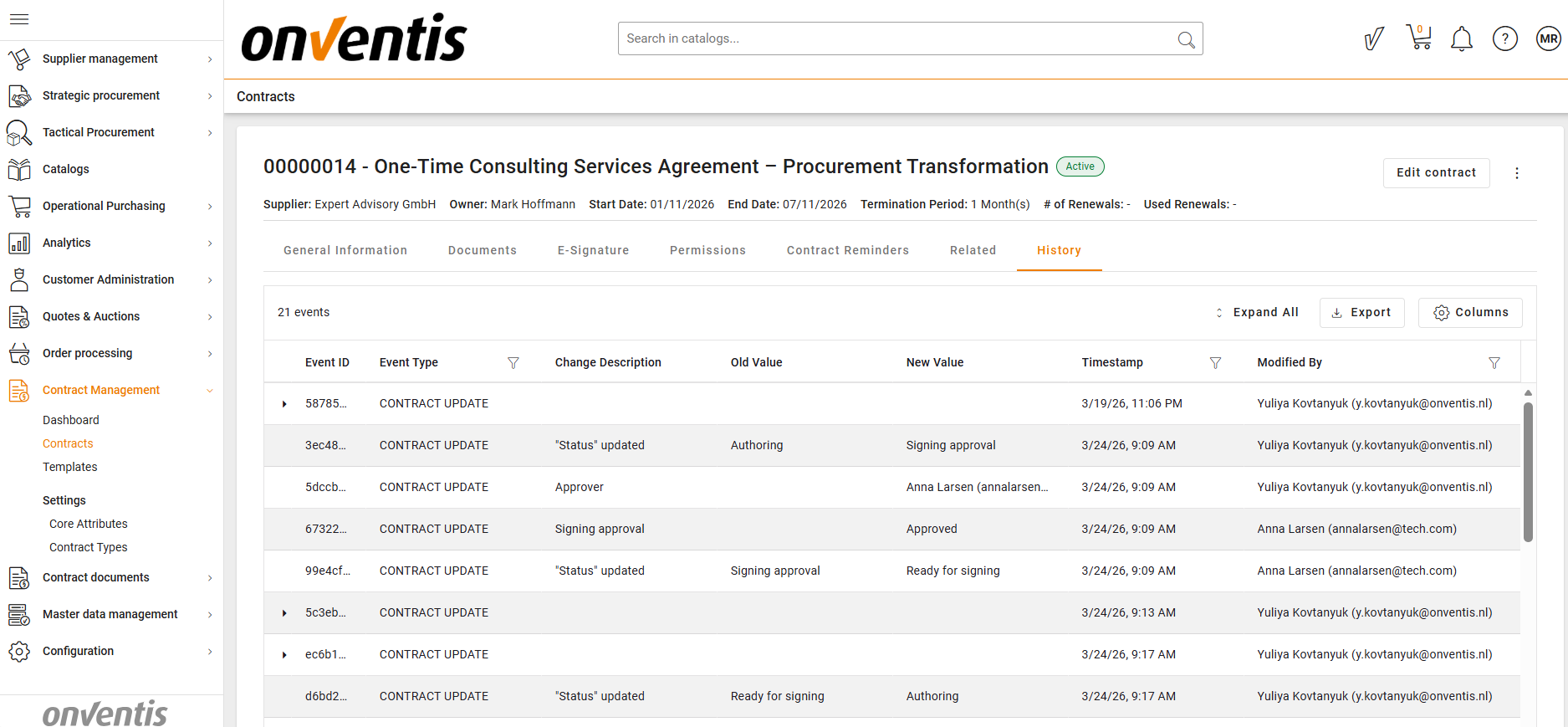
Contract History Log
Purpose
Ensure full transparency, accountability, and audit readiness by recording every contract‑related action across the entire lifecycle.
What’s included
Central, chronological history log available on every contract.
Tracking of contract lifecycle transitions, ownership changes, and permission updates.
Full visibility into document uploads, replacements, and version changes.
Logging of approvals, rejections, negotiation events, and external feedback.
Complete traceability of e‑signing events, including sending, signing, rejection, and completion.
Logging of termination actions, dates, and termination reasons.
History visibility for all users with access to the contract.
Learn more
Contract History Log – View and understand contract change history
Available for
Standard Business User
Premium Business User
Standard Power User
Premium Power User
Alerts & Reminders
Purpose
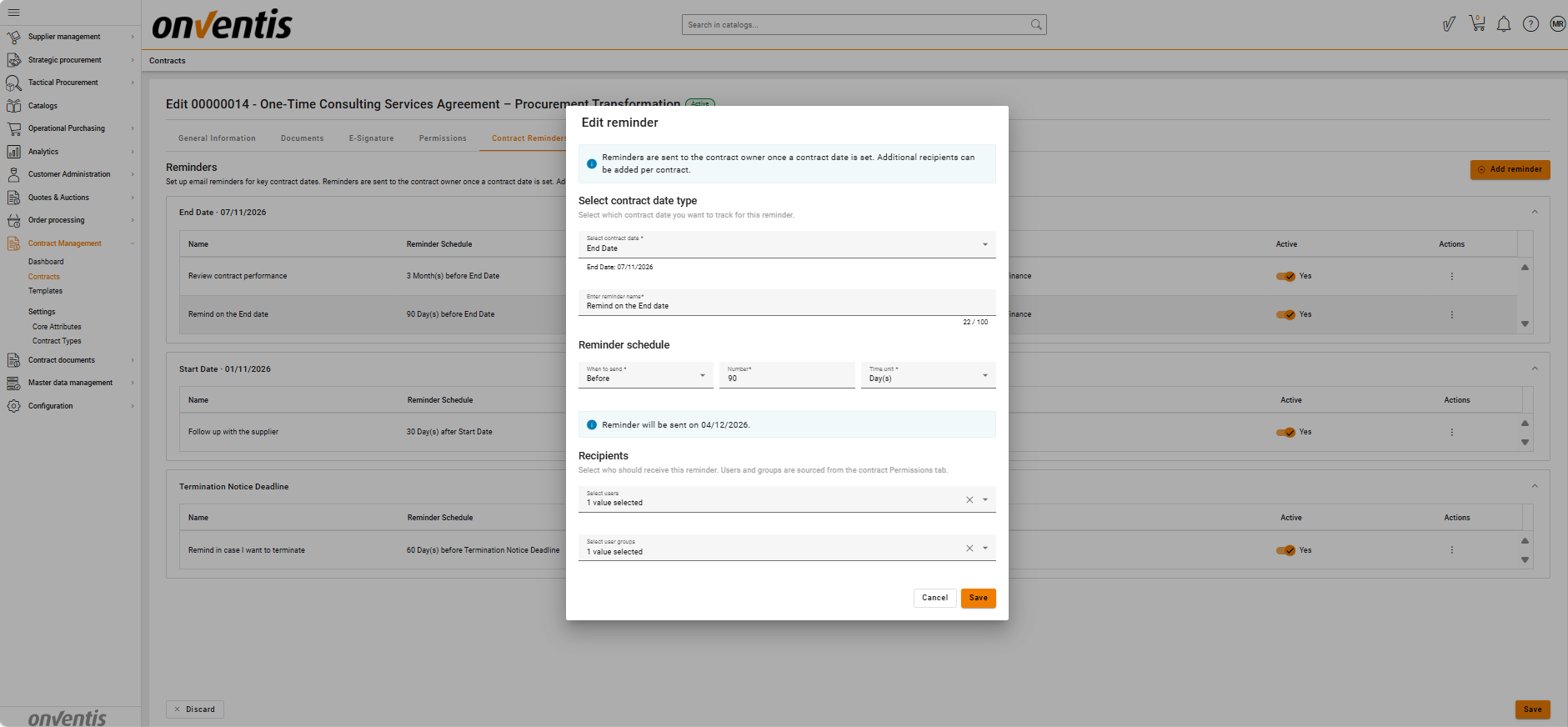
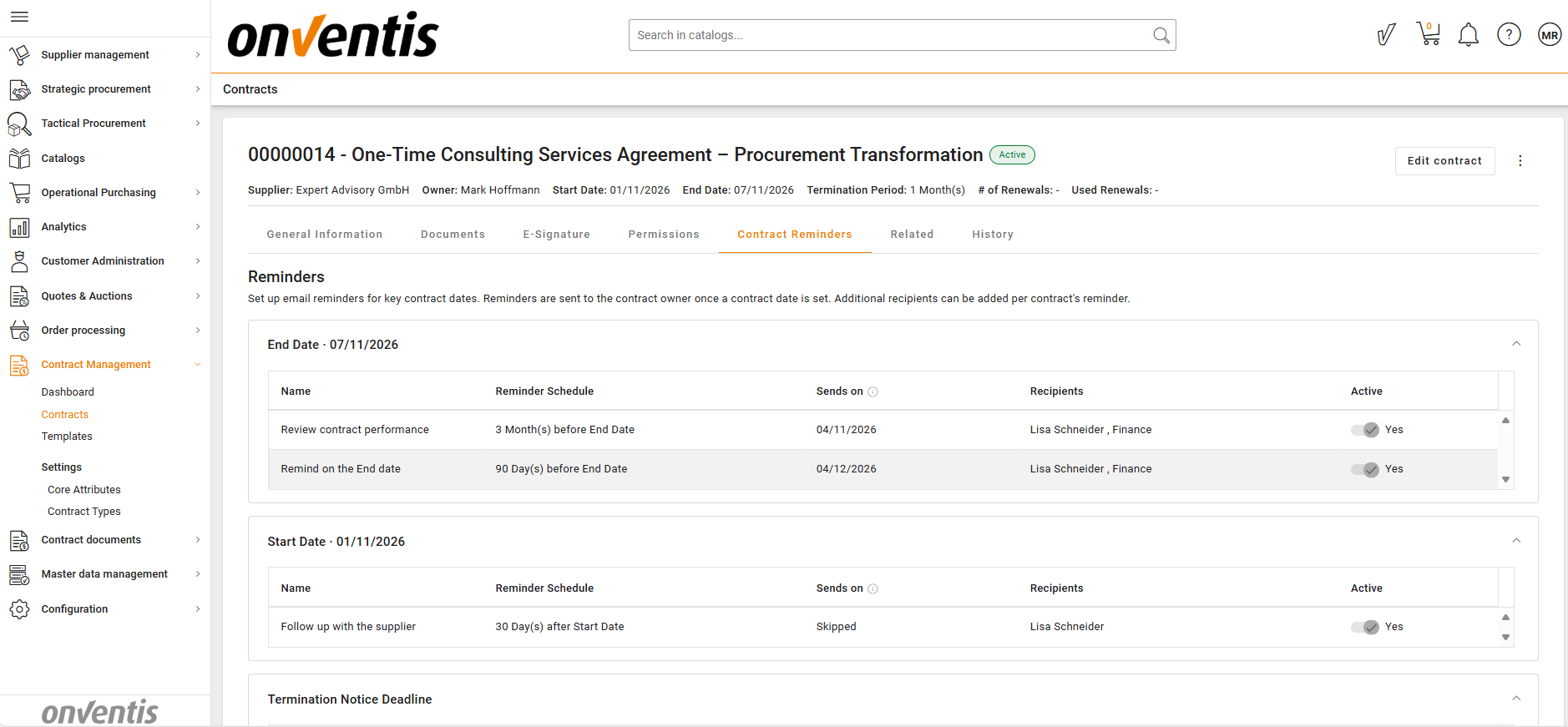
Ensure proactive contract management by notifying responsible users about upcoming, reached, or missed contract dates.
What’s included
Template‑level reminders inherited automatically by newly created contracts.
Contract‑level reminders with configurable recipients.
Support for system dates and eligible date attributes as reminder triggers.
Multiple reminders per date with before/on/after scheduling.
Automatic calculation and display of reminder send dates.
Individual activation/deactivation of reminders without data loss.
Email notifications sent to Contract Owners and selected recipients.
Full reminder lifecycle visibility and status handling.
Learn more
Alerts & Reminders – How to configure Contract Reminders
Available for
Standard Business User
Premium Business User
Standard Power User
Premium Power User
Bulk Operations
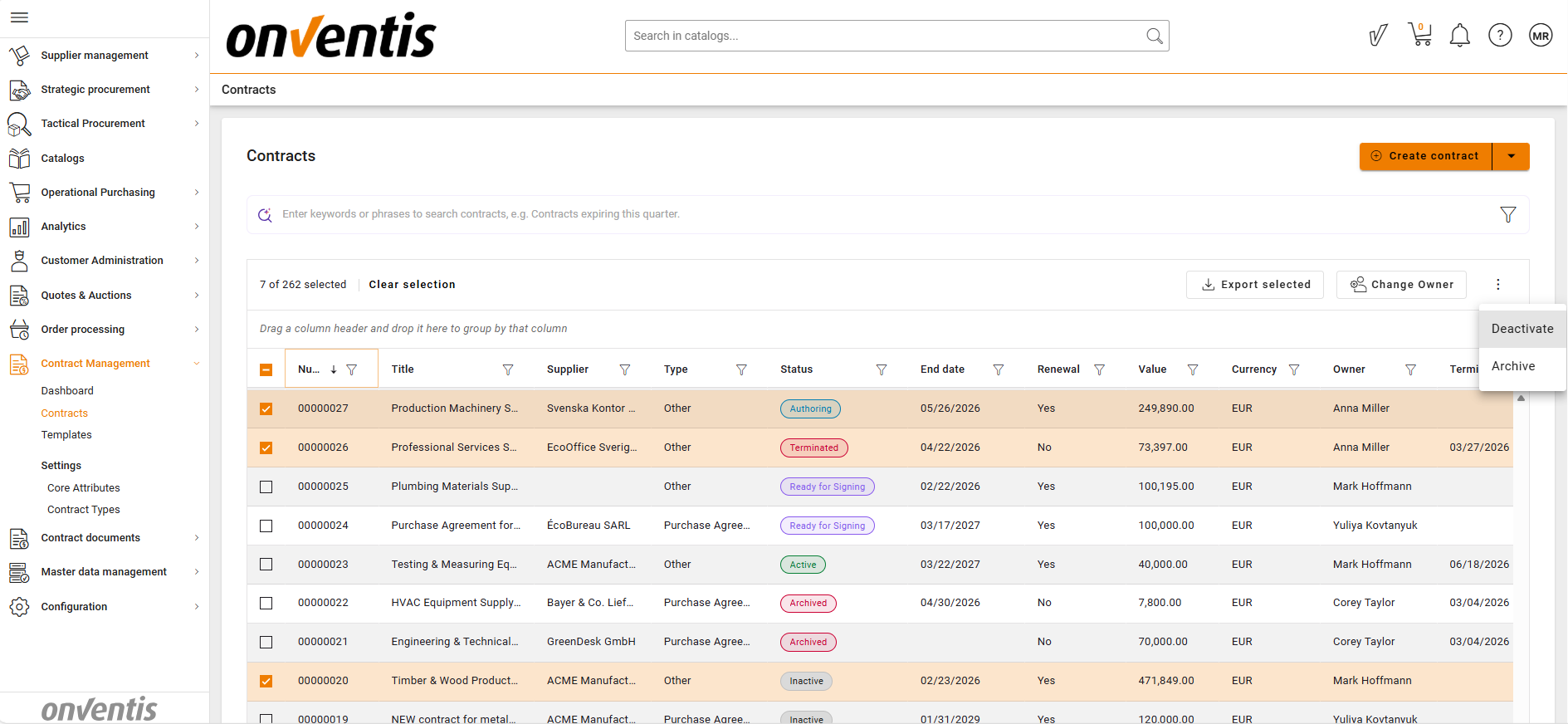
Bulk Update
Purpose
Efficiently manage large contract portfolios by applying the same change to multiple contracts at once.
What’s included
Bulk update of Contract Owner.
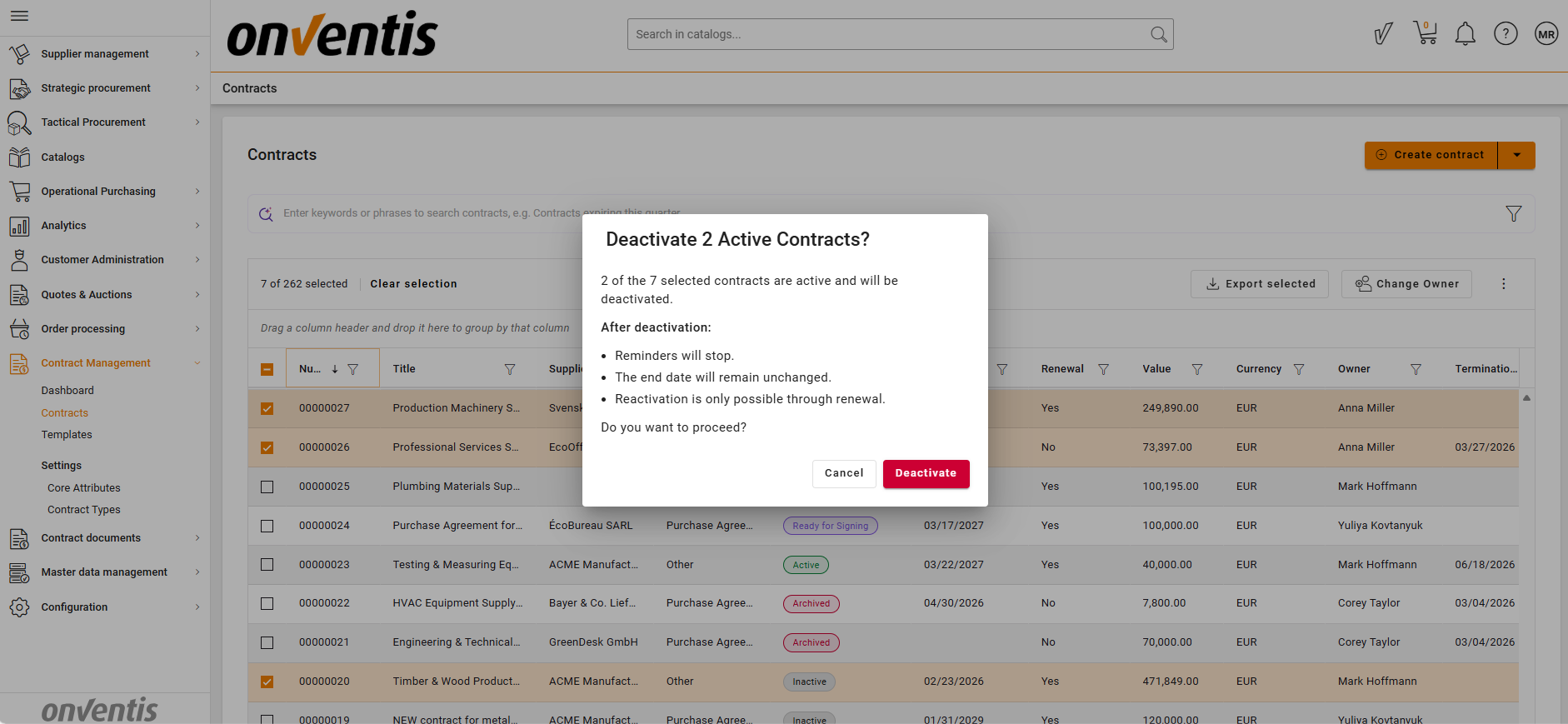
Bulk status transitions from Active → Inactive and Inactive → Archive.
Automatic skipping of ineligible contracts during bulk actions.
Immediate visibility of updates in the Contract Repository.
Learn more
Bulk Update – How to update multiple contracts at once
Available for
Standard Power User
Premium Power User
Bulk Export (Metadata)
Purpose
Enable fast reporting and internal sharing of contract data.
What’s included
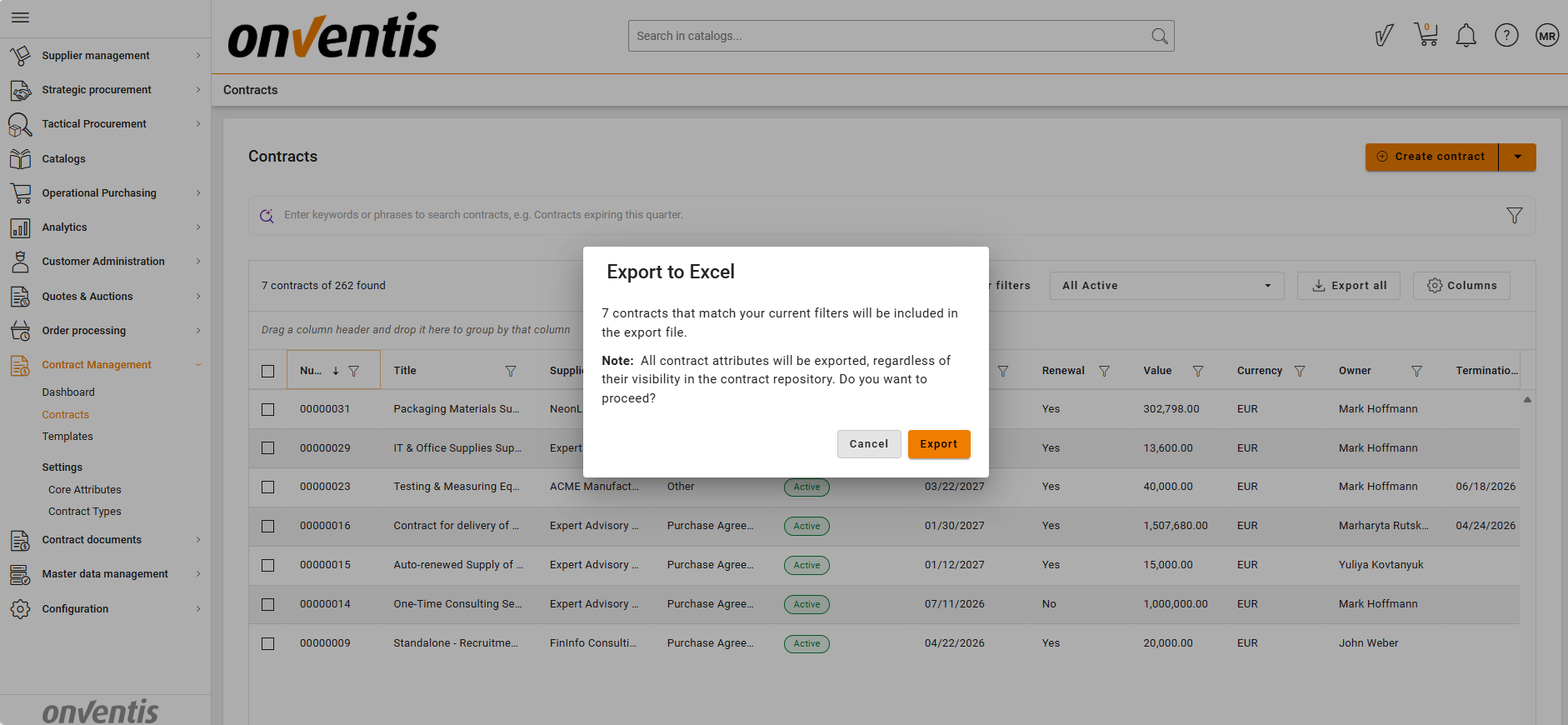
Export of all, filtered, or selected contracts from the Contract Repository.
Export of system attributes and metadata to Excel (.xlsx).
Export limited to contracts visible to the user.
Metadata‑only export (no documents).
Learn more
Bulk Export – How to export contract metadata
Available for
Standard Business User
Premium Business User
Standard Power User
Premium Power User
Bulk Export (Documents)
Purpose
Simplify collection of contract documents for internal use, audits, or reviews.
What’s included
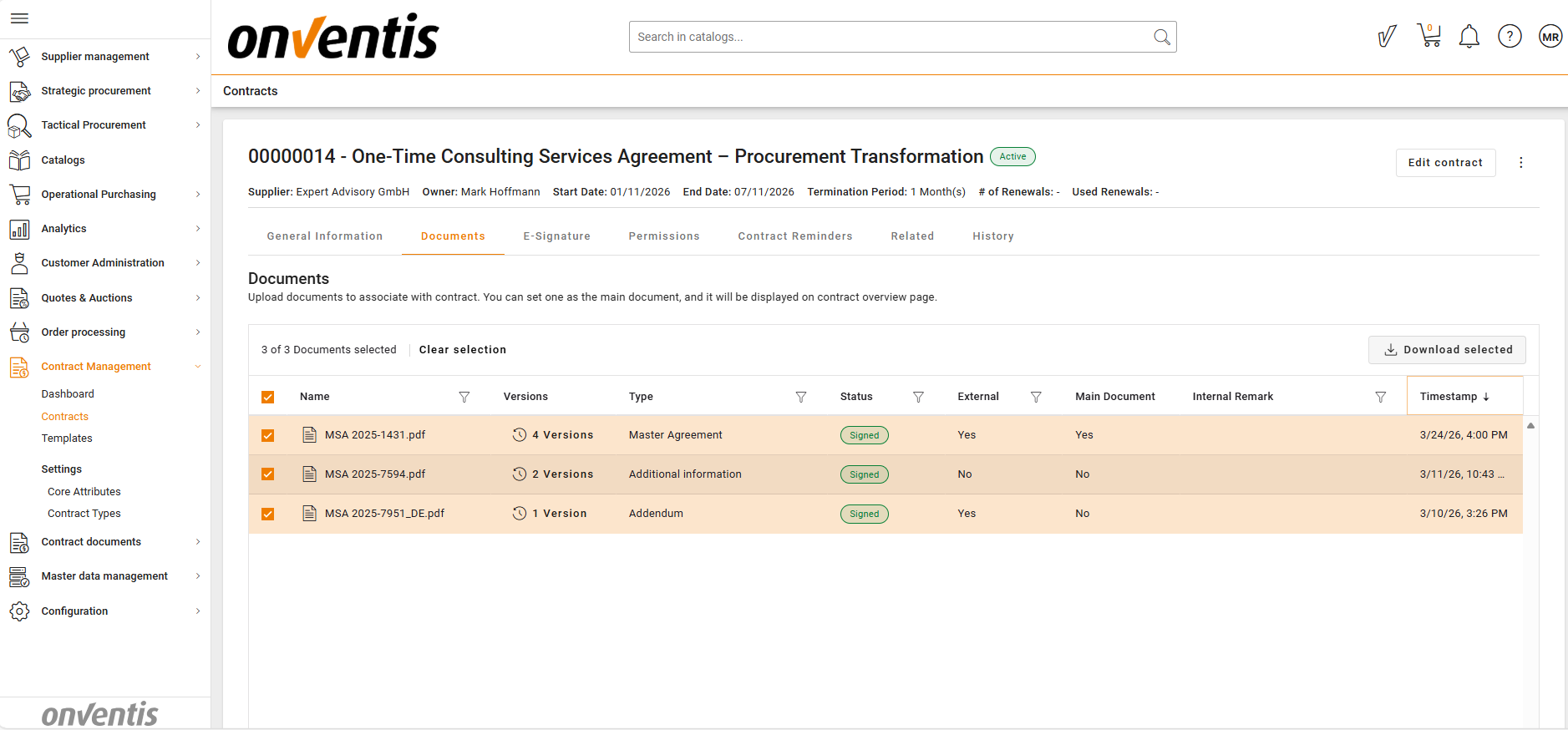
Multi‑selection and ZIP download of contract documents.
Export of latest document versions only.
Preservation of original file names with automatic conflict handling.
Non‑blocking export process with user feedback.
Learn more
Bulk Export Files – How to export contract documents
Available for
Standard Business User
Premium Business User
Standard Power User
Premium Power User
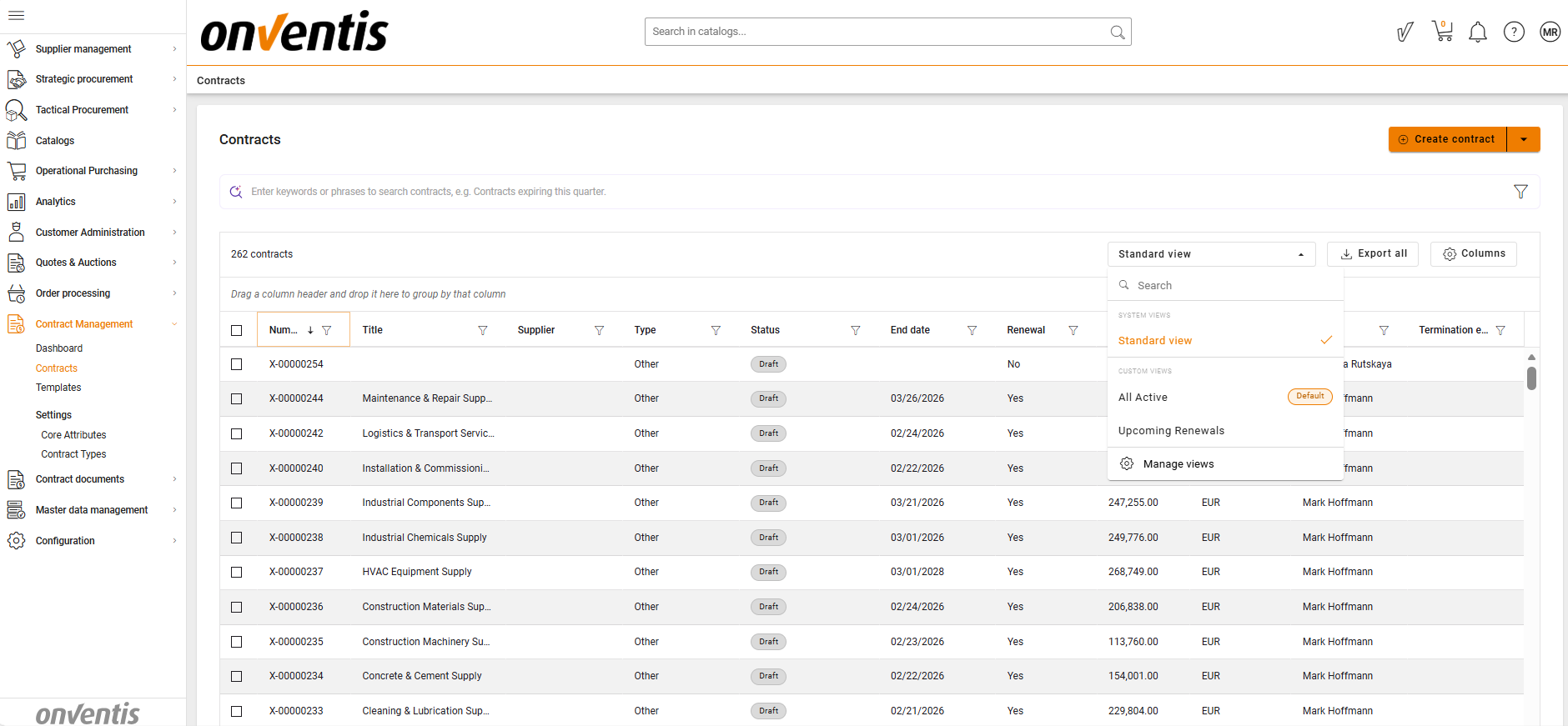
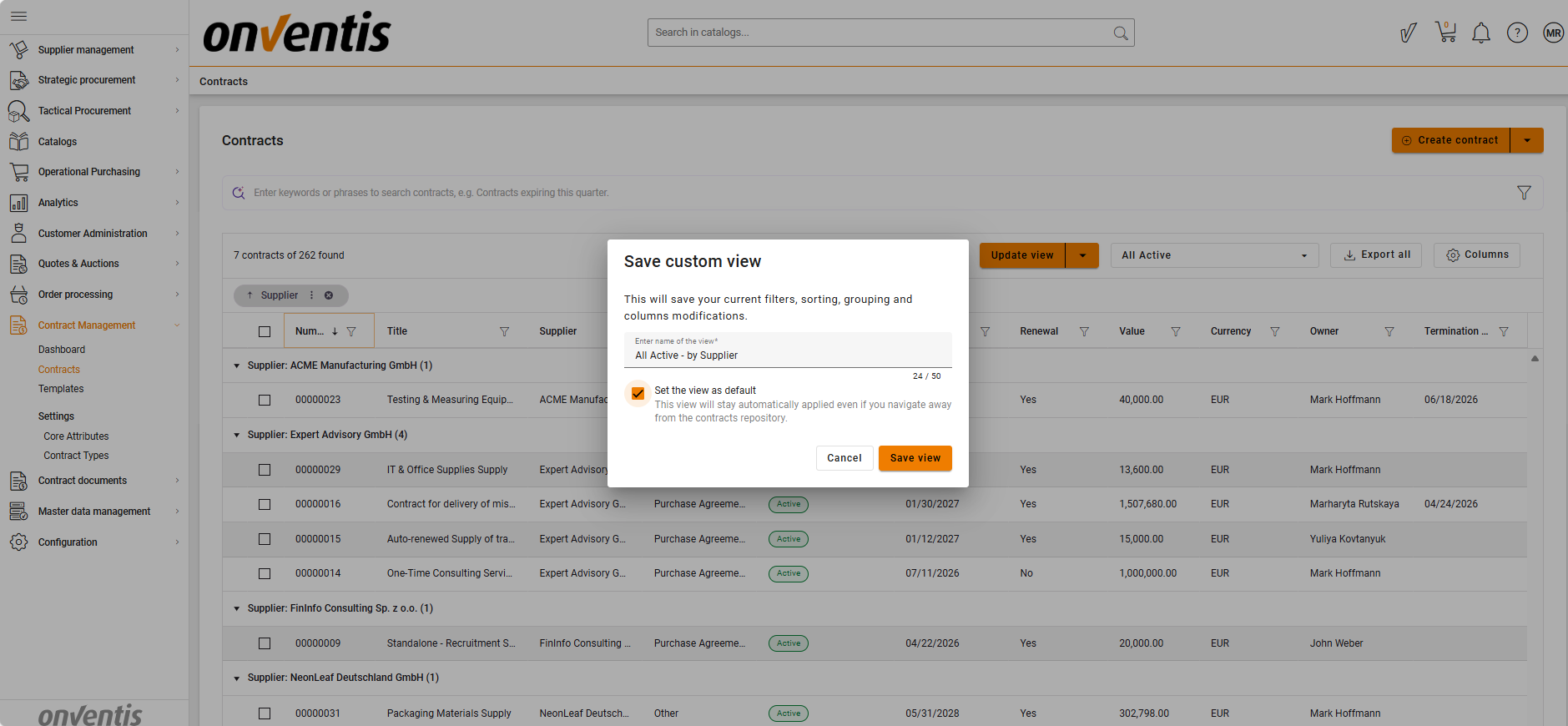
Custom Views in Contract Repository
Purpose
Improve efficiency and navigation by allowing users to personalize how contracts are displayed in the repository.
What’s included
Personal custom views with saved filters, sorting, grouping, and columns.
System “Standard View” always available.
Ability to update, rename, delete, and set a personal default view.
Automatic temporary views when navigating from dashboards.
Default fallback to Standard View if a personal default is deleted.
Learn more
Custom Views – How to configure Contract Repository views
Available for
Standard Business User
Premium Business User
Standard Power User
Premium Power User