
Onventis 2026.4
The new Onventis 2026.4 release contains various enhancements, improvements, and bug fixes. Check out the complete list below!
Beta release date: Monday,
Release date: Tuesday,
Procure-to-pay
Multiple Approvers per Approval Rank for Cost Centers and Projects
What we’ve added
Organizations can now assign multiple approvers to the same approval rank for Cost Center and Project account allocation objects when using the approval authority “Person in charge of the account allocation objects” in approval steps
Previously, only one responsible user could be assigned per approval rank. When approval ranking was enabled through the organization setting “Allow assignment of multiple persons responsible for a cost center”, this single approver could approve all account allocation objects assigned to that rank.
With this enhancement, a new approval mode can now be selected directly in the Responsible section:
Single approver
Multiple approvers
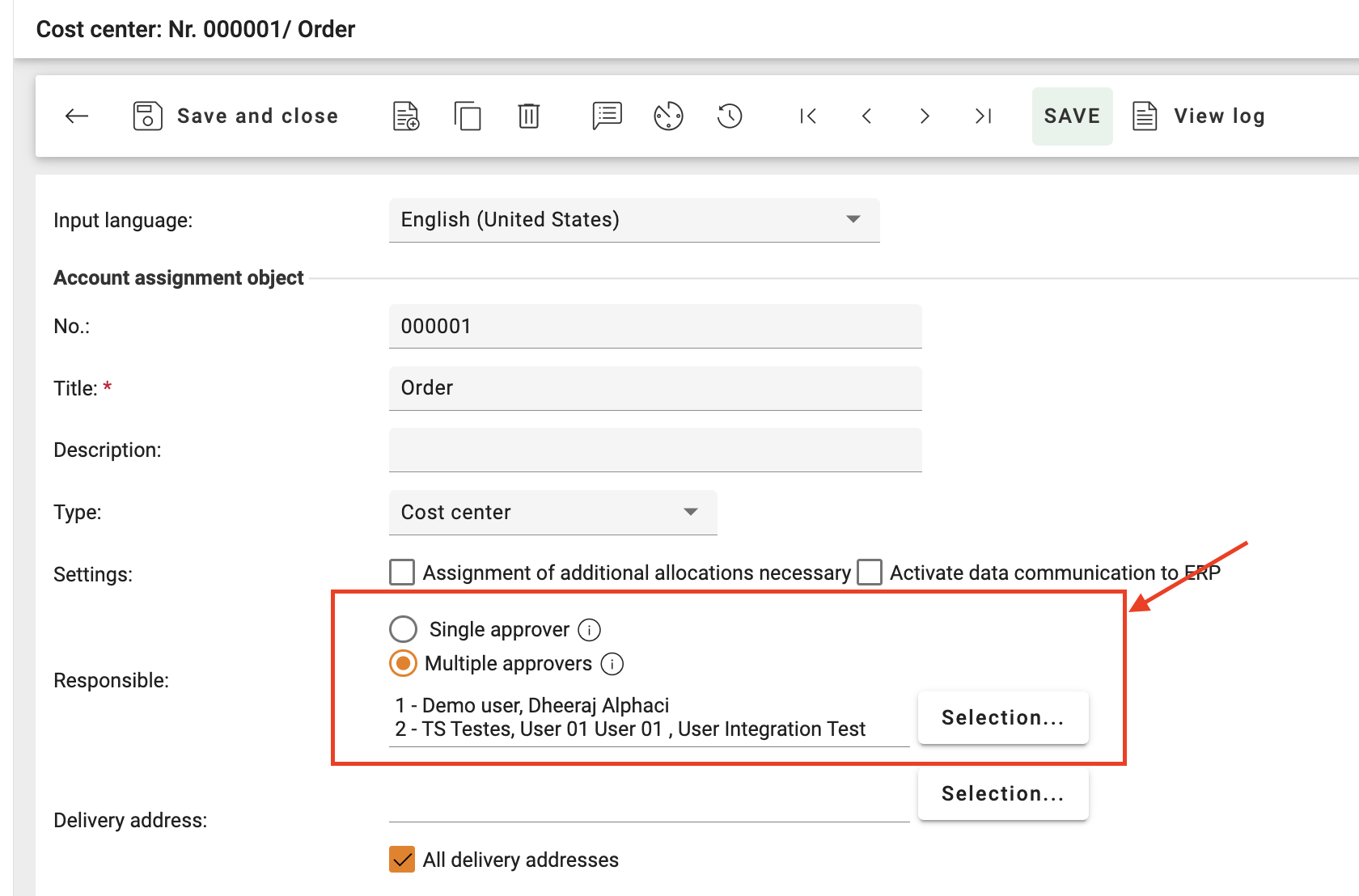
When “Single approver” is selected, the existing behavior remains unchanged and continues to support all account allocation object types.
When “Multiple approvers” is selected, multiple responsible users can be assigned to the same approval rank for:
Cost Centers
Projects
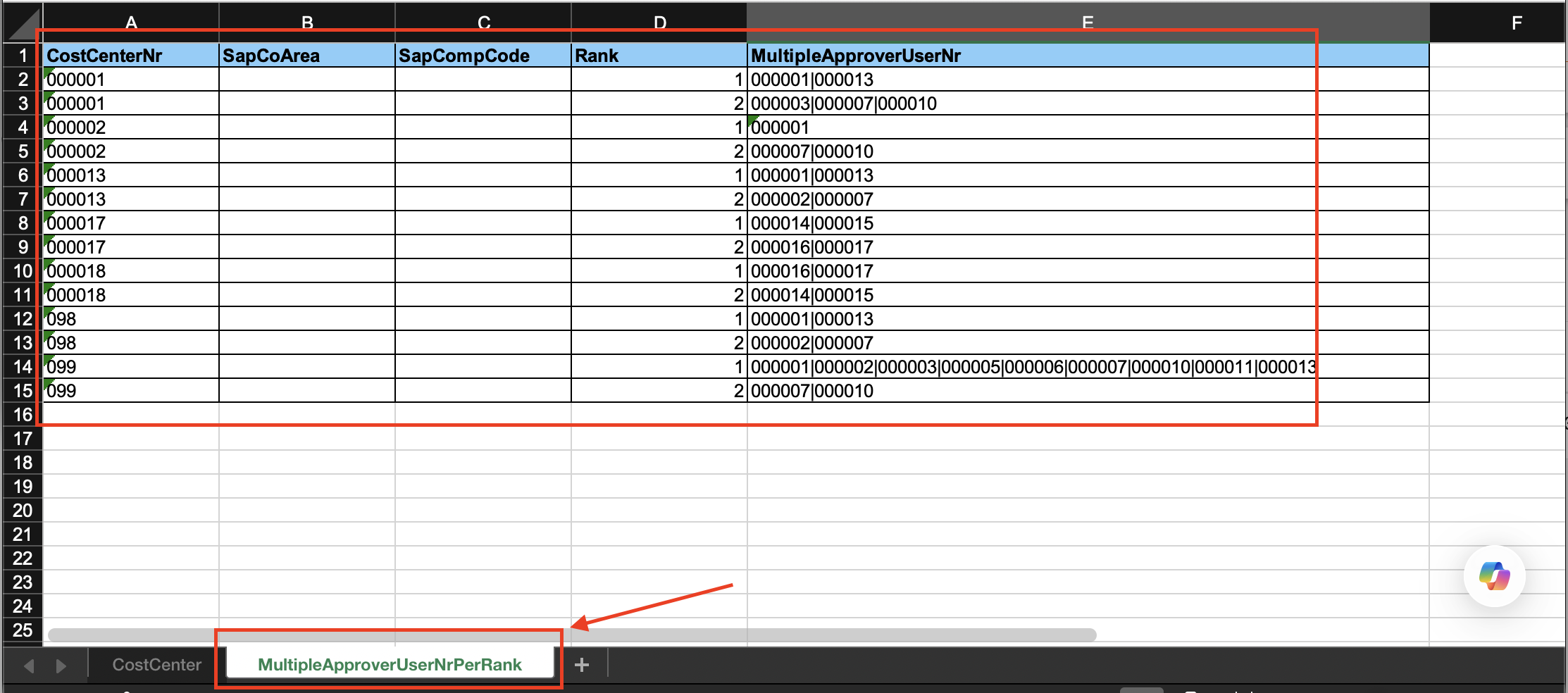
The approval mode selection is also supported in Cost Center and Project import/export templates via the new column: RankType
1 = Single Approver per Rank
2 = Multiple Approver per Rank
The field represents the approval mode radio button selection available in the UI Responsible section. The functionality is only relevant when the organization setting “Allow assignment of multiple persons responsible for a cost center” is enabled.
In this mode, each approver can approve purchase order positions related to their own assigned cost center or project responsibility.
The approval workflow and history views have also been enhanced to clearly display:
Multiple approvers assigned to the same rank
The related line items for which each approver group is responsible
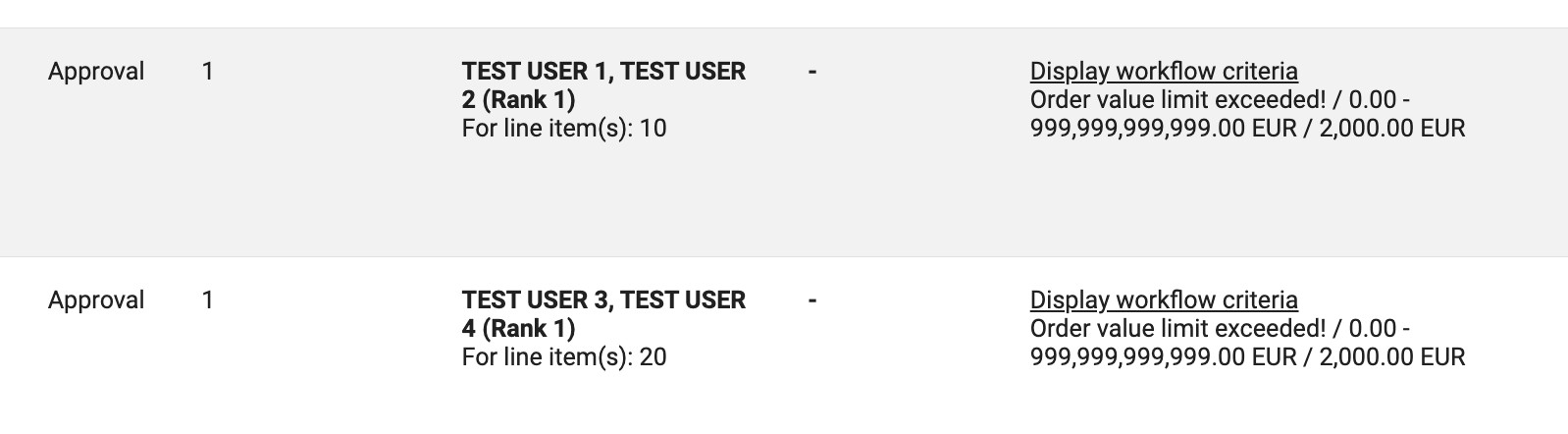
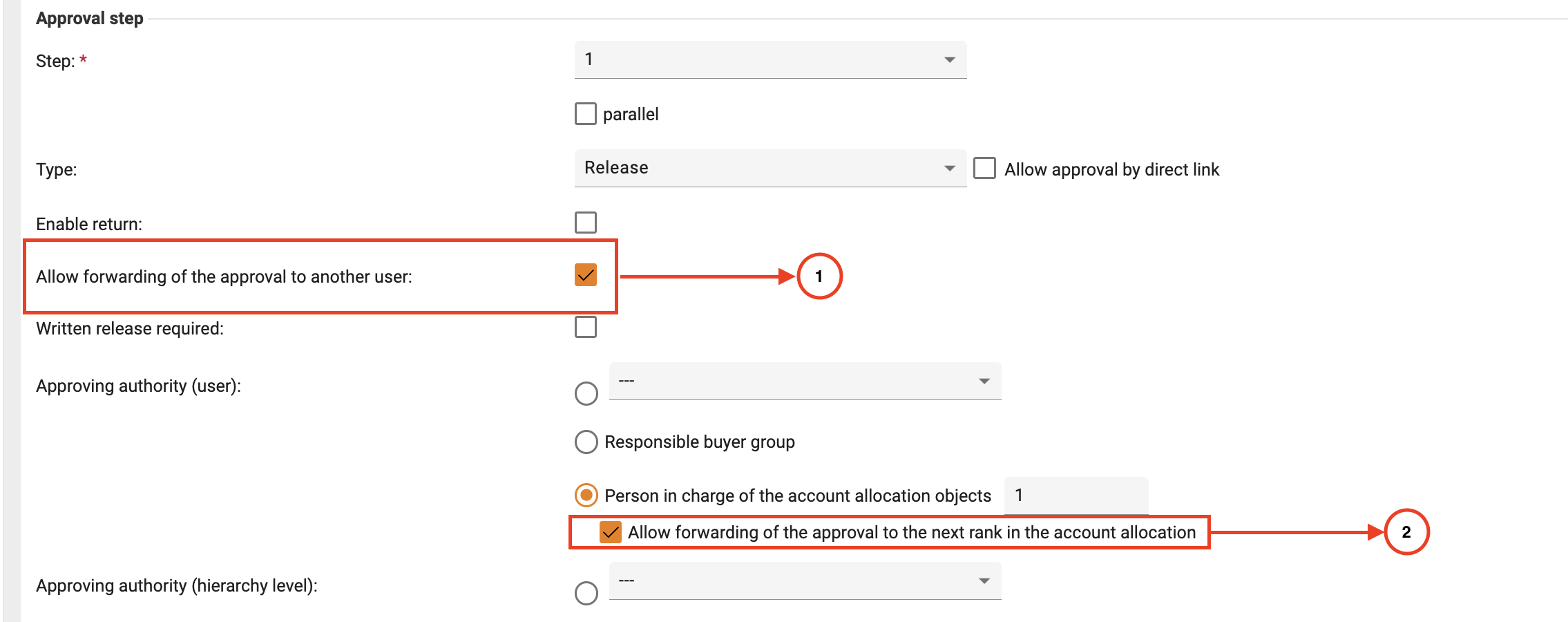
The functionality also supports forwarding approvals to the next approval rank of that respective line items.
Additionally, import and export support has been extended for this new approval structure. A new sheet named MultipleApproverUserNrPerRank is now available in Cost Center and Project import/export templates, allowing organizations to maintain multiple approvers per rank in bulk. This sheet works together with, and independently of, the CostCenter sheet.
Additional behavior:
The multiple approver workflow currently supports only purchase order positions with single account assignment. If at least one purchase order position contains multiple account assignments, the multiple approver workflow logic is not applied for the affected workflow step and the system falls back to the standard fallback approval behavior.
If responsible approver users configured in the multiple approver structure are inactive, blocked, or deleted, the approval process also falls back to the standard fallback approval behavior.
If the Cost Center or Project assignment is changed during an active approval process, the approval workflow is not recalculated. The purchase order continues with the already determined approval workflow.
Why this matters
This enhancement improves flexibility for organizations where multiple users share responsibility for approving purchases related to the same cost center or project. It helps reduce approval bottlenecks, supports more realistic approval structures, and improves transparency by clearly showing responsible approvers and related line items throughout the approval process.
Who benefits
Procurement teams, Finance teams, Cost center managers, Organization administrators
How it fits into your process
The functionality applies to approval workflow steps configured with: “Person in charge of the account allocation objects”
When:
The organization setting “Allow assignment of multiple persons responsible for a cost center” is enabled
Multiple approvers are configured for the related Cost Center or Project
Then:
Multiple users can be assigned to the same approval rank
Approvers can approve purchase order positions related to their assigned account allocation responsibility
Multiple approval ranks can still be maintained
Approval forwarding to the next rank is supported
Workflow and history views provide enhanced approval transparency
What you need to do
To use this functionality:
Enable the mentioned above organization setting:
Then configure responsible users within:
Cost Center master data OR
Project master data
For approval workflows:
Configure the approval authority as “Person in charge of the account allocation objects”
Administrators can then choose between:
Single approver
Multiple approvers
Up to 10 users can be assigned per approval rank.
Improved Delivery Address Handling for cXML Orders
What we’ve added / improved
We have improved how delivery address and recipient information is transferred in cXML purchase order messages. Previously, multiple delivery-related details were combined into the same ShipTo fields, which could lead to truncated or incomplete address information in supplier and carrier systems.
With this enhancement, delivery information is now structured more clearly across dedicated ShipTo fields. The system also prioritizes Consignee and Unloading Point information maintained in the user profile. If this information is not available, the system automatically falls back to orderer and delivery address information from the purchase order. The updated logic also better aligns with supplier and carrier processing limitations for address fields.
The ShipTo information is now filled using the following priority:
The recipient information in the first
DeliverTofield is prioritized from:SAP organizations: User Consignee
Non-SAP organizations: User Default Consignee
If not maintained, the purchase order orderer information is used.
The second
DeliverTofield is prioritized from:SAP organizations: User Unloading Point
Non-SAP organizations: User Default Unloading Point
If the combined Consignee and Unloading Point information exceeds the supported field length, the Unloading Point information is moved to the second Street line where possible. In this case, the Department information from the delivery address is used in the second
DeliverTofield.Street information continues to be transferred from the delivery address.
The structure is aligned with supplier and carrier limitations for
DeliverToandStreetfields to reduce truncation during processing and shipping label generation.
In a nutshell:
cXML Field | SAP Organization | Non-SAP Organization |
|---|---|---|
DeliverTo 1 | User.Consignee | User.DefaultConsignee |
DeliverTo 2 (≤ 50 chars) | User.UnloadingPoint | User.DefaultUnloadingPoint |
DeliverTo 2 (> 50 chars) | Address.Department | Address.Department |
Street 1 | Address.Street | Address.Street |
Street 2 (≤ 50 chars) | Address.Extension | Address.Extension |
Street 2 (> 50 chars) | User.UnloadingPoint | User.DefaultUnloadingPoint |
Condition checked:
(Consignee + UnloadingPoint) > 50 charactersIf TRUE:
UnloadingPoint moves from
DeliverTo→StreetDepartment replaces DeliverTo 2
If FALSE:
Standard mapping is used
Why this matters
This improves delivery address quality and reduces issues during supplier order processing and shipping label creation. The enhancement is especially beneficial for cXML integrations where suppliers or carriers apply strict field length limitations for recipient and street information.
Who benefits
Procurement teams, Suppliers, Logistics and warehouse teams, Integration administrators
How it fits into your process
The enhancement is automatically applied during cXML purchase order transmission to suppliers. No process changes are required for users. Existing integrations continue to work while benefiting from improved delivery address formatting.
What you need to do
No additional action is required.
To further improve delivery information quality, organizations can maintain Consignee and Unloading Point information in user master data profiles.
Conditional Mandatory Customs Tariff Number for International Orders
What we’ve added / improved
The Customs Tariff Number field is now automatically required only for international purchase orders where the buyer’s and supplier’s countries differ. Previously, the field could only be configured globally as mandatory or optional, regardless of whether the order was domestic or international.
The validation now dynamically checks the delivery country of the purchase order against the supplier country and only enforces the Customs Tariff Number when required for cross-border transactions.
This logic is also supported for:
Imported purchase orders from SAP
Purchase order changes
Supplier org unit–specific addresses
In addition, the Customs Tariff Number field in demand positions has been improved from a free-text field to a selectable field for better usability and consistency.
Why this matters
This reduces unnecessary manual effort for domestic orders while ensuring compliance-relevant customs information is captured for international procurement processes. It also improves usability and helps avoid missing tariff information during cross-border purchasing.
Who benefits
Procurement teams, Purchasing users, Compliance teams, SAP-integrated organizations
How it fits into your process
The validation is automatically applied during purchase order creation, order changes, and SAP-imported orders. Users only need to provide a Customs Tariff Number when supplier and delivery countries differ.
What you need to do
No additional configuration is required.
Organizations can continue maintaining Customs Tariff Numbers as part of their existing purchasing and supplier processes.
Improved Order Change Handling for Frame Orders
What we’ve added / improved
Users can now create order changes for frame orders even when no sales order confirmation step is configured in the order processing workflow. Previously, order changes for frame orders were blocked after the initial order was sent to the supplier if the workflow only contained the order transmission step without an additional order confirmation step.
With this enhancement, frame orders remain editable throughout their active order period, provided the organization allows order changes and the frame order has not yet expired or been archived.
Why this matters
This improves flexibility for long-running frame orders and allows purchasing teams to adjust quantities, prices, or other order details during the active contract period without requiring unnecessary workflow configuration steps. It also better aligns the system behavior with typical frame order processes.
Who benefits
Procurement teams, Purchasing users, Organizations using frame orders
How it fits into your process
The enhancement automatically applies to frame orders after they have been sent to suppliers. Users can continue creating order changes during the active validity period of the frame order as long as order change functionality is enabled in the organization settings.
What you need to do
No additional action is required.
Organizations can continue using their existing order processing workflows without needing to activate additional sales order confirmation steps for frame orders.
Restrict Purchase Order Creation via “New” Button
What we’ve added / improved
Administrators can now restrict selected users from creating purchase orders using the “New” button. A new user setting has been added in User Administration that allows organizations to hide the “New” button for specific users. These users can still create purchase orders by copying existing orders. The new setting is also supported in user import and export processes.
Why this matters
This helps organizations ensure that purchase orders are created using predefined templates or existing orders, supporting consistent number range assignment and correct accounting object usage. It also reduces the risk of users creating orders with incorrect or neutral number ranges when required accounting information is not yet available during manual order creation.
Who benefits
Procurement teams, Purchasing users, Administrators, Organizations using custom number range logic
How it fits into your process
Organizations can configure this setting individually per user in User Administration.
When enabled:
The “New” button is hidden for the affected user
Users can continue creating orders by copying existing purchase orders
What you need to do
To activate the restriction Go to → Master Data Management -> User -> Extended Tab
Setting: “User may not create a purchase order using the ‘New’ button”
The setting can also be maintained via user import/export using the field in last column
ForbidOrderCreationUsingNewButton1 = Activated
0 = Deactivated
Increased Character Limit for Supplier Customer Number Assignments
What we’ve added / improved
The maximum character limit for supplier customer number assignments has been increased from 5,000 to 50,000 characters. This enhancement applies to the CustomerNrBySupplier field used in address management and import processes.
Existing format stays same
[ SupplierNr1 ] ( [ CustomerNr1 ] ) | [ SupplierNr2 ] ( [ CustomerNr2 ] ) |...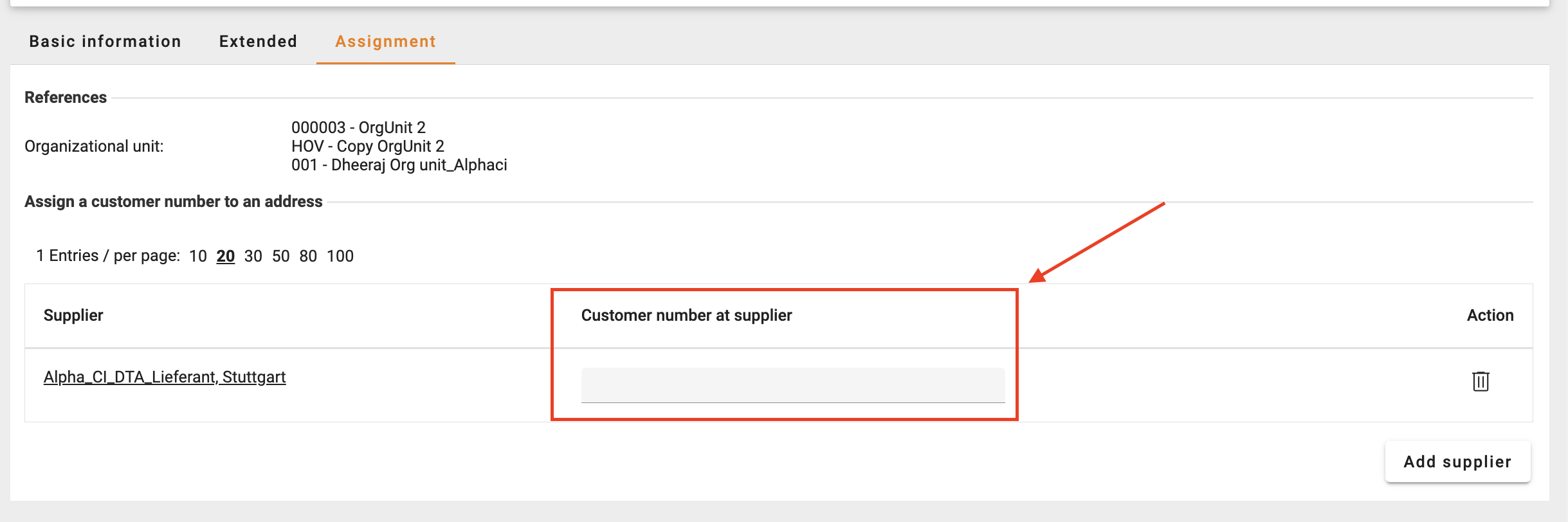
Why this matters
Organizations working with suppliers that require a large number of customer-specific supplier assignments can now manage and import significantly larger datasets without import failures caused by field length restrictions.
Who benefits
Procurement teams, Master data administrators, Organizations managing large supplier assignment mappings
How it fits into your process
The increased limit automatically applies to address import processes. Existing import files and processes continue to work without changes while supporting larger assignment volumes.
What you need to do
No additional configuration is required.
Organizations can now import larger supplier customer number assignment datasets within the updated limit.
Improved Visibility of Sales Order Numbers in Supplier View
What we’ve added / improved
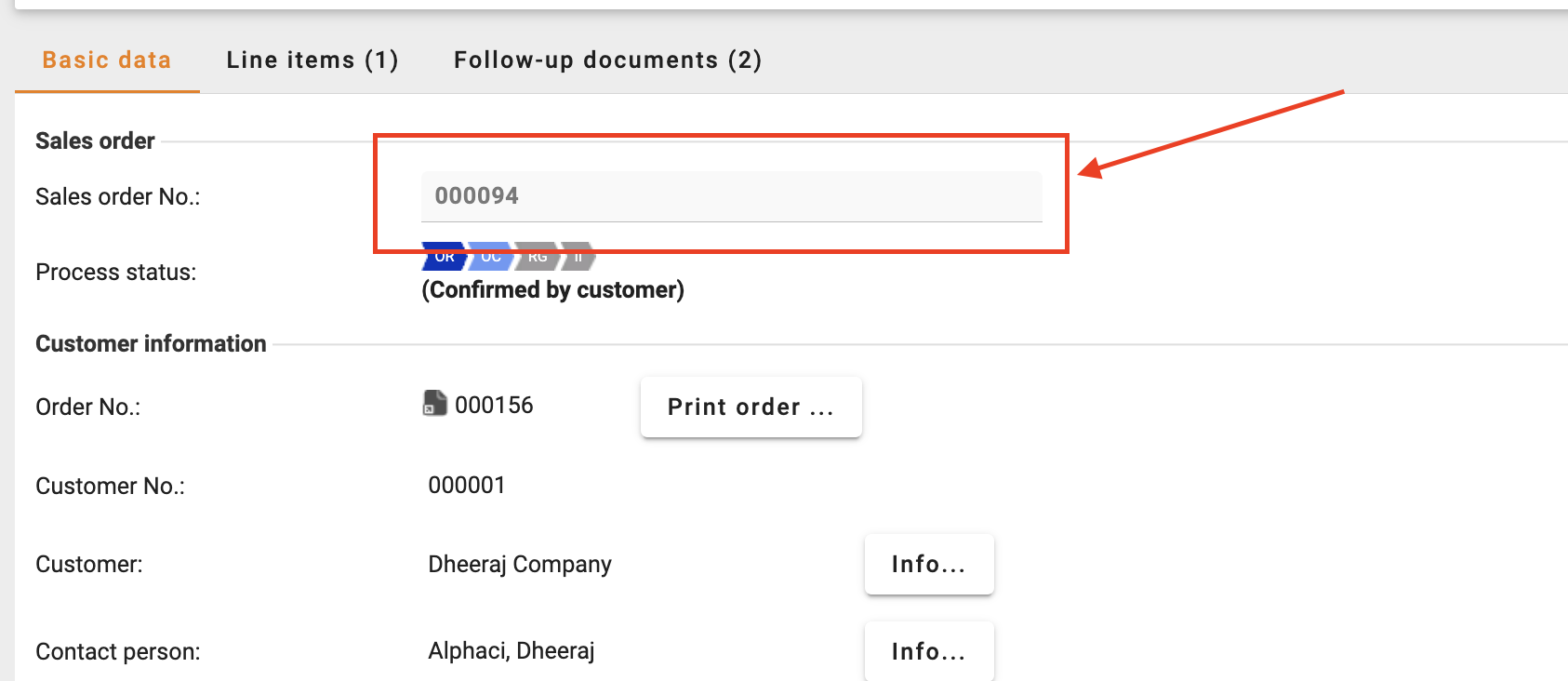
The display area for the “Sales order No.” field in the supplier view has been enlarged so that longer sales order numbers are fully visible without truncation. Users can now view and access the complete sales order number directly in the field without requiring horizontal scrolling.
Why this matters
This improves usability for suppliers by making long sales order numbers easier to read, verify, and copy during order processing activities.
Who benefits
Suppliers, Procurement teams, Order processing users
How it fits into your process
The enhancement automatically applies in the supplier sales order view under Order Processing-> Sales Orders-> Basic Data
What you need to do
No additional action is required.
Improved Catalog Item Matching for Additional Field Imports
What we’ve added / improved
A new BC-Job setting “Search by 'Item no.' for additional fields import” has been introduced for catalog import. When enabled, the system matches catalog items using the Import item no. (NrExtern) instead of the Internal item no.
Why this matters
SAP-integrated system often do not maintain Internal item numbers in Onventis, as this can trigger direct SAP material references. The new option allows additional field imports to work correctly using the import item number instead.
Who benefits
SAP-integrated customers, Catalog administrators, Procurement teams
How it fits into your process
The setting is available in the BC-Job configuration under Catalog Settings when using the Article Adapter import process. The existing behavior remains unchanged by default.
What you need to do
Enable the “Search by 'Item no.' for additional fields import” option in the BC-Job configuration if your catalog updates should use Import item no. (NrExtern) for matching instead of Internal item no.
Supplier Management
1. Kendo Grid for Qualification Management
What we’ve added
We introduced an enhanced table grid for Qualification Management: Processes and Requests Table, enabling advanced filtering, sorting, customizable columns visibility, and improved handling of large data sets.
Why this matters
This improves user experience and enables scalability by allowing users to efficiently navigate, filter, and manage large volumes of qualification data.
Who benefits
Supplier Managers and other teams responsible for supplier qualification.
How it fits into your process
This feature is used during qualification management and supports efficient supplier qualification and tracking.
Availability
✅ Available immediately for all customers using supplier qualification.
2. Mandatory Bank Details in Supplier Self-Registration Form
What we’ve added / improved
Buyers can now configure bank details as mandatory during supplier self-registration, including enforcing BIC/SWIFT code when bank information is provided.
Why this matters
This improves data completeness and reduces risk by ensuring critical payment information is captured during onboarding.
Who benefits
Procurement managers, Finance teams
How it fits into your process
This feature is used during supplier onboarding and supports a reliable and compliant procurement process.
3. AI Questionnaire Insights is now available for all existing customers using Supplier Qualification
What we’ve added / improved
With the 2026.3 Release, we introduced the AI functionality to analyze supplier questionnaire answers together with uploaded files, providing clear strengths, gaps, file issues, and an overall recommendation in one structured view.
❗ This feature is now available to all existing customers using Supplier Qualification.
4.AI Questionnaire Insights: Highlighting of Files having Issues
What we’ve added / improved
File Issues in supplier questionnaires are now visually highlighted at both the question and file level, making it easier to identify problematic documents.
Why this matters
This increases transparency and saves time by helping users quickly identify and address issues in supplier submissions.
Who benefits
Procurement managers, Buyers assessing questionnaire response
How it fits into your process
This feature is used during supplier qualification and supports efficient questionnaire assessment.
5. Editing Supplier Data During Supplier Approval Process
What we’ve added / improved
Approvers can now edit supplier master data directly during the approval of supplier updates, allowing corrections before final approval.
Why this matters
This reduces risk and improves data quality by enabling validation and correction before changes are committed to downstream systems.
For audit purpose, the changes done by the approvers are tracked in the ‘Work Item’ details.
This process covers approval of supplier through all the channels: Manual change/Update by supplier/Update via Interface etc.
Who benefits
Procurement managers, Administrators
How it fits into your process
This feature is used during supplier approval workflows and strengthens data accuracy.
Link for detailed information
Contract Lifecycle Management
1. Document Viewing Improvements
What we’ve added / improved
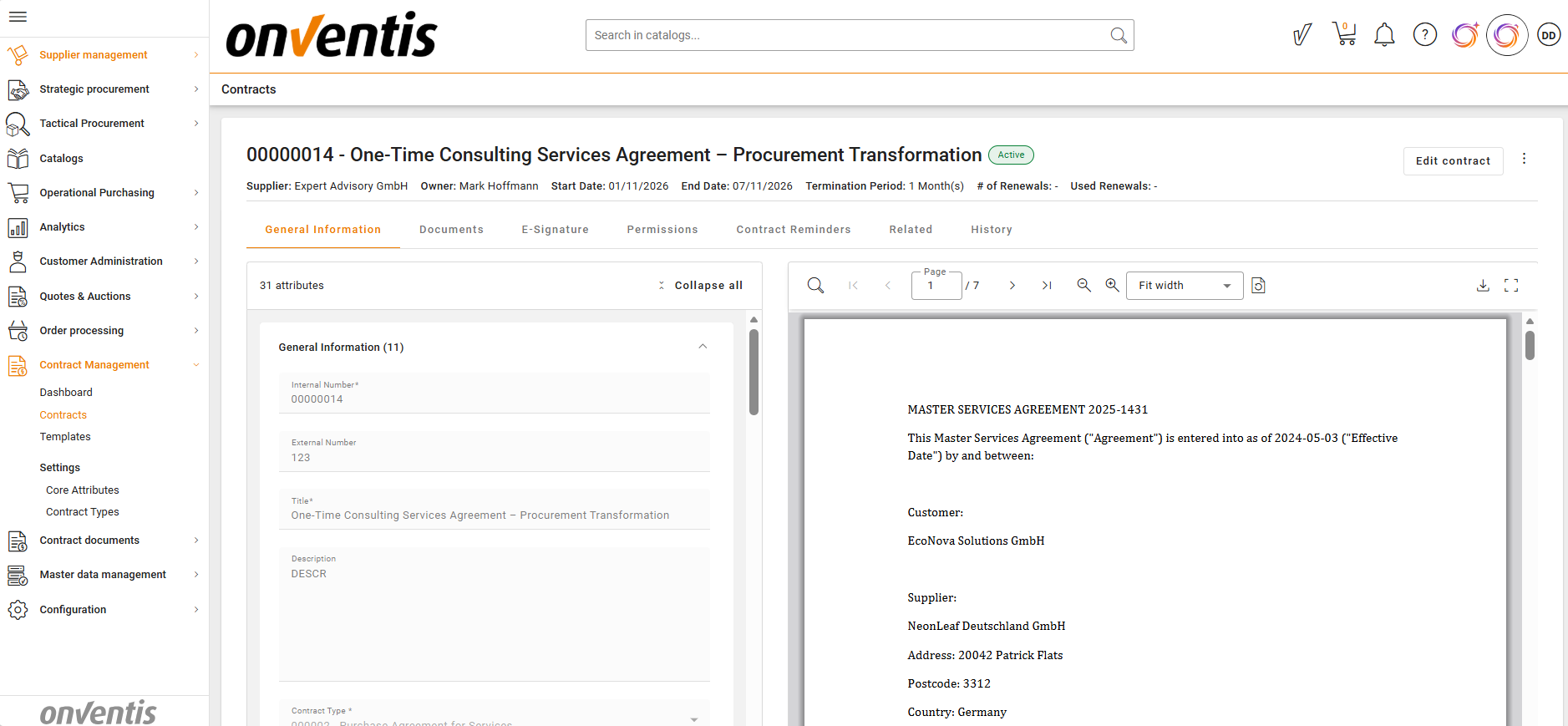
Buyers can now view contract documents using an enhanced PDF viewer with improved readability, navigation, and visibility of previously unsupported documents.
Why this matters
This improves contract review efficiency by providing a consistent and reliable document viewing experience directly within CLM.
Who benefits
Contract managers, legal and office administration
How it fits into your process
This feature is used when reviewing contract documents during authoring, negotiation, approval, and portfolio analysis.
What you need to do
No action required
Learn more: Contract Viewing
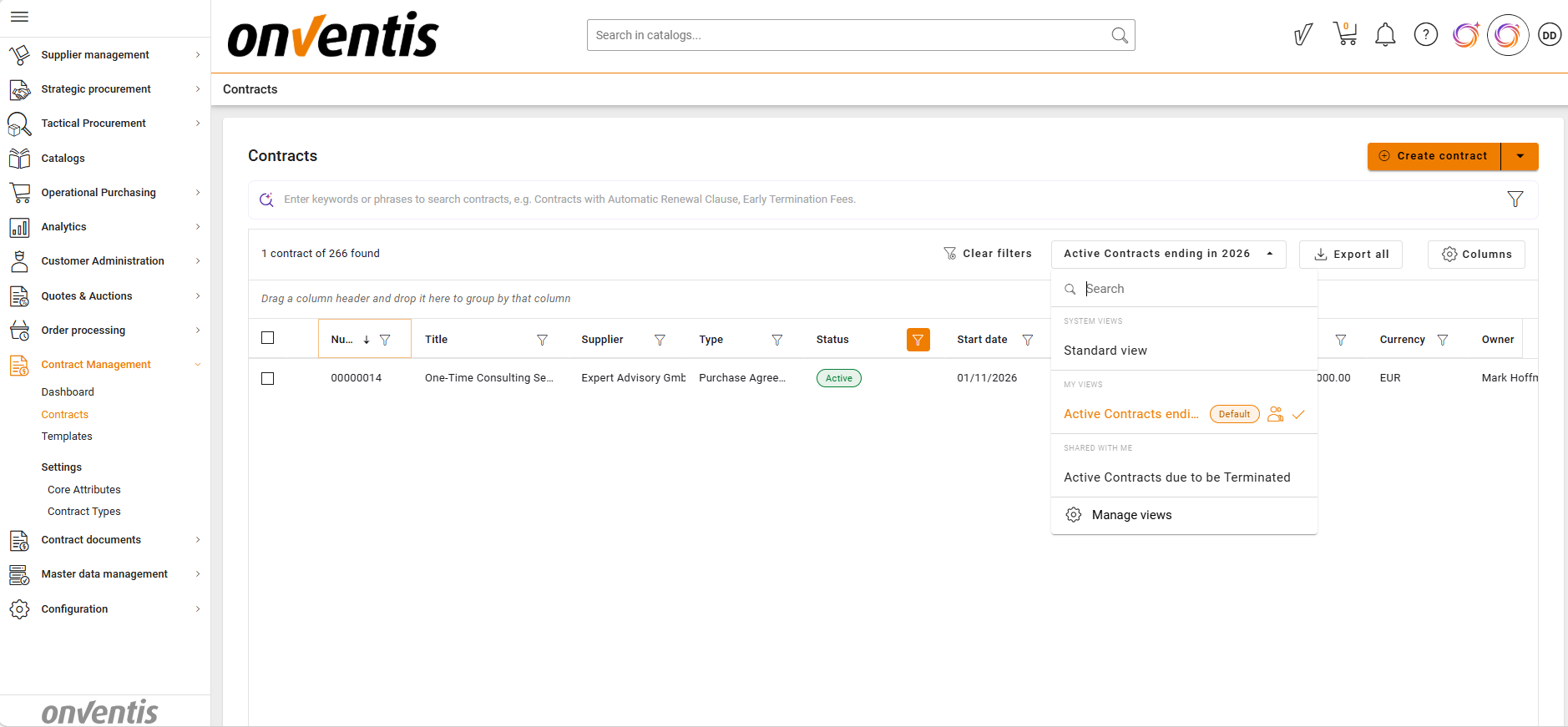
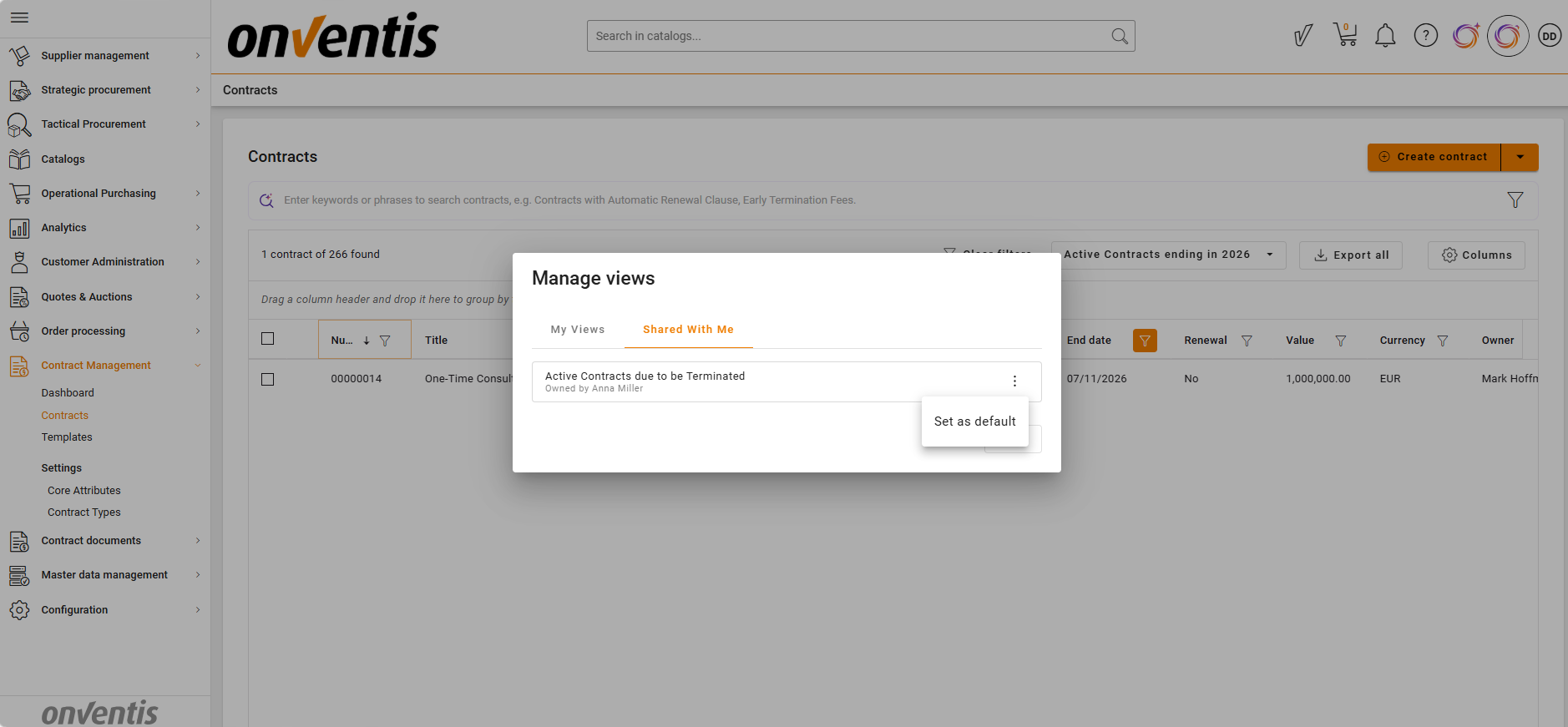
2. Shared Custom Views
What we’ve added / improved
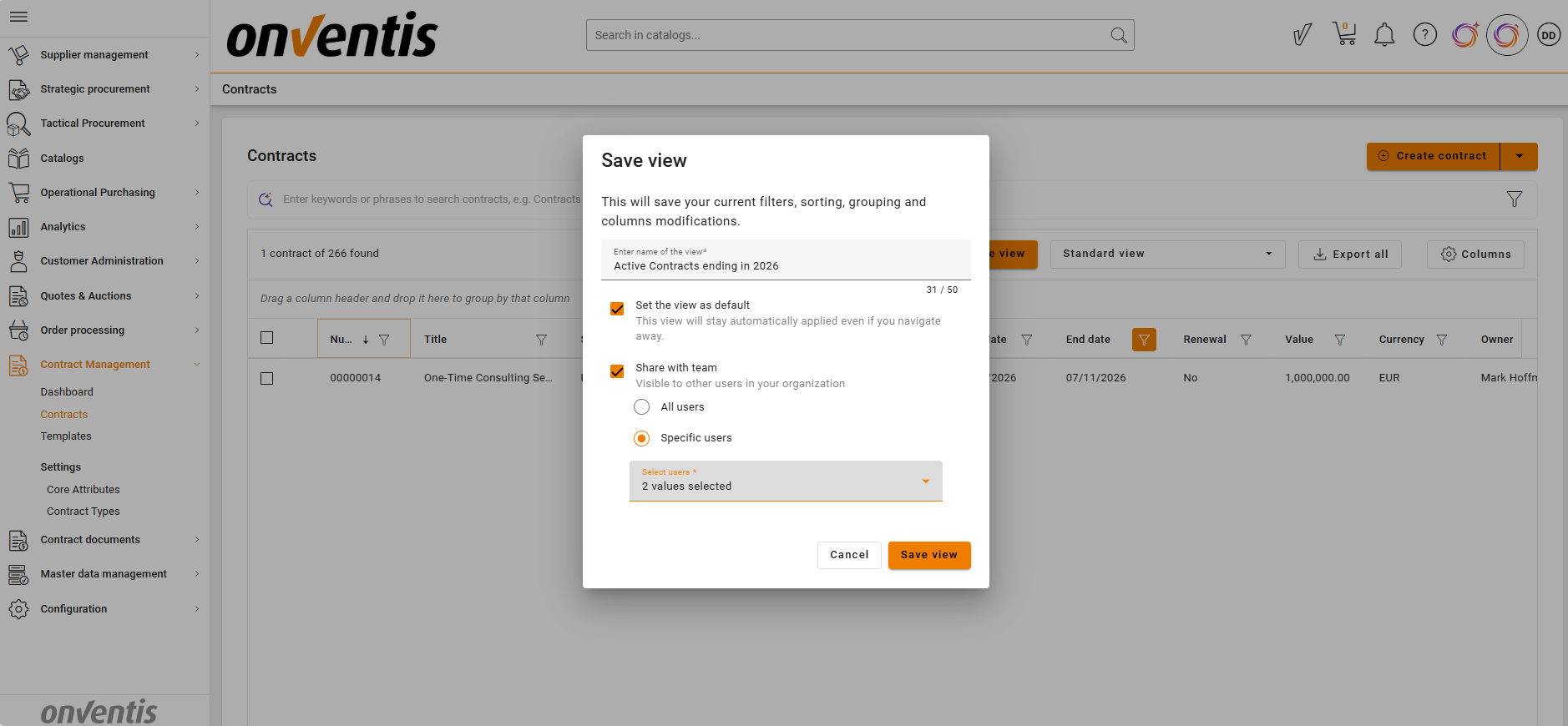
Users can now share custom Contract Repository views with other users or across the organisation.
Why this matters
This ensures consistency in how contract data is viewed and reduces effort by allowing teams to reuse predefined configurations.
Who benefits
Contract managers, legal and office administration
How it fits into your process
This feature supports collaboration and standardised reporting when working with contract portfolios.
What you need to do
Create or edit a custom view
Enable sharing and define the target audience
Learn more: Shared Custom Views
3. AI Search Enhancements
What we’ve added / improved
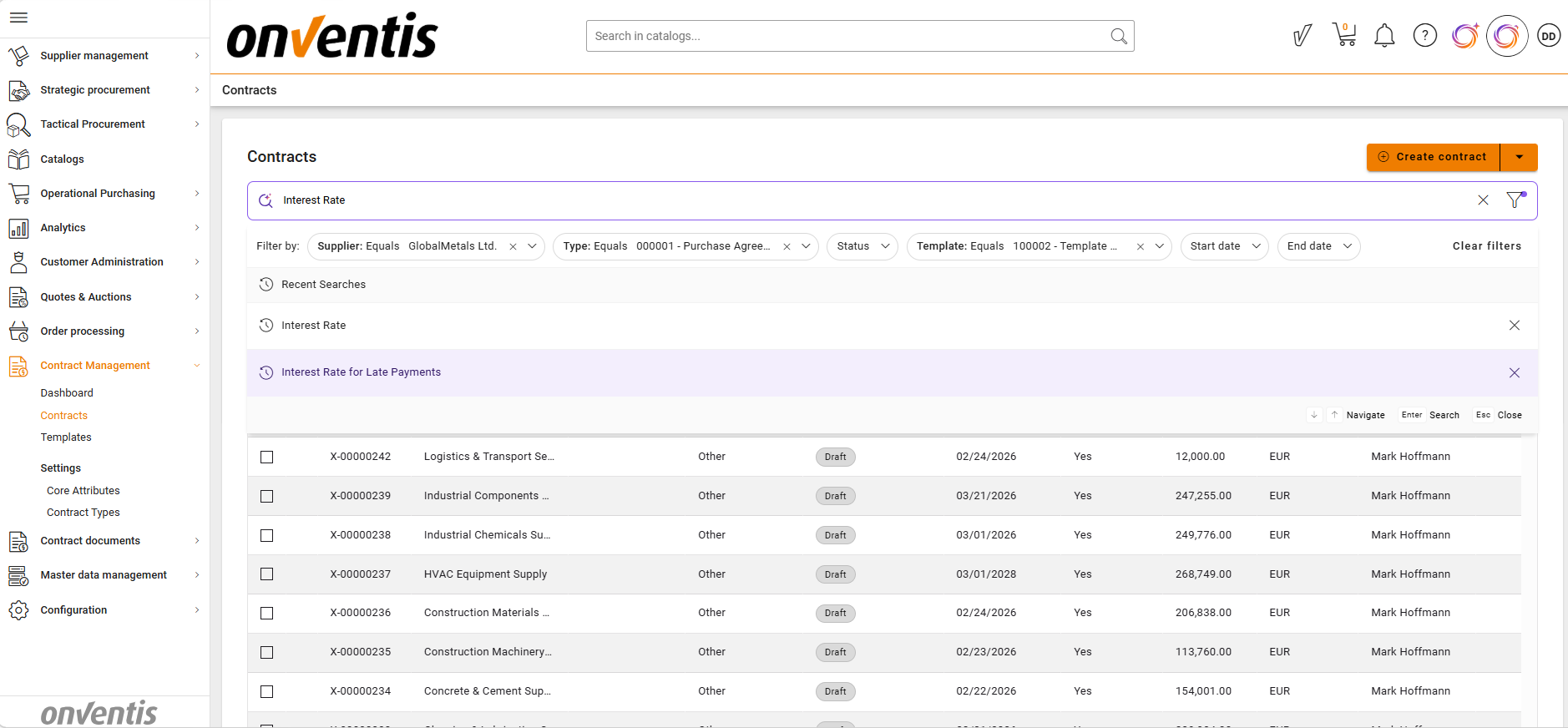
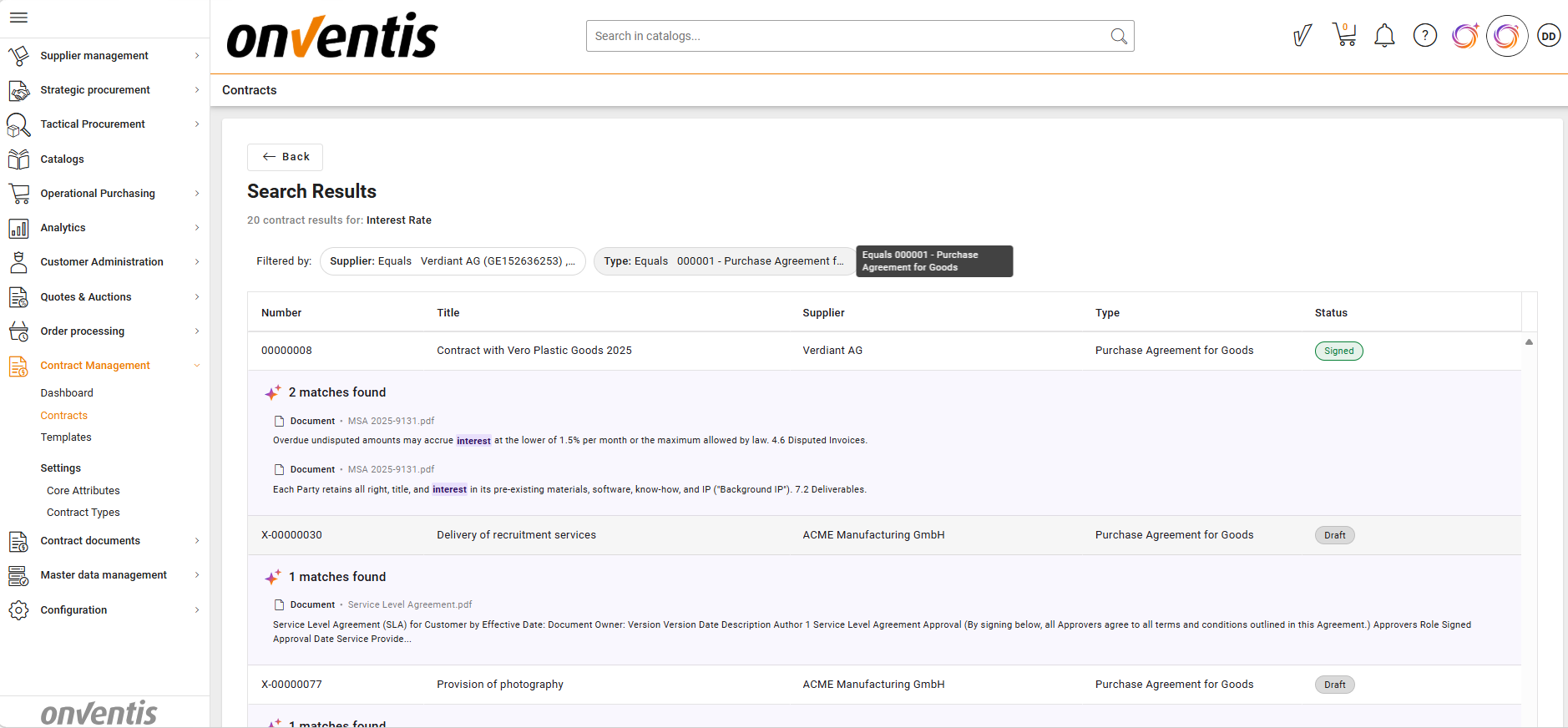
AI Search now supports filtering by key contract attributes (supplier, contract type, template) and allows reuse of recent search queries.
Why this matters
This improves search efficiency and helps users quickly find relevant contracts without repeating search inputs.
Who benefits
Contract managers, legal and office administration
How it fits into your process
This feature is used during contract search and analysis across large contract portfolios.
What you need to do
Use filters together with search queries
Reuse previous searches from the recent searches list
Learn more: Semantic Search
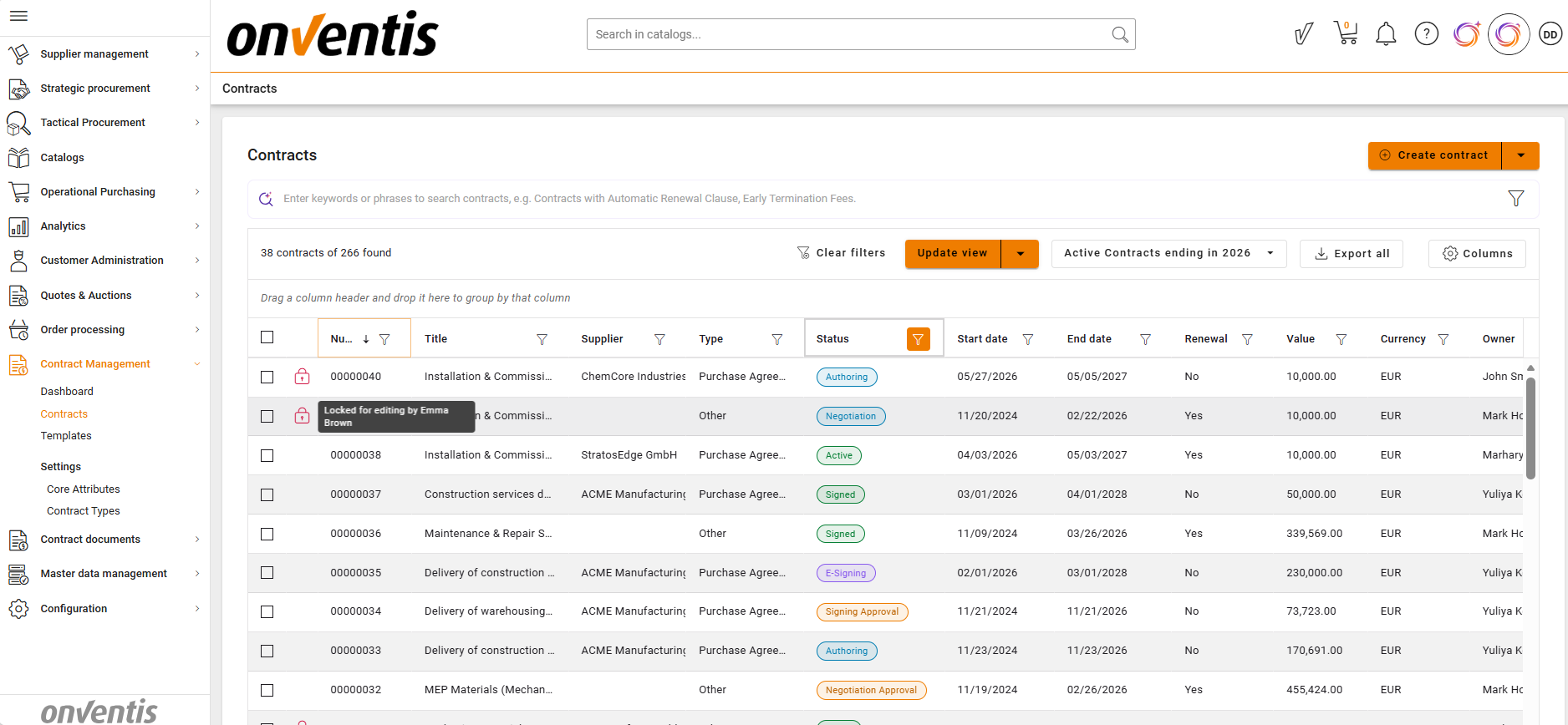
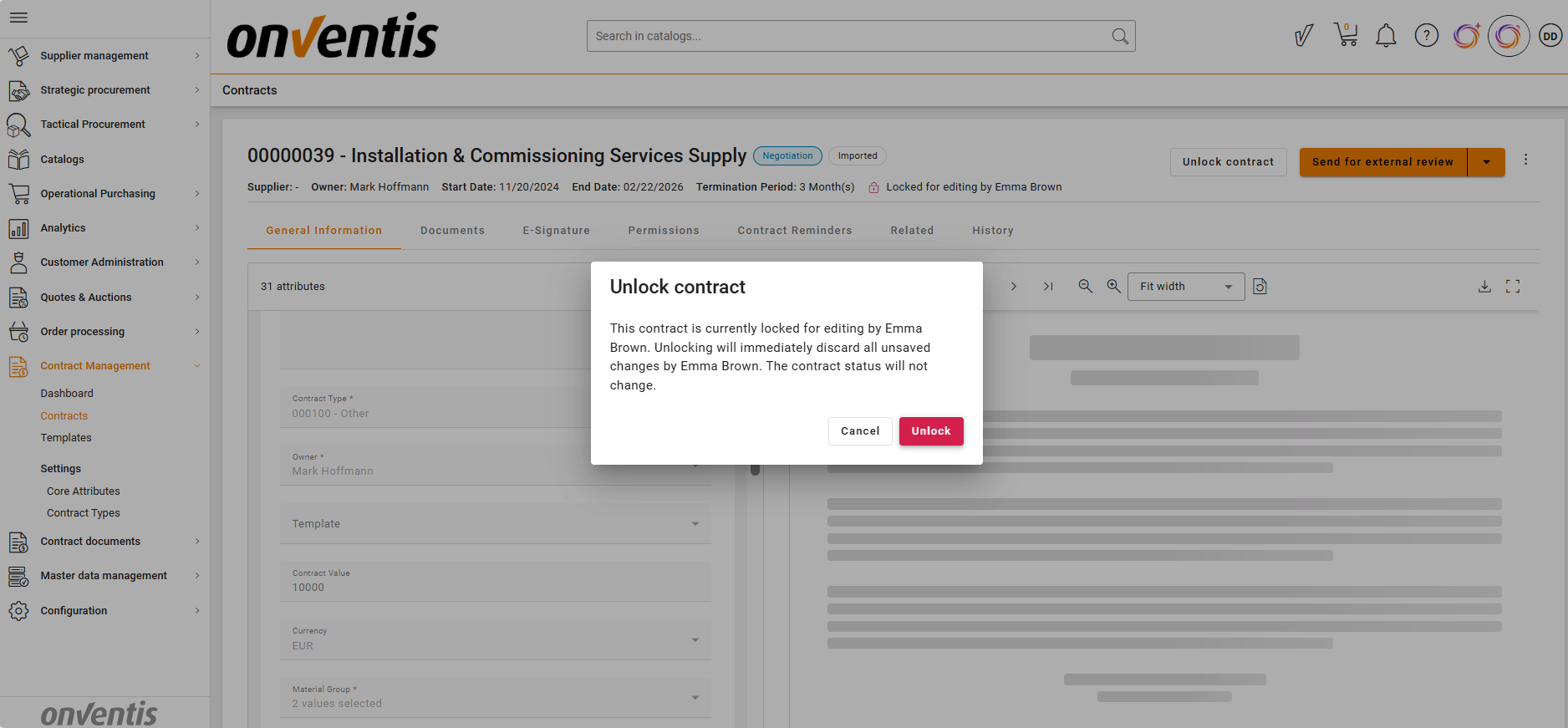
4. Contract Unlock
What we’ve added / improved
Contract Admins can now unlock contracts locked by other users without changing the contract lifecycle status. Unlock actions are fully tracked.
Why this matters
This prevents blocking situations and ensures continuity of contract processing.
Who benefits
Contract managers, legal and office administration
How it fits into your process
This feature is used when contracts are locked during editing and work needs to continue.
What you need to do
Use the “Unlock” action on locked contracts when necessary
Learn more: How to Unlock a Contract
5. Template & Contract Type Governance
What we’ve added / improved
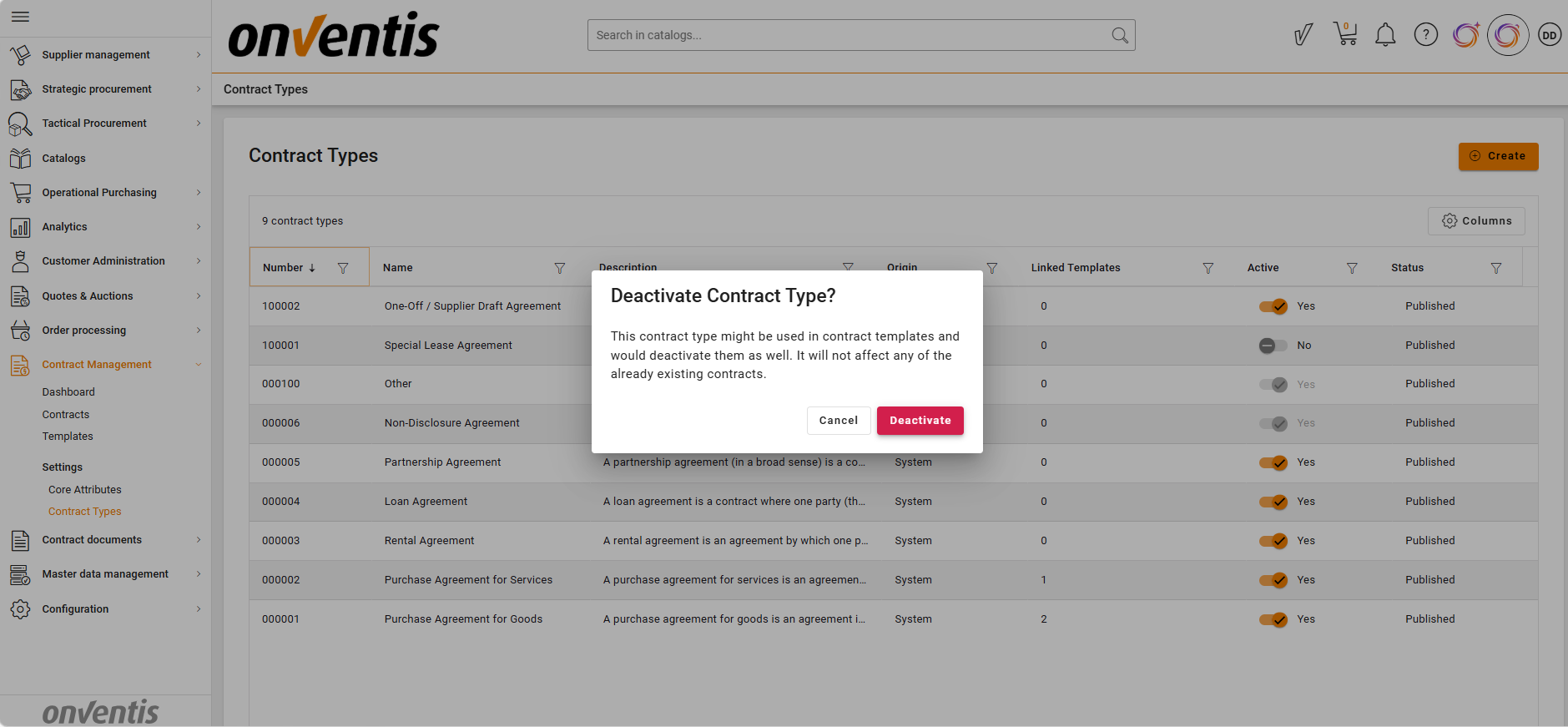
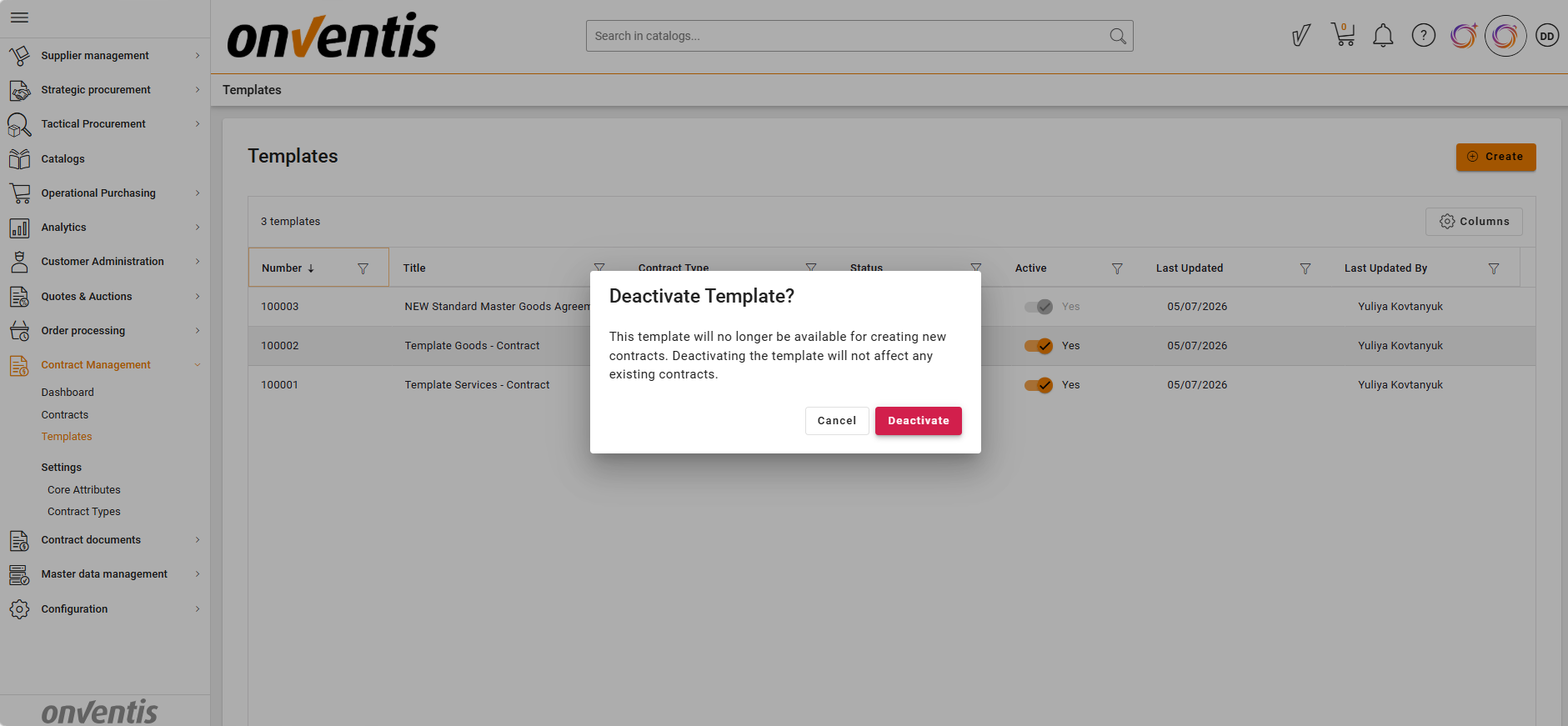
Templates and contract types can now be activated and deactivated in a controlled and aligned way.
Why this matters
This ensures only valid and up-to-date configurations are used for contract creation, reducing risk and improving compliance.
Who benefits
Contract type and Template managers, Contract creators
How it fits into your process
This feature governs contract creation and ensures consistent use of templates and contract structures.
What you need to do
Review and deactivate outdated templates or contract types
Ensure only approved configurations remain active
6. Public API
What we’ve added / improved
A Public API for CLM is now available, enabling external systems to access contract data, lifecycle status and documents, including downloading individual contract documents.
Why this matters
This enables integration with external systems and supports data synchronisation and reporting scenarios.
Who benefits
Integration teams, Data analysts, IT departments, Consulting partners
How it fits into your process
This feature is used when integrating CLM with external systems, or building analytics dashboards (e.g. Power BI, Tableau).
What you need to do
Contact Onventis Sales team to activate API access and use the available endpoints based on your integration and reporting needs
7. Bulk Import Improvements
What we’ve added / improved
Bulk import now applies template-based permissions and reminders automatically to imported contracts.
Why this matters
This ensures consistency between manually created and imported contracts and reduces configuration errors.
Who benefits
New Buyers importing the existing contracts in bulk
How it fits into your process
This feature is used during bulk contract creation or migration activities.
What you need to do
Ensure correct templates are selected before bulk import
Sourcing
Awarding
What we’ve added / improved
Introduction of a guided awarding workflow for RFQ and RFP events
Unified process to define awarding decision and follow-up action (create order or award only)
Selection of one or multiple suppliers and assignment of line items per supplier
Structured review step with full overview of suppliers, quantities, and totals
Mandatory confirmation step with final, immutable awarding result
Optional supplier notification including visibility of awarded items and quantities
Integrated order creation directly from awarding
Draft handling and strict status rules for consistency and data integrity
Why this matters
Awarding decisions are now fully documented and executed in a single structured process, ensuring a consistent link between supplier responses, awarding decisions, and follow-up actions such as order creation.
Who benefits
Tactical buyers executing Sourcing Events
Procurement teams requiring traceability and structured decisions
Organisations needing a consistent sourcing-to-order process
How it fits into your process
After the response window of a Sourcing Event closes, users move into the awarding workflow, select suppliers and line items, define the follow-up (order creation or awarding only), and confirm the decision. The process replaces manual steps and directly integrates with downstream actions like order creation.
What you need to do
No additional action is required
Availability
Available for RFQ and RFP events once the sourcing event status is “Response window closed”.
Platform
PDF Report Updates
What we've improved
As part of our platform modernisation, we have made a number of visible refinements to the Order Report and Request by Supplier Report.
Order Report
Date now displayed right-aligned
Address block in the header wraps later, keeping lines such as the country on the same line
"Continue on page" notice moved below the footer
Spacing between document title and "Ordered By" reduced
Request by Supplier Report
Hard copy information removed
Why this matters
These refinements ensure PDF output aligns more closely with what customers are familiar with, improving readability and consistency of documents sent to suppliers.
Who benefits
Procurement teams, Consulting, all organisations using PDF-based reports
What you need to do
No action required. Existing templates and workflows remain unchanged.
Availability
Initially available on Beta for a full release cycle before rolling out to production.