
Onventis 2026.2
The new Onventis 2026.2 release contains various enhancements, improvements, and bug fixes. Check out the complete list below!
Beta release date: Friday,
Release date: Tuesday,
Procure-to-pay
New Feature: Hide Price in Purchase Orders
The Hide Price feature is now available in Onventis Buyer. This feature allows buyers to hide price information in Purchase Orders sent to suppliers, while keeping the price visible internally for buyers and approvers.
This helps protect confidential pricing and ensures suppliers provide or confirm the correct price through their Sales Order confirmation.
Feature Highlights
Buyers can hide price information on individual Purchase Order line items
Suppliers receive Purchase Orders without seeing internal prices
Suppliers provide the actual price via Sales Order confirmation
Internal users can always see and manage price information
Works across supplier documents, emails, PDFs & Excel exports
Supports openTRANS and SAP integrations for consistent behavior
Improves price confidentiality and reduces risk of incorrect price usage
How It Helps
With Hide Price enabled, buyers can safely send Purchase Orders without exposing internal or placeholder prices. Suppliers must confirm the correct price, ensuring accurate and controlled price validation.
This helps:
Protect sensitive pricing information
Improve price accuracy and confirmation
Reduce errors caused by incorrect or temporary prices
Ensure better transparency and control in procurement
Learn More
To learn how to use the Hide Price feature, including setup and behavior, visit: https://help.onventis.com/content/hide-pricing-in-supplier-facing-documents-for-good
For activation please contact your account manager.
New Feature: Central Delivery Scheduling in Shopping Cart
The new Central Delivery Scheduling feature is now available in the Shopping Cart. This feature allows buyers to manage delivery dates and split quantities for all items in one place, without opening each item individually.
This simplifies delivery planning and improves efficiency when working with multiple items.
Feature Highlights
New Central Delivery Scheduling button available in the Shopping Cart toolbar
View and manage delivery schedules for all items in a single overview page
Edit delivery dates and quantities for multiple items at once
Switch between complete delivery and scheduled delivery easily
Add, edit, or remove delivery dates centrally
Changes are automatically reflected in the individual item details
.png?inst-v=9ee534f6-a49d-48e2-835f-43fa52805853)
How it helps
Previously, buyers had to open each shopping cart item individually to manage delivery schedules. This was time-consuming, especially when working with many items.
With Central Delivery Scheduling, buyers can:
Manage delivery schedules faster and more efficiently
Plan split deliveries across multiple dates
Ensure accurate delivery planning for all items
Reduce manual effort and improve usability
This enhancement makes delivery scheduling easier, faster, and more transparent directly from the Shopping Cart.
Improved Tax Code Handling with Organizational Unit Control and VAT Selection
Why this change?
Previously, tax code handling did not fully support organizational unit–specific restrictions or flexible selection. Users could see and select tax codes that were not relevant to their organizational unit, which increased the risk of incorrect tax usage.
In addition, tax code identification during import and export was limited, which made integrations with external systems less reliable.
These limitations made tax code management less controlled and less consistent.
What’s new?
Tax code handling has been enhanced to provide better control, consistency, and integration support.
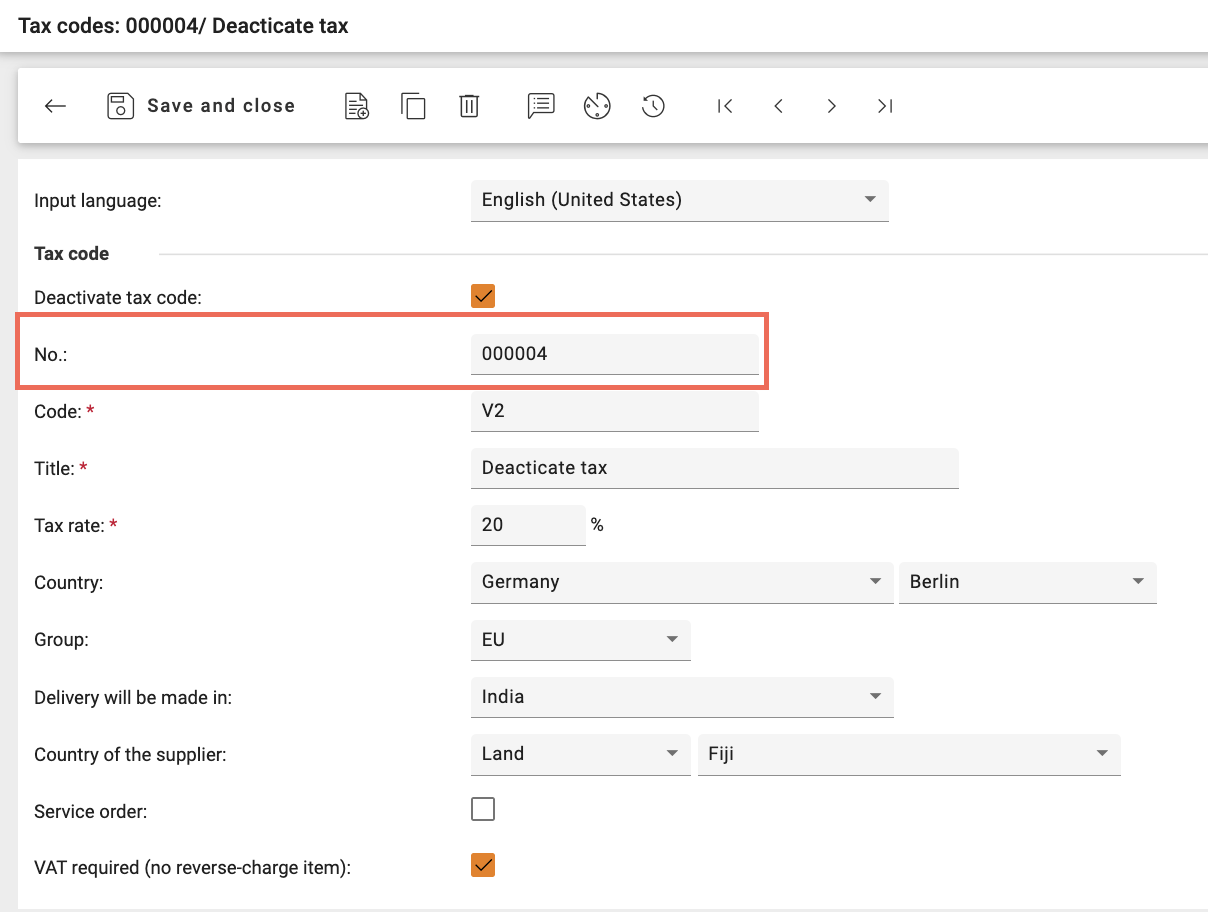
Support for Internal Number of Tax Code (Import and Export)
Tax codes now support an internal number, which improves consistency across integrations and data transfers.
This enhancement allows:
Reliable identification of tax codes during import and export
Consistent tax code mapping between Onventis and external systems (such as ERP)
Improved accuracy during system integrations and data synchronization
This ensures tax codes are correctly recognized and processed across systems.
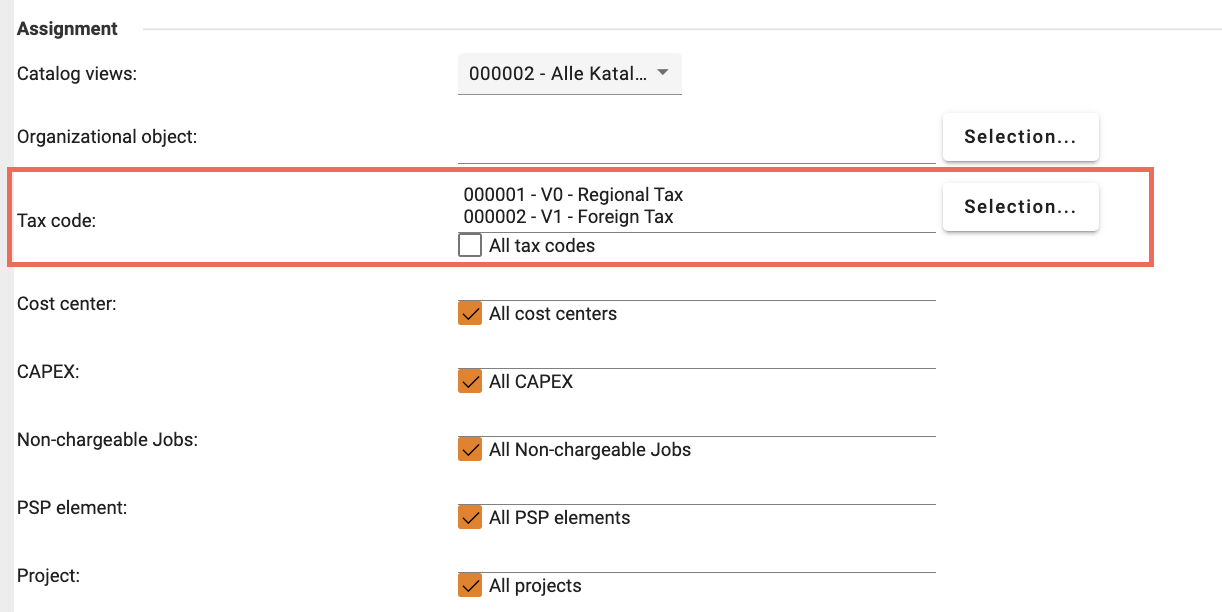
Tax Code Selection per Organizational Unit (with Import and Export Support)
Organizations can now define which tax codes are allowed for each organizational unit using
Key improvements:
Supervisors can select allowed tax codes for each organizational unit
Only selected tax codes can be used by users within that organizational unit
Support for import and export of organizational unit tax code configuration
Option to allow all tax codes or restrict to specific ones
In Org unit Import Template:
The existing column TaxCode is renamed to InvoiceTaxCode
Two new columns is introduced:
TaxCodeNr:
Contains a list of Tax Code
Must exist in Tax Code master data
Must be pipe-separated
AllTaxCodes
1 → all tax codes allowed
0 → restriction active
This provides better control and ensures users only select valid tax codes.
Tax Code Selection Behavior in Shopping Cart, Requisition, and Purchase Orders
Tax code selection is now fully aligned with the organizational unit configuration.
Key improvements:
Tax code dropdown shows only allowed tax codes for the user’s organizational unit
Automatic tax code determination uses only allowed tax codes
VAT rate and tax code selection work together and stay synchronized
Tax code validation ensures compliance with organizational rules
This applies consistently across:
Shopping Cart
Requisition Line Items (Demand Positions)
Purchase Orders
New Setting: Enable VAT Rate Selectable (Manual Mode)
A new setting Enable VAT rate selectable is now available when manual tax code selection is enabled.
Location: Organization Settings → Purchase Order → Manual selection of tax code → Enable VAT rate selectable
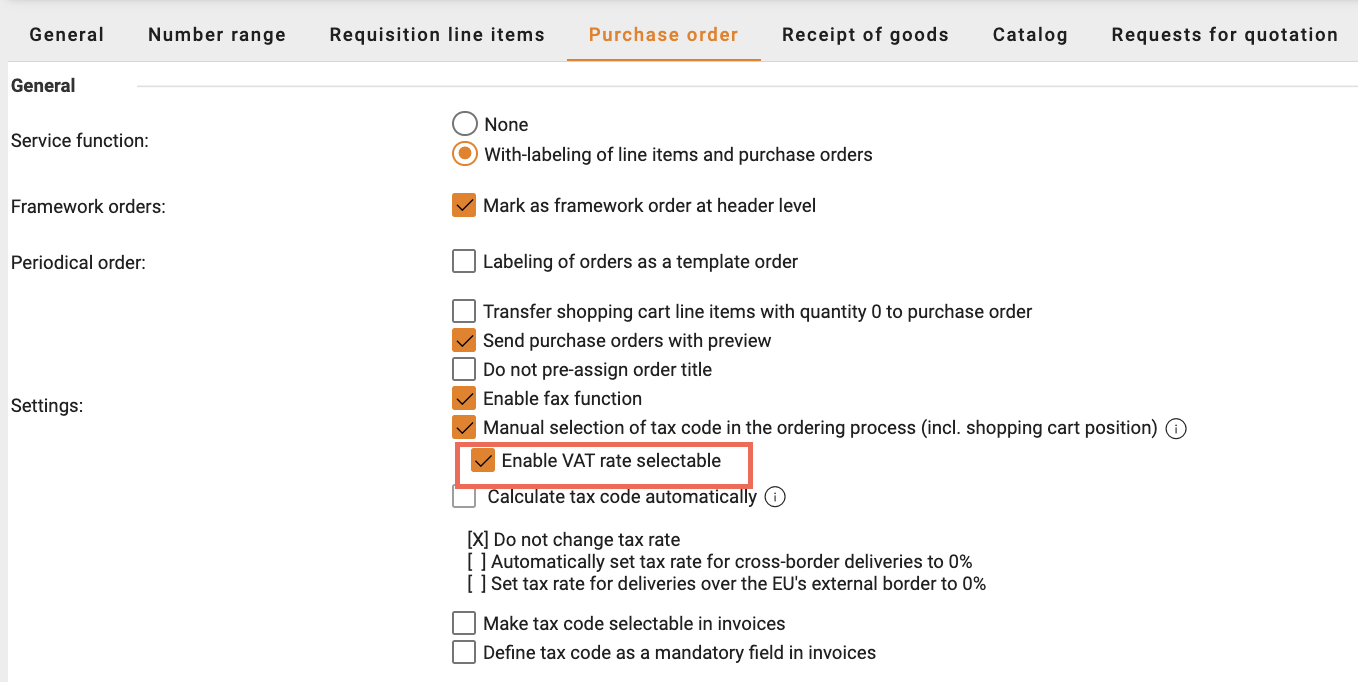
When this setting is enabled:
Users can select VAT rate (%) and Tax Code together
VAT rate and Tax Code are automatically linked
Selecting VAT rate filters the available Tax Codes
Only tax codes allowed for the organizational unit are shown
This applies:
Shopping Cart
Requisition Line Items (Demand Positions)
Purchase Orders
Improved Visibility and Accuracy of Partial Goods Receipts
Why this change?
Previously, when multiple partial goods receipts were created for the same Purchase Order line item, opening older goods receipt documents showed the latest overall status instead of the original values recorded at the time of receipt.
This made it difficult for users to track individual deliveries and understand what quantity was received in each goods receipt. It also caused confusion because older goods receipts appeared to have the same status as the final receipt.
What’s new?
Each goods receipt document now correctly shows its own original data and status, exactly as recorded when the goods receipt was created.
Key improvements:
Each goods receipt shows the exact quantity received in that specific receipt
The remaining open quantity is displayed correctly based on the time of that receipt
The final confirmation status reflects the correct status at that moment
Older goods receipts are no longer updated or overwritten by later receipts
Every goods receipt document now represents its own accurate historical record
Improved Automatic Account Assignment Behavior
Why this change?
Previously, when automatic account assignment determination was enabled, the system did not replace existing account assignment values if they were already present. This was designed to prevent data loss, especially in SAP-related scenarios.
However, for customers who rely on automatic account assignment, this caused confusing behavior:
Old account assignment values remained visible even after rule changes
Users were unsure if the system or the user had applied the account assignment
This made account assignment less predictable and reduced trust in automatic determination.
What’s new?
A new organization setting has been introduced to give customers full control over automatic account assignment behavior.
New setting available:
Turn off dynamic account assignment which was manually changed
When this setting is enabled:
Automatic account assignment is always applied based on configured rules
Existing account assignment values are replaced when determination is triggered
Manual override indicators are no longer shown unnecessarily
Users see clear and consistent account assignment results
Where it applies:
Shopping Cart
Requisition Line Items (Demand Positions)
Purchase Orders
Small Improvements
Improved Description Field Length for Account Assignment Criteria:
The Description field for account assignment criteria now supports up to 5000 characters.
This allows users to document detailed allocation rules and business context more clearly. Import and export of longer descriptions is fully supported, and existing data remains unchanged.
New Option to Delete Email Import Configurations:
Administrators can now delete email import configurations directly from the system.
Once deleted, the configuration is removed and will no longer retrieve or process emails. This helps keep the configuration list clean and easier to manage.
Improved Task Allocation Without Job Dependency:
Task allocation can now be used independently without requiring a Job selection.
The Task dropdown is always available in the Shopping Cart, allowing users to assign tasks more easily and improving flexibility in cost allocation.
Interfaces Related Key-Update
Export of Time Value (Uzeit) for Sales Order and Delivery Note Transfer to SAP: The SAP interface has been enhanced to support exporting a fixed time value using the parameter
Export_Uzeitfor Sales Order and Delivery Note transfers. When this parameter is activated, the configured time value (<Uzeit>120000</Uzeit>) is included in the SAP XML. This ensures consistent and complete transfer of delivery and order timing information to SAP.New Parameter to Control Export of SAP Plant in Price Condition Updates: A new interface parameter
Export_SAPPlanthas been introduced to support customers using plant-independent price conditions in SAP. When the parameter is set to false, the SAP plant node (<IfWerks>) is no longer exported. This prevents SAP errors during price condition updates and ensures compatibility with both plant-specific and plant-independent pricing scenarios. The default behavior remains unchanged.Support for Import of Custom Accounting Fields via openTRANS: We now supports the import of Custom Accounting 1 and Custom Accounting 2 values from openTRANS ORDER and ORDERCHANGE documents. When these values are received in the XML (via
<REMARK type="Onv-CustomAccounting1"> and <REMARK type="Onv-CustomAccounting2">), they are automatically imported and assigned at line-item level. This ensures consistency between Onventis and external systems and improves support for customer-specific accounting requirements.Dynamic Language Export in cXML OrderRequest Based on User Session Language: The cXML interface has been enhanced to dynamically export language-dependent attributes based on the session user language instead of using hardcoded German values. This includes the root
xml:langattribute, address name language attributes, and country display names. When an order is sent to the supplier, the language information in the XML (for example:xml:lang="es-ES") now reflects the actual user session language. This ensures that suppliers correctly interpret the document language and respond in the appropriate language, improving international compatibility and communication accuracy.
Sourcing
Extend response deadline without version
Editors can now extend the offer submission deadline without generating a new event version.
Summary of Changes
Deadline extensions can be made up to 1 hour before the current deadline expires.
The extended deadline cannot exceed the contract period start date or any delivery date defined at header or item level.
Extensions are supported in the following event states:
Response Window Open
Question Window Open
Question Window Closed
Each event supports up to 10 extensions.
In multi-round events, each round also allows up to 10 extensions.
When an extension is created, suppliers are automatically notified.
Suppliers who have declined participation or have already submitted their offer are excluded from these notifications.
Add supplier after publishing without version
Editors can now add suppliers to a published Sourcing Event without generating a new event version.
Summary of Changes
Suppliers can be added while the event is in one of the following states:
Response Window Open
Question Window Open
Question Window Closed
Editors can add both new suppliers and regular suppliers, and can toggle guest access.
Suppliers can only be added up to 24 hours before the response window closes.
In multi-round events, suppliers can only be added in the base round.
Supplier Management: 🚀 Qualification Management Redesign
Overview
Qualification Management has been redesigned to introduce a new process-centric model. The previous setup using separate rulebooks, templates, and manual processes has been consolidated into unified Qualification Processes, boosting automation and providing improved flexibility, transparency, and scalability.
This redesign simplifies configuration, removes structural limitations, and offers full visibility into all qualification requests in one place.
With this redesign multiple qualification requests of varying scope can be auto triggered by assigning different supplier statuses.
For detailed information, refer to the Help Center documentation: Link to Help Center
Why this change?
The previous design separated qualification setup into multiple components (Rulebook, Template, Manual Processes, Qualification Requests), which led to:
Fragmented configuration across different areas
Rulebook: Configure 'Start Rule, 'Scope Rule', and 'Assessment Rule'
Template: Configure ‘General Information’, ‘Master Data’, ‘Document Acceptance’, and ‘Generic Questionnaire’
Qualification Requests: Display all the requests triggered by the configuration in Rulebook and Template
Restricted automation
Only one supplier status can be selected as 'Start Rule' which can trigger only one template configuration
Organizational unit–specific configuration not allowed in Template for auto-triggered requests.
Limited flexibility with assessment rules (universal assessment rule in Rulebook which is applied to all requests)
Limited visibility of all qualification requests (The ‘Qualification Request’ tile does not show qualification requests belonging to qualification processes)
The redesign addresses these limitations by introducing a unified and scalable process model.
Key Concepts
1. Qualification Process
A Qualification Process defines the internal configuration for qualifying suppliers. It includes defining:
General Information (Basic information, Organizational scope, Response times and reminders)
Assessment Scope (What information suppliers must provide? Master Data/ Document Acceptance/ Questionnaires)
Trigger Rule (for auto‑triggered processes- How qualification requests are triggered)
Assessment rules (How questionnaire results are assessed)
A process acts as a reusable framework that generates qualification requests.
2. Qualification Request
A Qualification Request is an individual request sent to a supplier based on a qualification process. It represents the execution of the process for a specific supplier. All qualification requests are part of some qualification process.
Each request tracks:
Supplier responses
Assessment results
Status and history
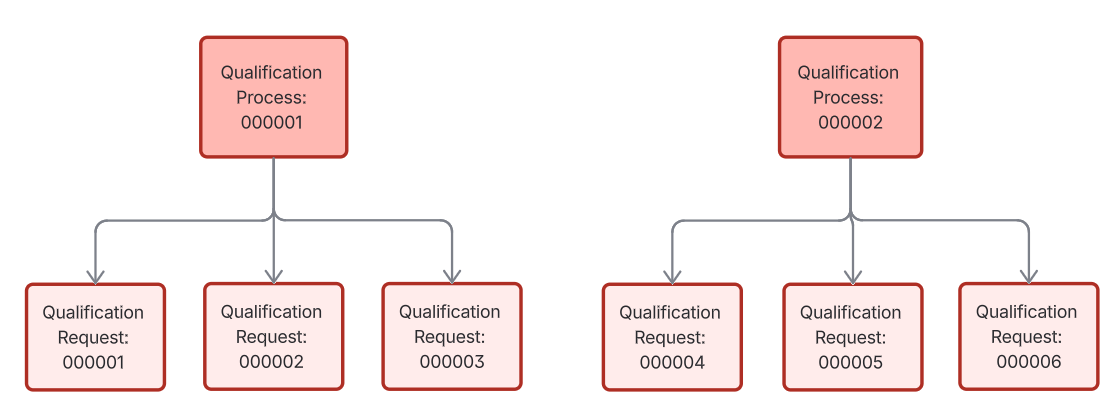
Key Improvements
1. Unified Entry Point for Qualification Management
Qualification Management now consists of two tabs:
Qualification Processes: List of all Qualification Processes
All Requests: List of all Qualification Requests part of all Qualification Processes
The previous four-tile landing page has been removed.
2. New Type of Qualification Process
The redesigned Qualification Management introduces two types of qualification processes that users can configure to support different business scenarios:
Manual Process (Existing)
A Manual Qualification Process in which suppliers are explicitly selected for qualification.
Suppliers are added manually during or after publishing the qualification process
Qualification requests are created when the process is published
Additional suppliers can be added later to an already published process
This option is ideal for targeted or ad-hoc qualification campaigns.
Auto-Triggered Process
An Auto-Triggered Qualification Process in which qualification requests are created based on supplier status changes.
A supplier status is defined as the trigger while configuring the process
When a supplier is assigned this status, a qualification request is generated automatically
This option is suitable for automated onboarding, re-qualification, or compliance-driven qualification scenarios.
Both types of processes can be configured for Organization/Organization Unit scope.
3. Configure Multiple Processes
You can now configure multiple:
Manual processes
Auto-triggered processes (boosts automation)
Each process has its own:
General Information (Basic information, Organizational scope, Response times and reminders)
Assessment Scope (Master Data, Document Acceptance, Questionnaires)
Trigger Rule: Supplier Status (for auto‑triggered processes)
Assessment rules
Through multiple Auto-triggered processes multiple qualification requests of varying scope can be auto triggered by assigning different supplier statuses. Example:
Supplier Status ‘000001’ → Auto-triggered process 'A'
Supplier Status ‘000002’ → Auto-triggered process 'B'
Supplier Status ‘000003’ → Auto-triggered process 'C' and so on.
📹 How to configure an auto-triggered qualification process
4. Process-Specific Assessment Rules
Assessment rules are now defined per qualification process instead of being universal.
This enables:
Different scoring thresholds per process
More flexible qualification scenarios
Controlled manual assessment in amber cases
5. Aggregated View of All Qualification Requests
The new All Requests tab displays all qualification requests across all processes, including:
Previously manual qualification requests
Auto-triggered qualification requests
This replaces the former standalone “Qualification Requests” tile.
6. Consistent functioning of qualification requests
Clear system rules now govern which actions are available for qualification requests irrespective if the request is part of manual or auto-triggered qualification process.
Restarting requests: Succeeded, Failed, Cancelled (new)
Aborting requests
Confirming failed qualifications
Only one active request per supplier and organizational scope can exist at a time. Detailed information on the different actions on qualification request.
7. Access Rights Consolidation
Access rights have been consolidated to simplify administration.
556: Access to Qualification Management Menu
563: View Qualification Processes (Organizational Unit Scope)
3563: Edit Qualification Processes (Organizational Unit Scope)
564: View Qualification Processes (Organizational Scope)
3564: Edit Qualification Processes (Organizational Scope)
Deprecated access rights are migrated automatically with the new setup.
Where Can I Find My Previous Configuration?
No historical data and configuration has been removed.
The redesign is done considering that existing configuration in ‘Rulebook’ and ‘Template’ will still create new Qualification Requests and all existing and ongoing Qualification Requests will continue to function.
1. Rulebook & Template Settings
All former Rulebook and Template configurations have been migrated into the new Qualification Processes structure.
The configuration logic is now migrated as part of a new Auto-Triggered Qualification Process, which is highlighted in the list of Qualification Process.
The configuration of this migrated process can be viewed by clicking on the Action: View Process in the process detail view.
You can find the migrated process in Qualification Management → Qualification Processes
2. Previous Standalone Qualification Requests
All standalone qualification requests (part of ’Qualification Requests' tile) can be found in
Detail view of the new migrated auto-triggered process
All Requests tab
📹 Migration of Old Configuration: Standalone Requests, Rulebook, & Template
❗ Important Notes
The Rulebook and Template setup is no longer available as standalone configuration areas.
Qualification logic must now be maintained within Qualification Processes.
Existing qualification requests remain accessible and auditable.
Supplier status mapping and approval workflows continue to function as before, with improved consistency.