
Hide Pricing in Supplier-Facing Documents for Goods and Service Orders
1. Introduction
The Hide Price feature enables buyers to selectively hide price information for individual Purchase Order line items from supplier-facing documents, while keeping the price fully visible internally within the buyer system.
This feature applies to both:
Goods Purchase Orders
Service Purchase Orders
The purpose of this feature is to support procurement scenarios where the buyer does not want to disclose internal prices or placeholder prices to suppliers. Instead, the supplier provides or confirms the final price through the Sales Order process.
This ensures proper separation between internal budgeting values and supplier-confirmed transactional prices.
2. Before You Begin
Ensure the following prerequisites are met:
The Hide Price feature must be enabled for your organization as access right. If the feature is not enabled, the Hide Price checkbox will not be available.
A dedicated user setting whether a user can set or modify the Hide Price checkbox
Contact your system administrator if required.
3. Feature Overview
When the “Hide price” checkbox is enabled on a Purchase Order line item, all price values for that line item are hidden from supplier-facing documents and interfaces. This includes unit price, line totals, and calculated order totals. Internally, the buyer continues to see and use the full price information without any restriction.
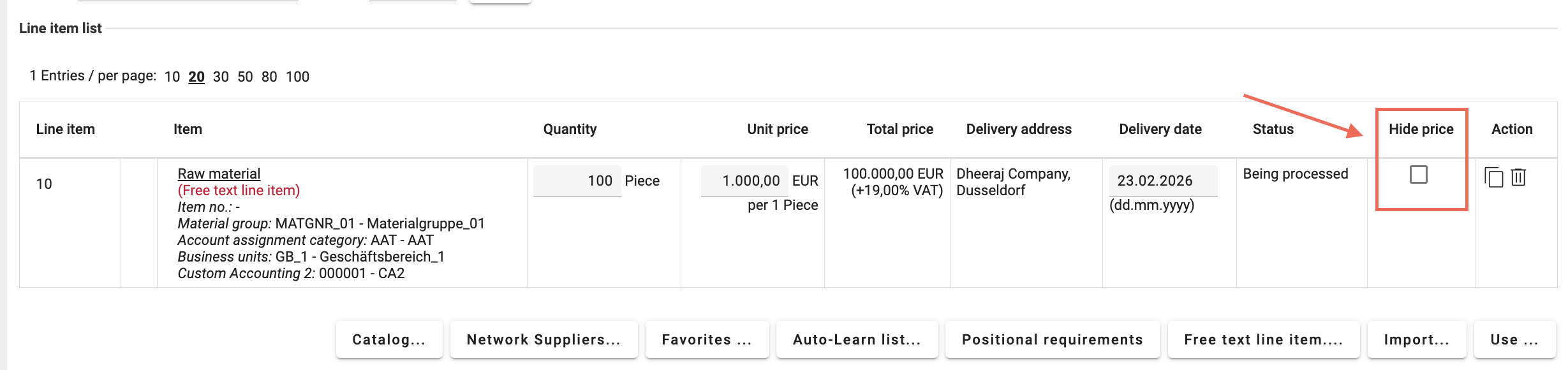
Behavior flow:
Buyer creates Purchase Order with Hide Price enabled
Supplier receives Purchase Order without price information
Supplier enters the actual price in the Sales Order position
Once the Sales Order is submitted,
It creates a sales order change at Buyer side which require a release (approve or reject)
Based on decision -> assuming approve:
The supplier-provided price becomes the valid transactional price
The price becomes visible in the supplier context
The price is used for further processing documents
Based on decision -> assuming reject:
Supplier has to create or send a modified sales order confirmation via "New sales order change...". The reason could be a rejected sales order confirmation from customer.
The supplier-entered price replaces the hidden buyer-side placeholder price.
4. Areas
The Hide Price feature affects how price information is displayed and processed across buyer-side and supplier-facing areas. It ensures controlled price visibility while maintaining full internal data integrity and procurement process continuity.
1. Buyer-Side
When the Hide price checkbox is enabled on a Purchase Order line item:
The full price information remains stored in the Onventis system.
Internal users (orderer/approver) can always see price
There is no loss or modification of internal price data.
2. Supplier-Facing Artifacts
When Hide Price is enabled, price information is hidden from all supplier-facing documents and interfaces.
This includes:
Documents Sent:
Purchase Order PDF
Purchase Order Excel export
Purchase Order email notifications
Purchase Order XML (openTRANS)
Purchase Order XML (openTRANS) with version number
User Interface:
Sales Order view
Follow-up documents View
Interface:
openTRANS
SAP
5. User Interface
1. Sales Order View
When a supplier opens the Sales Order corresponding to a Purchase Order line item with Hide price enabled, the following behavior applies:
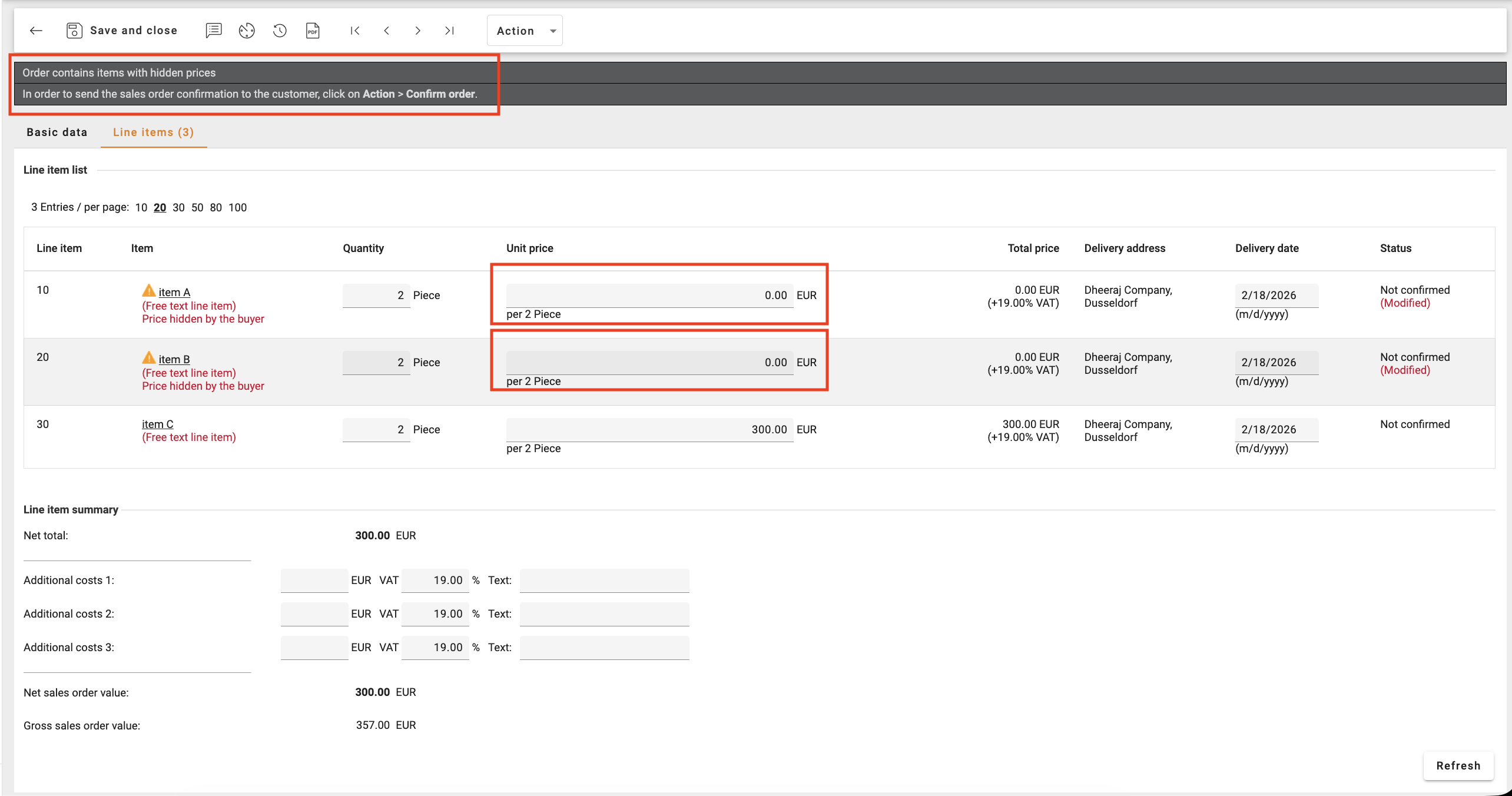
2. Follow-up Document View
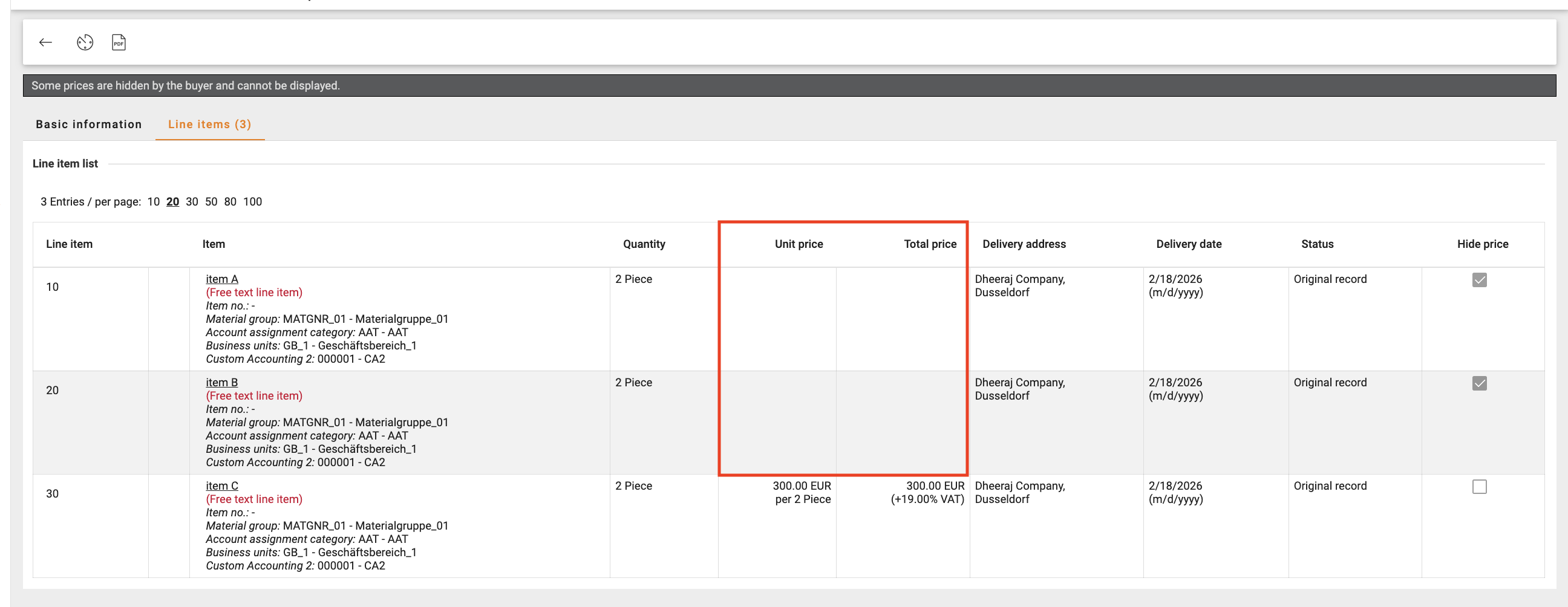
The Hide Price logic remains enforced across all supplier-facing follow-up documents, including Order and Order Change, until the buyer reviews and approves the supplier-submitted change. Only after buyer approval does the supplier-provided price become visible and effective.
6. Interface
1. openTRANS:
A. openTRANS Export Behavior (Onventis → Supplier or ERP)
openTRANS export behavior differs depending on the export destination and configuration.
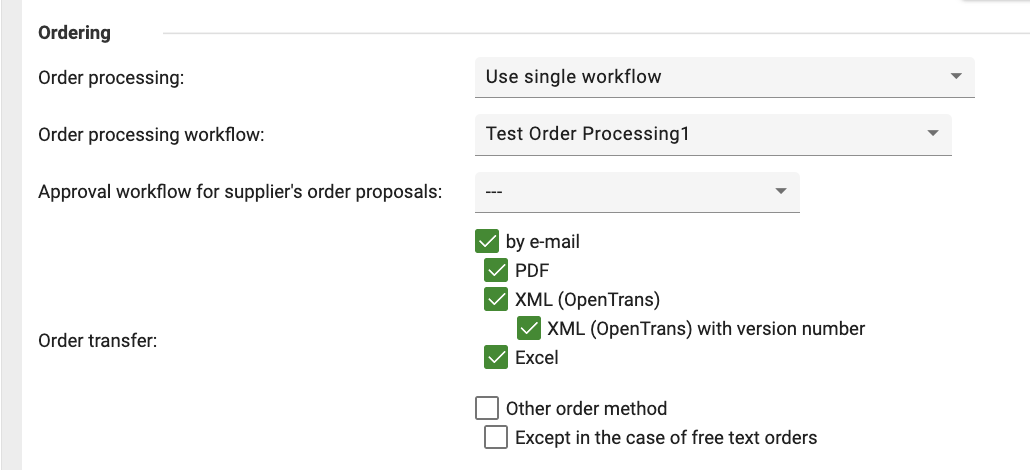
Export to Suppliers via openTRANS (Automatic Behavior)
When a supplier is configured to receive Purchase Orders via:
XML (openTRANS), or
XML (openTRANS) with version number
the Hide Price logic is automatically applied.
No additional configuration is required.
What happens in the exported openTRANS XML
When Hide Price is enabled on one or more line items:
At line item level:
Unit price is set to 0.00
Line total is set to 0.00
Tax amounts are set to 0.00
Discounts and surcharges are set to 0.00
The XML includes a marker indicating the price is intentionally hidden:
<REMARK type="Onv-PriceHidden">Hidden by buyer.</REMARK>
<REMARK type="Onv-HidePrice">1</REMARK>
If line item is not marked as HidePrice:
<REMARK type="Onv-HidePrice">0</REMARK>At header level:
If at least one line item has Hide Price enabled:
Total order amount is set to 0.00
Additional costs and shipping costs are set to 0.00
This remark is added:
<REMARK type="Onv-PriceHidden">Hidden by buyer.</REMARK>What suppliers should expect
Suppliers will:
Receive complete order structure
Not see any buyer price values
Clearly see that prices were intentionally hidden
Suppliers must provide the price via Sales Order confirmation.
Export to Customer ERP via openTRANS (BCJob / Interface)
When exporting openTRANS XML to a customer ERP system via interface or BCJob, Hide Price behavior is controlled by a parameter.
Parameter:
ApplyHidePrices=trueWhen ApplyHidePrices=true
Hide Price logic is applied.
ERP system receives:
Price values set to 0.00
Hide Price marker REMARK type="Onv-HidePrice"
Header totals suppressed if applicable
This ensures ERP systems do not receive internal buyer price values.
When ApplyHidePrices=false or not configured
Hide Price logic is not applied.
ERP system receives:
Original price values
Original totals
No Hide Price suppression
This allows ERP systems to receive internal buyer pricing if required.
B. openTRANS Import Behavior (Supplier or ERP → Onventis)
Onventis now supports automatic interpretation of Hide Price markers during openTRANS import.
When openTRANS XML contains:
<REMARK type="Onv-HidePrice">1</REMARK>the system automatically recognizes that the price is hidden.
Import behavior
If Hide Price marker = 1:
Line item is treated as Hide Price enabled
Price remains hidden in supplier-facing contexts
Supplier must provide price via Sales Order confirmation or ORDERCHANGE
If Hide Price marker = 0 or absent:
Line item is treated as normal
Price remains visible
This ensures consistent Hide Price behavior across system integrations.
Supported openTRANS Documents
The following openTRANS documents are supported:
Import & Export:
ORDER
ORDERCHANGE
2. SAP:
A. SAP Export Behavior (Onventis → SAP)
When a Purchase Order is exported from Onventis to SAP using the standard SAP XML interfaces:
PO Create (XSL_OUT_PO_Create1.xsl)
PO Change (XSL_OUT_PO_Change_Order.xsl)
the Hide Price status is transferred using the SAP field:
PrntPriceThis field controls whether the price should be printed or visible in SAP supplier-facing processes.
When Hide Price is Enabled in Onventis
If the Hide price checkbox is enabled on a Purchase Order line item, the exported SAP XML will contain:
In segment:
PoitemThe field is empty:
<PrntPrice></PrntPrice>In segment:
PoitemXThe field is marked as active:
<PrntPrice>X</PrntPrice>Example:
<Poitem>
    <item>
        <PoItem>00010</PoItem>
        <ShortText>Schrauben</ShortText>
        <PrntPrice></PrntPrice>
    </item>
</Poitem>

<Poitemx>
    <item>
        <PoItem>00010</PoItem>
        <ShortText>X</ShortText>
        <PrntPrice>X</PrntPrice>
    </item>
</Poitemx>
Result in SAP
SAP recognizes that:
Price should not be printed or exposed in supplier-facing documents
Hide Price logic is correctly applied at line item level
This ensures price protection across integrated SAP procurement processes.
When Hide Price is NOT Enabled
If Hide Price is not enabled:
The PrntPrice node is not included in the XML
SAP processes the document normally
Price remains visible according to standard SAP behavior
No change occurs to existing integrations.
B. SAP Import Behavior (SAP → Onventis)
Onventis also supports Hide Price information during inbound SAP integration.
Hide Price status is received from SAP via the SAP ORDERS05 message.
SAP field:
PRSDRLocation:
_-ONV_-1ZUSDAT / PRSDRWhen SAP sends:
PRSDR = XOnventis interprets this as:
Hide Price enabled for the corresponding line item
Price visibility is restricted in supplier-facing documents within Onventis
When PRSDR is empty:
Hide Price is treated as disabled
Price remains visible normally
This ensures full synchronization of Hide Price status between SAP and Onventis.
6. Organization Setting
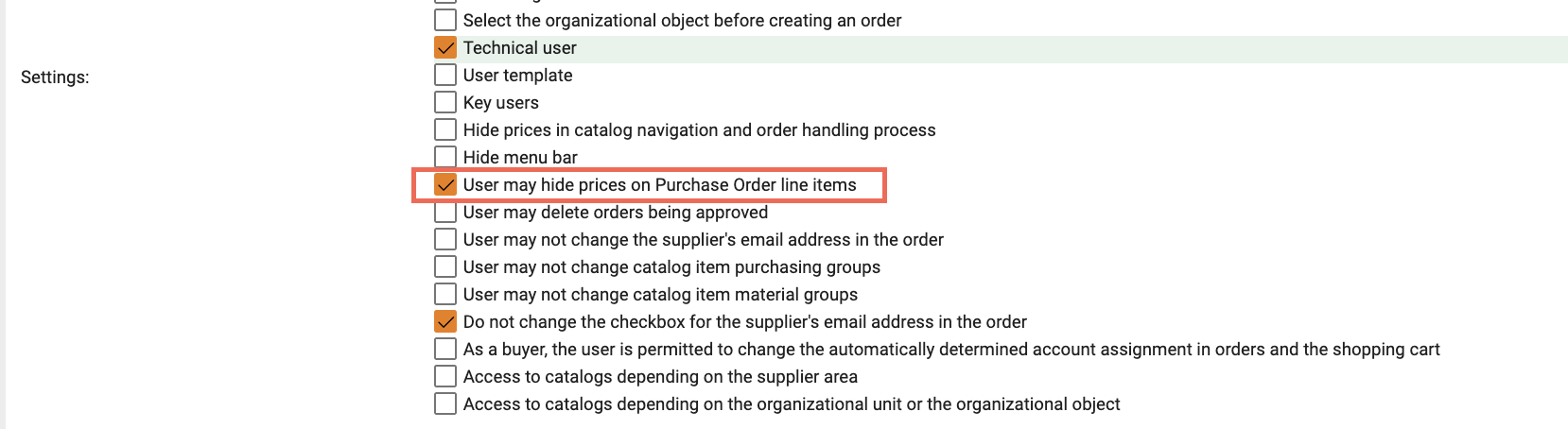
1. User Permission: Allow hiding prices
Setting is only visible when the access right is applied for the organization.
Location: User → Extended Settings
Setting: User may hide prices on Purchase Order line items (checkbox)
Behavior:
Enabled → User can select the Hide Price checkbox on Purchase Order line items.
Disabled → User cannot hide prices; the checkbox is not available.
It is also available using import/export of user master data using column HidePriceOnSupplierDocs → Values (0/1)
0 → Disabled
1 → Enabled
Purpose: Ensures only authorized users can hide price information from suppliers.
2. Organization Setting: Show explanatory note to suppliers
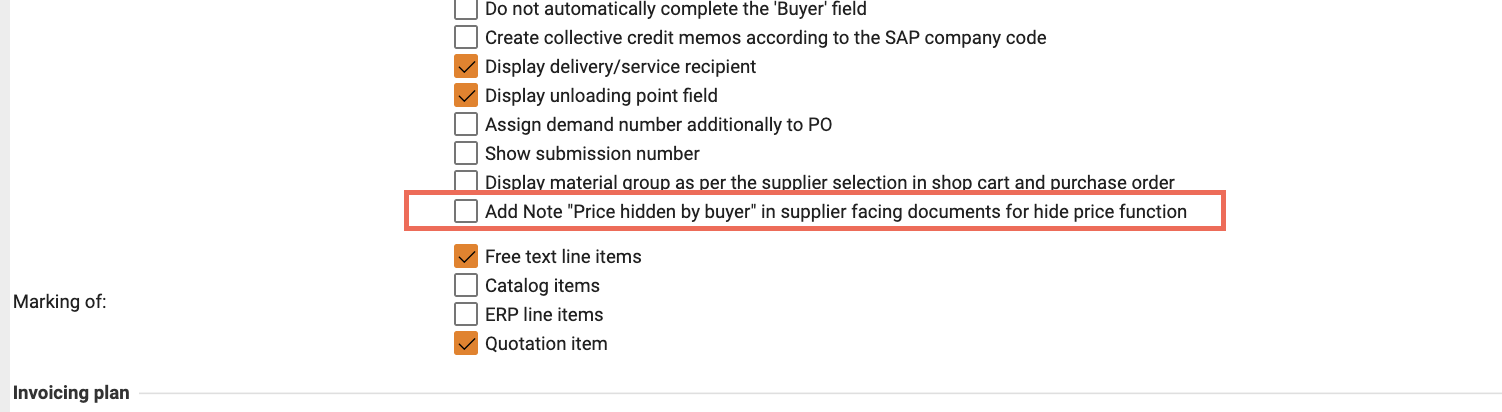
Location: Organization Settings → Purchase Order
Setting: Add note “Price hidden by buyer” in supplier-facing documents for Hide Price function (checkbox)
Behavior:
Enabled → Suppliers see the note “Price hidden by buyer” in documents (PDF, Excel, Sales Order view).
Disabled (default) → Prices are hidden, but no explanatory note is shown.
Purpose: Controls whether suppliers are explicitly informed that prices were intentionally hidden.
3. Order Processing: Automatic Sales Order Posting Impact
For customers using Automatic Sales Order posting, the following applies:
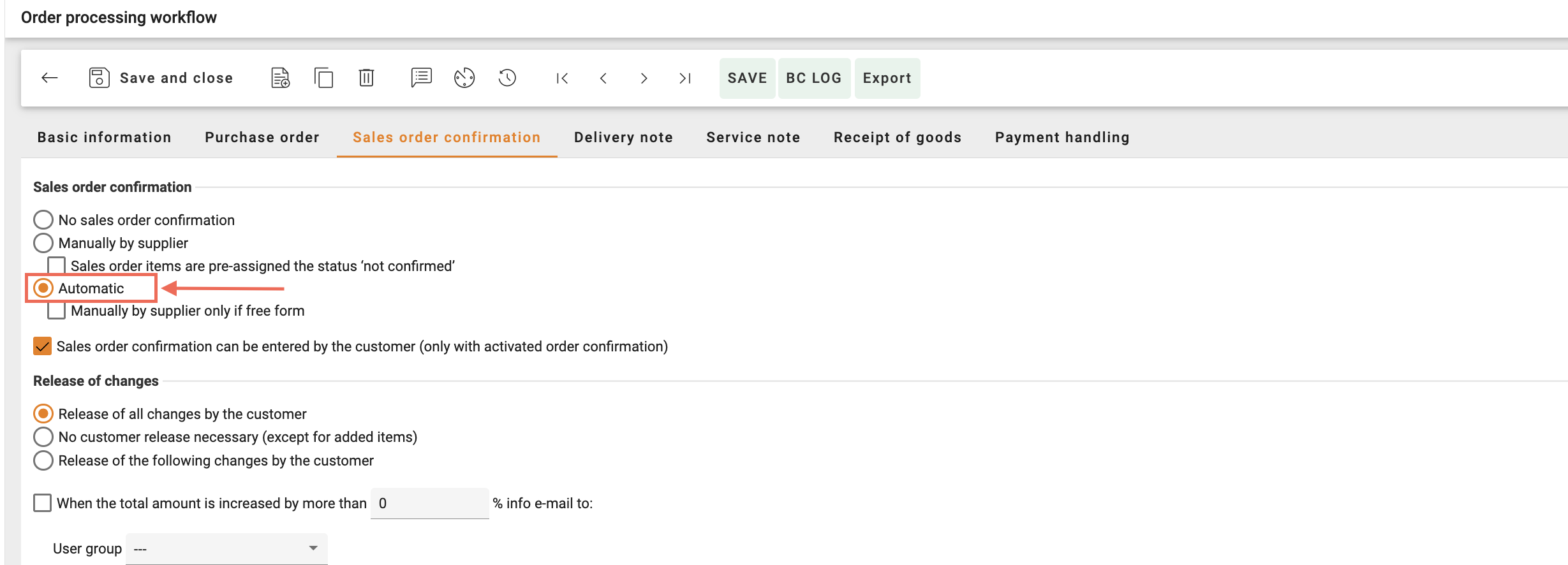
When the Hide Price option is enabled on a Purchase Order line item, the system intentionally does not expose any buyer-side price to the supplier. Therefore, the final price must always be provided via the Sales Order, regardless of whether automatic Sales Order posting is enabled.
Even when automatic Sales Order posting is enabled:
The system will automatically import and create the Sales Order document.
However, the system will not automatically populate or transfer any price from the Purchase Order, because the Hide Price flag prevents price exposure.
Instead:
The supplier must provide the price in their Sales Order, or
The buyer may enter the price manually on behalf of the supplier, if required.